RainerBien
Participant
September 28, 2022
Answered

Sortierreihenfolge in der Web Galerie anpassen.

  • September 28, 2022
  • 2 replies
  • 654 views

Die Bildreihenfolge im der Webgalerie ( Link aus LR Galerieanpassung ) entspricht nicht der Reihenfolge der Alben bzw. der Galerievorschau in LR-Online.

Kann man die Reihenfolge ( ich möchte nach Aufnahedatum sortieren ) beeinflussen?


Gut Licht

-rainer-
Correct answer Sameer K

Hi there, I'd love to help you figure this out.


You can create custom orders in a web gallery by clicking the following:

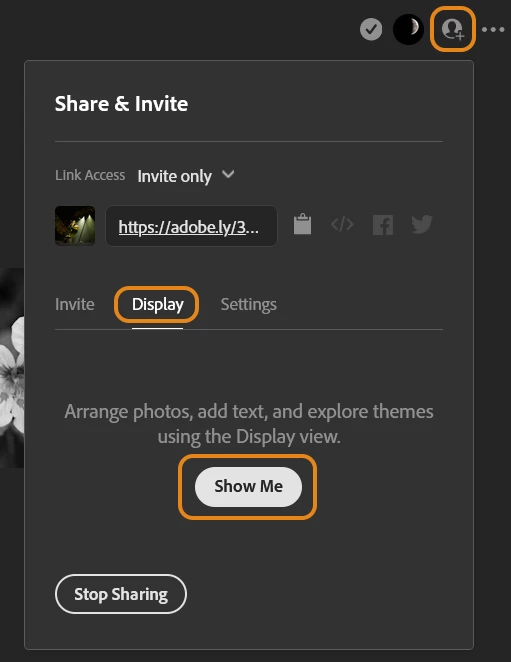
  • Go to Share Settings from the top right > Select Display > Click on 'Show Me'


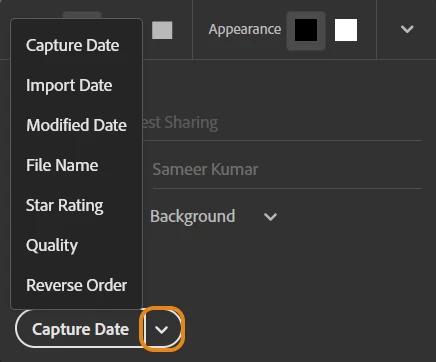
  • On the following page > Go to 'Reorder by' & then sort by the given options. The capture date order might work for you.


Check this article for more help: https://helpx.adobe.com/lightroom-cc/how-to/share-photos-on-web-gallery.html


Let me know if this helps,

Thanks!
Sameer K


2 replies

Known Participant
May 2, 2025

Sameer hatte hier die richtige Antwort gegeben. Leider hat Adobe aber das Programm verändert und so funktioniert es leider nicht mehr. Ich habe z.Z. keine Löszng finden können. Kann jemand von Adobe bitte antworten ?

Sameer K
Community Manager
Sameer KCommunity ManagerCorrect answer
Community Manager
September 28, 2022

Hi there, I'd love to help you figure this out.


You can create custom orders in a web gallery by clicking the following:

  • Go to Share Settings from the top right > Select Display > Click on 'Show Me'


  • On the following page > Go to 'Reorder by' & then sort by the given options. The capture date order might work for you.


Check this article for more help: https://helpx.adobe.com/lightroom-cc/how-to/share-photos-on-web-gallery.html


Let me know if this helps,

Thanks!
Sameer K


Known Participant
October 16, 2024

Thanks - Great Help. I searched for this for many months. As usual solution is simple but hided.