Participant
June 10, 2022
Answered

Storage Does Not Update To 1TB On Lightroom on Desktop & Android

  • June 10, 2022
  • 3 replies
  • 446 views

I had my monthly subscripotion lapse as I was travelling. I have since renewed the subscription but my storage shows only 20GB available. When I sign into Adobe Cloud on the web browser, it shows 1TB storage available, but when I open Lightroom on my laptop or Lightoroom for Samsung, it shows only 20GB and that I have exceeded my available storage.


I have signed out and signed back in on all devices, but no joy. Any suggestions?


{Thread title updated by moderator}

This topic has been closed for replies.
Correct answer Sameer K

Hi Hanno,


Thanks for reaching out. We are sorry for the trouble with Lightroom. I'd love to help you figure this out.

I have reviewed your account, and the subscription status is normal.

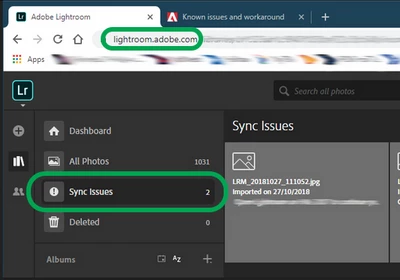
You can also log on to Lightroom Web (https://lightroom.adobe.com) to check if everything is updated and synced correctly and if nothing is pending to be synced under Sync issues.


If there are any sync issues, click on them to know more, find the original for those images, and back them up safely before you empty the Sync issues from Lightroom Web.

Once you have ensured that your images are up to date on all surfaces (iOS, Android & macOS), you can try to uninstall and reinstall Lightroom on your mobile.


Let us know if this works.

Thanks!

Sameer K.

3 replies

Sameer K
Community Manager
Sameer KCommunity ManagerCorrect answer
Community Manager
June 10, 2022

Hi Hanno,


Thanks for reaching out. We are sorry for the trouble with Lightroom. I'd love to help you figure this out.

I have reviewed your account, and the subscription status is normal.

You can also log on to Lightroom Web (https://lightroom.adobe.com) to check if everything is updated and synced correctly and if nothing is pending to be synced under Sync issues.


If there are any sync issues, click on them to know more, find the original for those images, and back them up safely before you empty the Sync issues from Lightroom Web.

Once you have ensured that your images are up to date on all surfaces (iOS, Android & macOS), you can try to uninstall and reinstall Lightroom on your mobile.


Let us know if this works.

Thanks!

Sameer K.

Participant
October 2, 2022

I am having the exact same problem. I have upgraded my account to the 1TB service, but Lightroom (Web, Desktop and Mobile) are all still saying I only have 20Gb.

How do I fix this?