
"Store a copy of all originals" doesn't download ALL originals
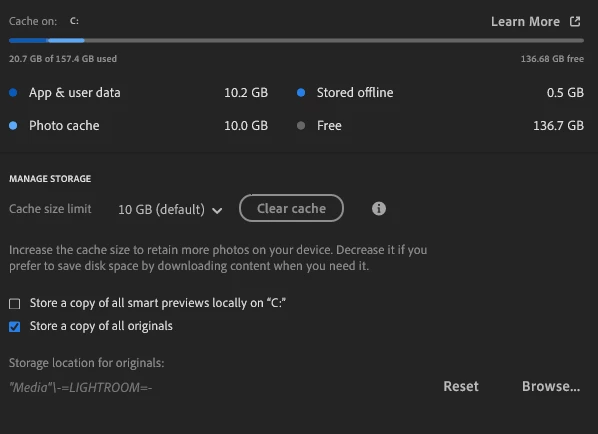
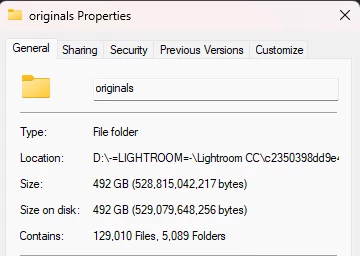
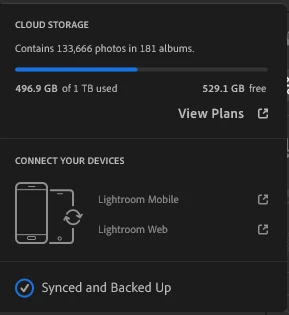
I'm trying to finally make the switch to cloud-based Lightroom, but I still want to store a copy of all my originals locally. I have turned on the "Store a copy of all originals" setting and pointed it to an internal SSD on my computer. It took most of a day, and I had to restart Lightroom a few times, but LR now says it is "synced and backed up." However, my Lightroom library has 133,666 photos and videos, but the folder on my drive only has 129,010 files. Why wouldn't Lightroom save all my originals?
Lightroom version: 9.0 x64 [ 20251017-1944-414afc8 ] (Oct 17 2025)
NGL Version: 1.42.0.5
WF Version: 8.0 58cbd19
VF Version: 1.0.164
HIL Version: 40501
CAI Version: c2pa-c/0.6.0 c2pa-rs/0.46.0
PH Version: 5.2.3
Adobe GSDK Version: 1.4.0.42
CR Version: 29.0.0.202506270808_710830c
Operating system: Windows 11
OS Version: Windows 11 Pro (2009)


 AdChoices