
Participant
December 1, 2022
Answered

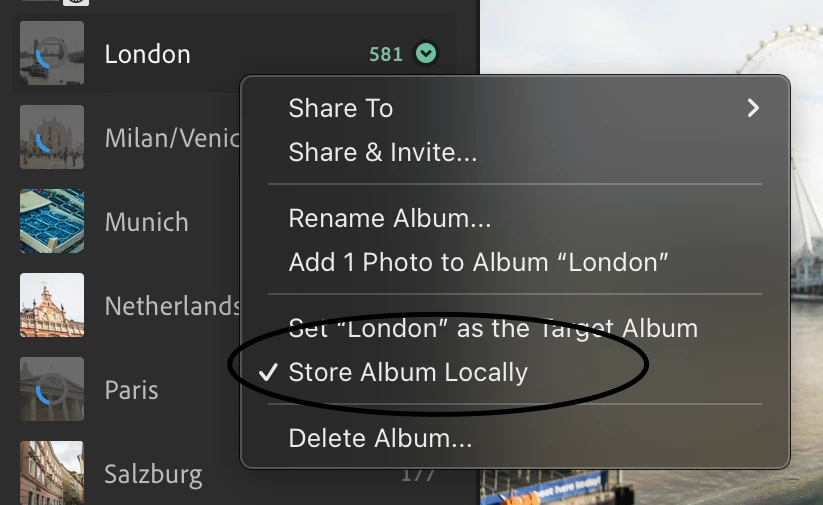
"Store album locally" option

  • December 1, 2022
  • 1 reply
  • 3817 views

Hi guys, I am going on a trip and do not have wifi connection during the trip, however, I would like to edit current photos on the go and have selected "store album locally". I notice that space has been taken up in my hard drive after doing this action. I am using just lightroom (not classic)

However, after this trip, I would like to store my files in the cloud instead and delete these albums from my local storage. If I deselect "store album locally", will Lightroom upload my edited photos to the cloud and delete the files from my local storage? My end goal is to have my local storage cleared whilst retaining my edited photos in the cloud. Thanks in advance
Correct answer Jim Wilde

The images always remain in the cloud. "Store Album Locally" downloads a COPY of the images to your local hard drive so that you can continue to access them when offline. When you uncheck that option, all that happens is that the local copy will become eligible for deletion, but that will probably not be immediate as there are some complex rules which determines when locally stored copies are removed (Lightroom will often silently download a local copy, e.g. for editing, even when you are online).

1 reply

MarcusstAuthor
Participant
December 1, 2022

Hi guys, I am going on a trip and do not have wifi connection during the trip, however, I would like to edit current photos on the go and have selected "store album locally". I notice that space has been taken up in my hard drive after doing this action. I am using just lightroom (not classic)

However, after this trip, I would like to store my files in the cloud instead and delete these albums from my local storage. If I deselect "store album locally", will Lightroom upload my edited photos to the cloud and delete the files from my local storage? My end goal is to have my local storage cleared whilst retaining my edited photos in the cloud. Thanks in advance


My apologies I realised the photo is not placed correctly.


Jim Wilde
Community Expert
Jim WildeCommunity ExpertCorrect answer
Community Expert
December 1, 2022

The images always remain in the cloud. "Store Album Locally" downloads a COPY of the images to your local hard drive so that you can continue to access them when offline. When you uncheck that option, all that happens is that the local copy will become eligible for deletion, but that will probably not be immediate as there are some complex rules which determines when locally stored copies are removed (Lightroom will often silently download a local copy, e.g. for editing, even when you are online).

MarcusstAuthor
Participant
December 1, 2022

Oh, I see how it works now. Thanks for your help Jim!