
flp47353288
Participant
April 3, 2025
Question

Strange detection when trying to find subject or object

  • April 3, 2025
  • 2 replies
  • 176 views

Hello !

For a few days (maybe weeks) now, Lightroom is acting strangely when I try to find a subject.

When I click the "Subject" button in masking options, I get an error message saying it doesn't find people in the photo, hence it's classical portraits. When I try to select the person with the "Object" tool, Lightroom is giving me weird masks, here's some examples :
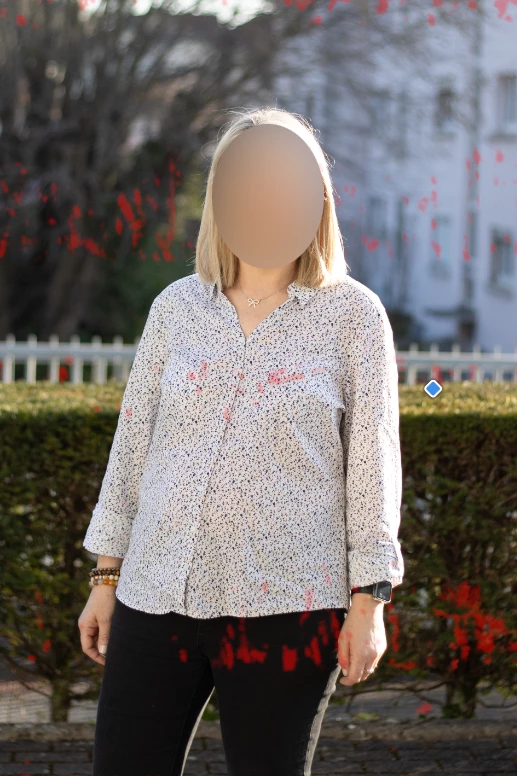
 

This shot was taken by me. You can see the "detected" masking in red.

 

This shot was bought in stocks. Same kind of "detected" masking in red.


I tried to uninstall and reinstall Lightroom and reset the preferences.


Is anyone having the same issue and is there a workaround ?


Thank you !

2 replies

February 3, 2026


February 3, 2026

I need help with this something showup when I edit the subject😭😭.Thanks in advance 😭

Sameer K
Community Manager
Community Manager
February 5, 2026

Hey, ​@madammonchie. Welcome to the Lightroom Community. I'll need more information to help you figure this out.


What troubleshooting steps have you tried already? Does Lightroom show the masks that are not relevant to the target image? 


Please share more details about your workflow and the system info from Lightroom. Go to Help > System info, copy and paste it into a text document, then upload and attach it here along with a few screenshots or a short video. At this point, the information I have is too limited to help you.


Thanks!
Sameer K

(Type '@' and type my name to mention me when you reply)

JohanElzenga
Community Expert
Community Expert
April 3, 2025

Problems like that are almost always caused by outdated, buggy GPU drivers.


-- Johan W. Elzenga
flp47353288
Participant
April 4, 2025

Hello,

Thank you for your answer.
I'll try to update my GPU drivers. I use an Nvidia RTX A3000 so I assume - and hope - it's not an hardware obsolescence issue.