


Participant
September 1, 2026
Question

Stuck in "sync disabled" after paying for more storage

  • September 1, 2026
  • 1 reply
  • 20 views

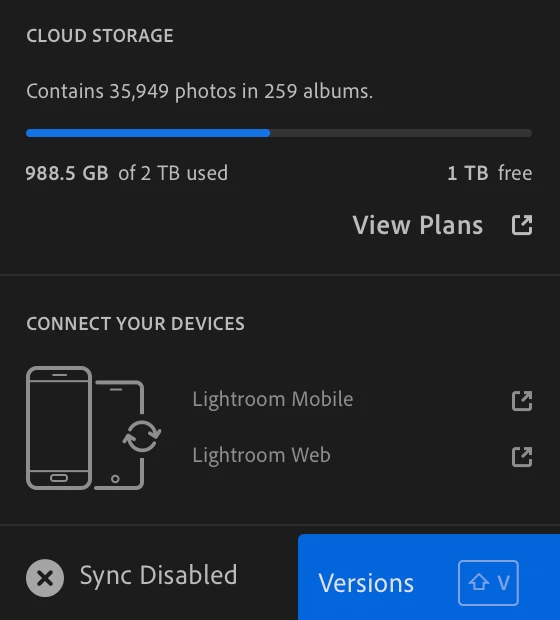
In Lightroom Cloud, I had filled up my storage. I purchased “Creative Cloud Files Storage 1 TB”, and see in my app that the storage is there, but I can’t get the sync to re-start. Even worse, a number of images I’ve hard in my account for years are showing as pixelated and will not let me edit them. 


    1 reply

    Anshul_Saini
    Community Manager
    Community Manager
    September 16, 2026

    Hi @focused_Glaze2c5a,
     

    Thank you for sharing the screenshots. Since Lightroom is still showing “Sync Disabled,” I’d like first to make sure your photos are safely available in the cloud before we reset anything locally.
     

    Please check https://lightroom.adobe.com/ and look for one or two of the older photos that currently appear pixelated in Lightroom on your computer. Do they appear normally at full resolution on Lightroom Web?
     

    If the originals look correct on Lightroom Web, please do the following:

    1. Close Lightroom completely.

    2. Open the Creative Cloud desktop app and make sure you are signed in to the same Adobe account.

    3. Launch Lightroom again and check whether the Sync Disabled status changes.

    4. If it remains disabled, please try resetting Lightroom’s preferences and test again. Quit Lightroom completely. While launching Lightroom, hold Alt/opt + Shift, and when prompted to reset Lightroom preferences, confirm the reset.
     

    Because Lightroom stores the original photos in the cloud, resetting the application’s preferences should not remove the originals from your cloud library. However, please verify the affected photos in Lightroom Web before performing the reset, so we know the cloud copies are present.
     

    If the problem persists after the preference reset, the next step is to reinstall Lightroom from the Creative Cloud desktop app and test again.
     

    Please also let me know what happens after the reset: does Lightroom begin syncing, immediately return to Sync Disabled, or show a different error/message?
     

    And for the pixelated photos, please confirm whether they look normal or pixelated on Lightroom Web.
     

    Thanks,
    Anshul Saini