Participant
July 13, 2018
Answered

Sync between Lightroom Mobile and Classic CC – folders and albums/collections

  • July 13, 2018
  • 1 reply
  • 1030 views

Hi!

Over the last two weeks I for the first time travelled without my computer, and instead imported my camera images using Apple Camera Connection Kit and Lightroom Mobile on my iPad. I created an album called Summer2018 which synced to the cloud and my iPhone. Everything worked as I expected, the album was created and images downloaded to the phone as well.

Now, back at my computer, I'm trying to find out how Lightroom Mobile works together with Classic CC on MacOS. I've got two, perhaps related, questions:

First, it's the location on disk. I store all my photos in a folder structure based on year/month/day. The images that are added via my iPad are stored in a directory called Mobile and subfolders with the same year/month/day-structure. What's the best (and easiest) way to move photos from the Mobile folder into my main image collection?

Second, it's the album created in Lightroom Mobile. This is not replicated as a collection in Classic CC. Since it works the other way around, collections in Classic CC being replicated as Albums on Mobile, I had expected that Albums added on mobile show up as collections on desktop as well. Am I doing something wrong, or doesn't this work the way I suppose they do?

Thanks,

Anders
    This topic has been closed for replies.
    Correct answer Jim Wilde

    athoresson  wrote

    On possible caveat though: I got my library on an external drive. What happens if I launch Lightroom Classic CC without the external drive, instead opening one of my temporary libraries stored on the computer? Will Lightroom Classic CC start to sync new cloud images to the internal drive instead?

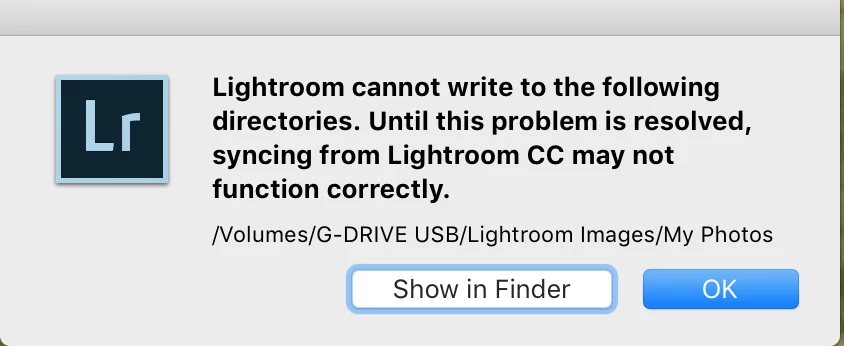
    If you have specified a different location for the Lightroom Sync ecosystem images in Classic, e.g. to an external drive, and you start Classic with that drive not connected you should receive the following warning:

    Any images you then add to the ecosystem, e.g. by taking a picture with your phone, will attempt to sync down into Classic, so you will see the "Syncing xx Photos" message above the ID plate. But that sync cannot complete, so it will remain in a "pending" state until the external drive is reconnected. So no, it does not dynamically change the download location if the specified location is not available....it simply waits for it to be connected again.

    1 reply

    Jim Wilde
    Community Expert
    Community Expert
    July 14, 2018

    athoresson  wrote

    First, it's the location on disk. I store all my photos in a folder structure based on year/month/day. The images that are added via my iPad are stored in a directory called Mobile and subfolders with the same year/month/day-structure. What's the best (and easiest) way to move photos from the Mobile folder into my main image collection?

    Second, it's the album created in Lightroom Mobile. This is not replicated as a collection in Classic CC. Since it works the other way around, collections in Classic CC being replicated as Albums on Mobile, I had expected that Albums added on mobile show up as collections on desktop as well. Am I doing something wrong, or doesn't this work the way I suppose they do?

    First: for existing images, use drag and drop in the Folders Panel to drag the images from the existing location to your preferred location. Easier perhaps to drag the dated folders. Longer term, change the location for the sync downloads on the Preferences>Lightroom Sync tab, which will fix the problem for all future sync downloads.

    Second: The corresponding collection should be created in Classic, but note that it will be under a Collection Set called "From Lr mobile", which you probably have collapsed. Expand it and you should see the collection.

    Participant
    July 14, 2018

    Ah, of course. Using my regular folder structure even for images added via Lightroom Mobile will store them at the correct location straight away. Too obvious.

    On possible caveat though: I got my library on an external drive. What happens if I launch Lightroom Classic CC without the external drive, instead opening one of my temporary libraries stored on the computer? Will Lightroom Classic CC start to sync new cloud images to the internal drive instead?

    Jim Wilde
    Community Expert
    Jim WildeCommunity ExpertCorrect answer
    Community Expert
    July 15, 2018

    athoresson  wrote

    On possible caveat though: I got my library on an external drive. What happens if I launch Lightroom Classic CC without the external drive, instead opening one of my temporary libraries stored on the computer? Will Lightroom Classic CC start to sync new cloud images to the internal drive instead?

    If you have specified a different location for the Lightroom Sync ecosystem images in Classic, e.g. to an external drive, and you start Classic with that drive not connected you should receive the following warning:

    Any images you then add to the ecosystem, e.g. by taking a picture with your phone, will attempt to sync down into Classic, so you will see the "Syncing xx Photos" message above the ID plate. But that sync cannot complete, so it will remain in a "pending" state until the external drive is reconnected. So no, it does not dynamically change the download location if the specified location is not available....it simply waits for it to be connected again.