

photopoeth
Inspiring
May 23, 2024
Answered

Sync doesn't stop although there are no currently synced images!?

  • May 23, 2024
  • 11 replies
  • 6113 views

Before I switch to LrC 13.3, I wanted to heed the tip that all syncs should be completed first. Unfortunately, Lightroom (Desktop) shows that a synchronization is in progress, but it never comes to an end. When I filter for the images that are currently being synchronized, none are displayed. There is no synchronization showing in the smartphone app and in LrC, only in Lightroom (desktop).
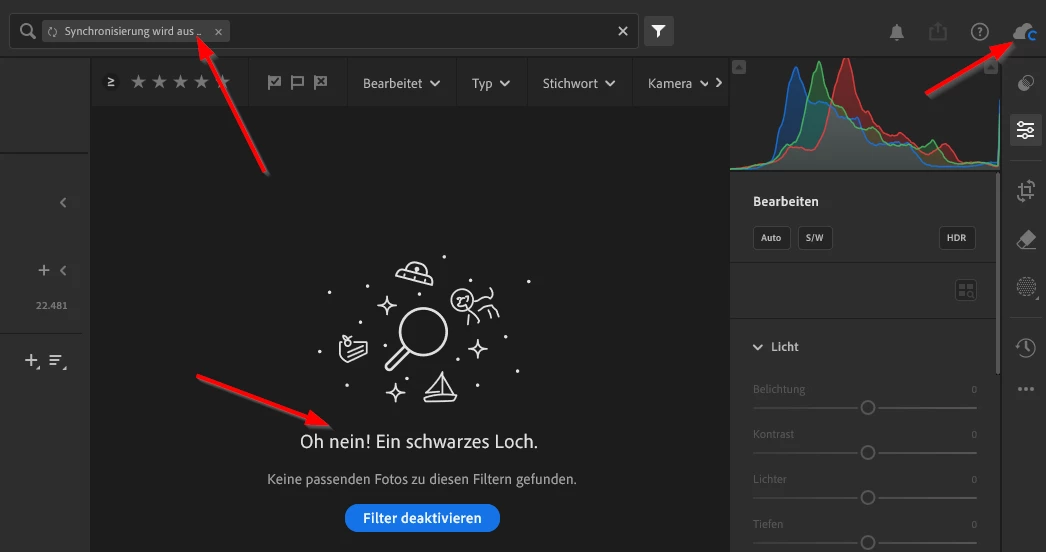
 

How can I find out what the problem is and how can I fix the situation?

This topic has been closed for replies.
Correct answer photopoeth

I've just got a call from Adobe support and they fixed the issue of the stuck sync process. Before the call there were 6 images syncing forever... Here's the solution:
1. Generate diagnostic report from Lightroom Classic Sync preferences tab
2. Unzip the diagnostic report to extract the contents
3. Double click on lrsync_log.html file to open it in a browser & Select "Lightroom Classic Diagnostic Logs"
4. Select "Binary Uploader"
5. If there are files in needsBinaryUpload section with binaryType as proxy, get the filename(s) from this section
6. Edit the develop settings of the file(s) in Classic and wait for some time. This should resolve the issue. 


...and it did! Thumbs up! No pending syncs at the moment. 


11 replies

MartinSchlender74
Participating Frequently
May 23, 2024

Hi,

if I understand correctly you are not yet on 13.3 - right? Then you can click on the cloud symbol and then on the settings symbol and you should see the list of files beeing synchronized right now.

If your are already on 13.3 - welcome to the club. 6 files synching endlessly for me 😞


photopoeth
Inspiring
May 23, 2024

I am not on 13.3 right now, because i read somewhree (I think via Lightroomqueen blog), that you make sure that all syncs are done before the upgrade. I think what you describe is the way in Lr Classic, but teh screen shot (and the endless sync of course) is in cloud based Lightroom (Desktop).

Rikk Flohr_Photography
Community Manager
May 23, 2024

I think the exact verbiage is to make sure Uploads are done first. 

The new sync engine fixes much of the stuck-sync issue.  If you are sitting at the same number for more than an hour, I would recommend performing the update. 

Rikk Flohr: Adobe Photography Org