Known Participant
December 8, 2019
Answered

Sync from LR mobile to LR Clasic has stopped

  • December 8, 2019
  • 1 reply
  • 1146 views

Hi


Syncing from Lightroom mobile to Lightroom Classic seems to have stopped.

I am collating pictures from a recent holiday and I shared some photos from my wife's iPhone, spanning three days, to mine. They appeared in the Photos app on my phone and also in Lightroom mobile. Lightroom Clasic attempted a sync, but only the last two photos were synced.

I have stopped and restarted the sync and closed and reopened both LR Classic and LR mobile, but the sync does not resume.

Preferences>Lightroom Sync is showing no activity in progress.


The only chaneg I made is to reorganise my filing structure. Until today I had the Catalog on one external drive and the sync pointing to another external drive. Today I repointed the sync location so that it is on the same drive as the Catalog (after copying files from the original sync location).


Is there a way of forcing sync to restart and add the new photos into my catalog?


I use a MacBook Pro, running Catalina, for my desktop activities.


Thanks in advance.
This topic has been closed for replies.
Correct answer Jao vdL

Just to clarify, I do see the photos in the All Photos collection on my phone. But not on my MacBook.


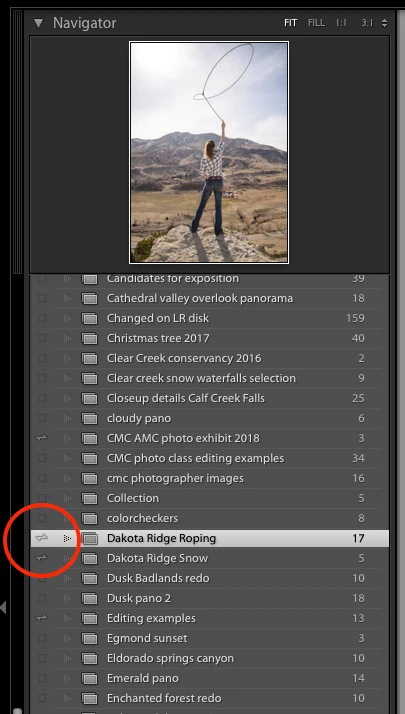
And, weirdly, the 2 albums on my phone do appear in Classic, but one of them does not appear under the From Lightroom CC holder, it is listed elsewhere, after all my Smart Collections. Strange.


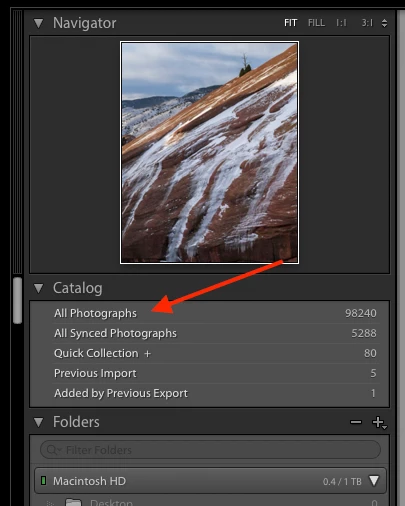
All photographs is here in Classic:

That the albums show up in different locations in the collections area in Classic is normal. It normally intermixes them with the non-synced collections. The little doublesided arrows next to the name is what shows which ones are synced with Lightroom in the cloud.


1 reply

Community Expert
December 8, 2019

If you are sure that you're logged onto the same account and that searching for the missing files in all photographs doesn't turn them up (they might not be where you expect them), go into Classic's preferences and in the sync tab. Hold your alt/option button and new buttons should appear on the bottom right of the interface. One of them says "rebuild sync data". Hit that and see if it brings in the missing images.

FlybridgeAuthor
Known Participant
December 8, 2019

Hi


Thanks for that reply. Unfortunately, nothing has changed, I still don't see the photos in my sync location in LR Classic.

Community Expert
December 8, 2019

Are they visible on https://lightroom.adobe.com ?