
Inspiring
November 6, 2021
Answered

Synced collections missing images after upgrade

  • November 6, 2021
  • 3 replies
  • 983 views

I have recently upgraded LrC on Windows and LR Mobile (Android and iPadOS) with the October release.  Synced collections that I had PRIOR to the upgrade as well as new synced collections created AFTER the upgrade have images missing on the Cloud side.
This topic has been closed for replies.
Correct answer rogerf62351972

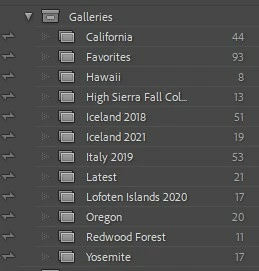
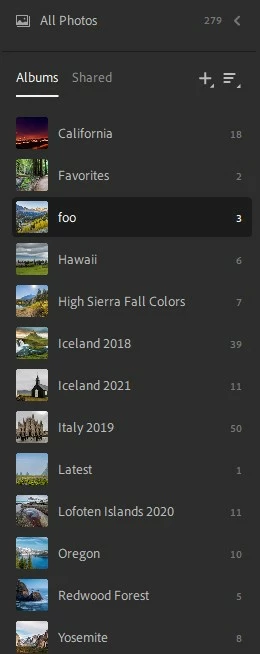
Just for starters... here's a current view of what is happening (LrC first, then LrD), but I will try to create a new/documented use case.

All of the synced images show up in the All Photos count, but they are not showing in their respective albums.


"Stop the presses!"

This issue did not occur, even with very old collections/albums, until the recent Lr upgrades.  Just now, I unsynced all of the synced collections on LrC, then re-enabled syncing.  This seems to have cleared the issue.

3 replies

Participating Frequently
January 4, 2022

I am dealing with this same issue. I've shifted to mainly iPhone photography and it's been a while since I used LR. (I have the latest version, 11.1.) When I opened my catalog today a large chunk of my collections have zero photos in them, while others are fine. I'm guessing this happened when LR automatically upgraded my catalog in a recent version update.All the photos seem to still be in my library. Is there any way to reconstruct those collections without having to manually go through all my photos, which at best would be a guessing game?


Per one of the responses here, I tried unsyncing and resyncing one of these collections but it made no difference.

Rikk Flohr_Photography
Community Manager
November 10, 2021

Ok Roger, 

Not a whole lot of details to go on here but I did see something like this in my own world of syncing a few months back. 

In my case it was Collection Sets in Lightroom Classic that don't sync to the cloud that was at the root.  The solution was to create the missing collection sets heirarchy in album/folder form on the mobile and drag the photos in on a device. Yours may be a different situation entirely. 


We need to start somewhere and nail down a workflow that results in the situation you are in now. I don't think the update is in play here but I could be wrong. 


Let's keep it simple for now and try to isolate to a single collection and (from memory) work up a step by step for what you remember happening. Include relevant screenshots for this collection.


Rikk Flohr: Adobe Photography Org
Inspiring
November 10, 2021

Sounds good.  FWIW, I have existing LrC collections, previously synced with the cloud, may have changed or added an image, the cloud ends up with less than all of the images.  They ARE in 'all photos' but not in the targets collections/albums.  I'll try to work up a simple test case and get back to you.

Inspiring
November 11, 2021

Just for starters... here's a current view of what is happening (LrC first, then LrD), but I will try to create a new/documented use case.

All of the synced images show up in the All Photos count, but they are not showing in their respective albums.

Inspiring
November 7, 2021

Further.... when I view my cloud-synced images via lightroom.adobe.com, I can see that all of the images are there, but some are missing from their LrC-assigned collections.

Inspiring
November 8, 2021

Rick, this is occurring with synced collections setup prior to the upgrades as well as with those setup post-upgrade.


Inspiring
November 9, 2021

Oops... forgot to tag this one.

<invalid tag removed>