
Participant
May 12, 2025
Question

Synchronisation Lighroom Desktop Lightroom Web

  • May 12, 2025
  • 1 reply
  • 127 views

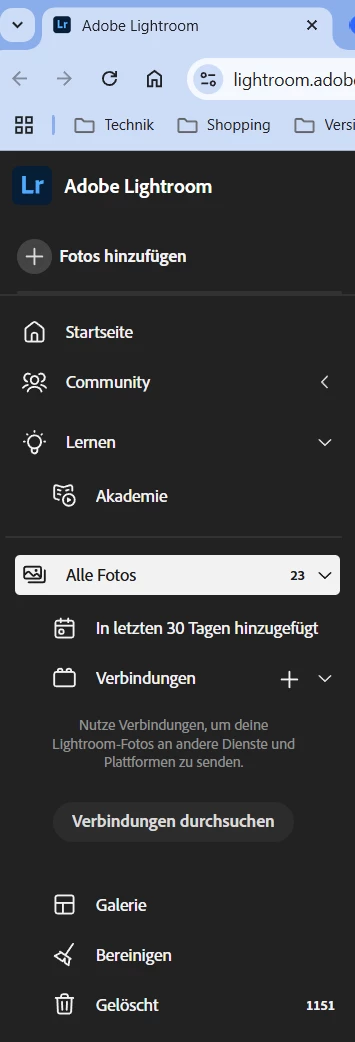
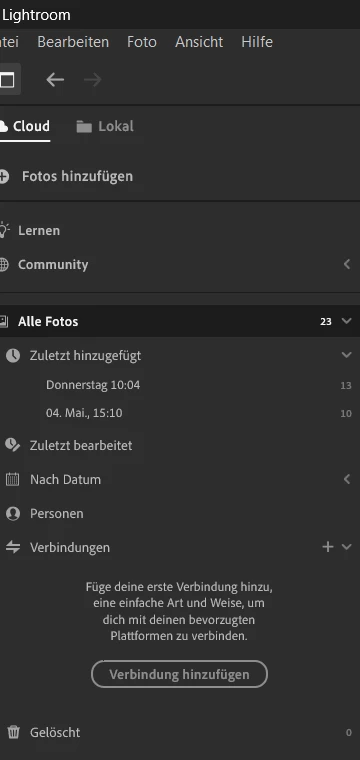
Ich habe in Lightroom Desktop 23 Fotos und alle anderen vor Tagen und Wochen aus dem papierkorb gelöscht (der ist leer). Wenn ich Lightroom Web öffne werden mir trotzdem 1100 Fotos im Papierkorb angezeigt. Warum wird das nicht synchronisiert? Ich bin nur darauf gekommen weil 3GB an Cloudspeicher belegt sind...
1 reply

Sameer K
Community Manager
Community Manager
May 12, 2025

Hey, @Steffen_Berendt6043. Welcome to the Lightroom Community. I'll move this post to discussions for now. I'll help you figure this out. 


We can use the diagnostic report to learn more about this. In Lightroom, go to Preferences > Account > Press and hold the ALT/OPT Key to generate a Diagnostic report. Upload the report to any cloud file-sharing service, share the link here, or send it to me directly from my profile.


Check Lightroom Web (https://adobe.ly/4eF2E7u) and clear the Deleted Section. Before emptying these tabs, please ensure you have backups for these images.


After this change, let Lightroom sync and check if it returns to normal. 


Awaiting your response. Thanks!
Sameer K

(Type '@' and type my name to mention me when you reply)

Participant
May 12, 2025

Ich habe den Papierkorb in Lightroom im Browser gelöscht. Anbei die Datei.

https://drive.google.com/file/d/1UVV8p7cqcyR_siXEWEcW-iq9c9STcT29/view?usp=sharing