Participant
January 21, 2019
Answered

Syncing multiple ipads with one CC account - identifing photos from each device.

  • January 21, 2019
  • 1 reply
  • 394 views

Hi All, we have set up four ipads feeding into our single CC account. We had set auto import from camera roll on to four individual albums one for each device. This seems to have stopped working in the last few weeks. All are now auto importing to All Pictures and as all ipads are identical we are searching for a way to identify which photos have come for which device. There is an option to make a custom copyright for each device, but neither Lightroom CC or Lightroom CC Classic seems to be able to sort by the copyright metadata. Any thoughts would be appreciated. Thanks
This topic has been closed for replies.
Correct answer Michael J. Hoffman

Hi Ben,

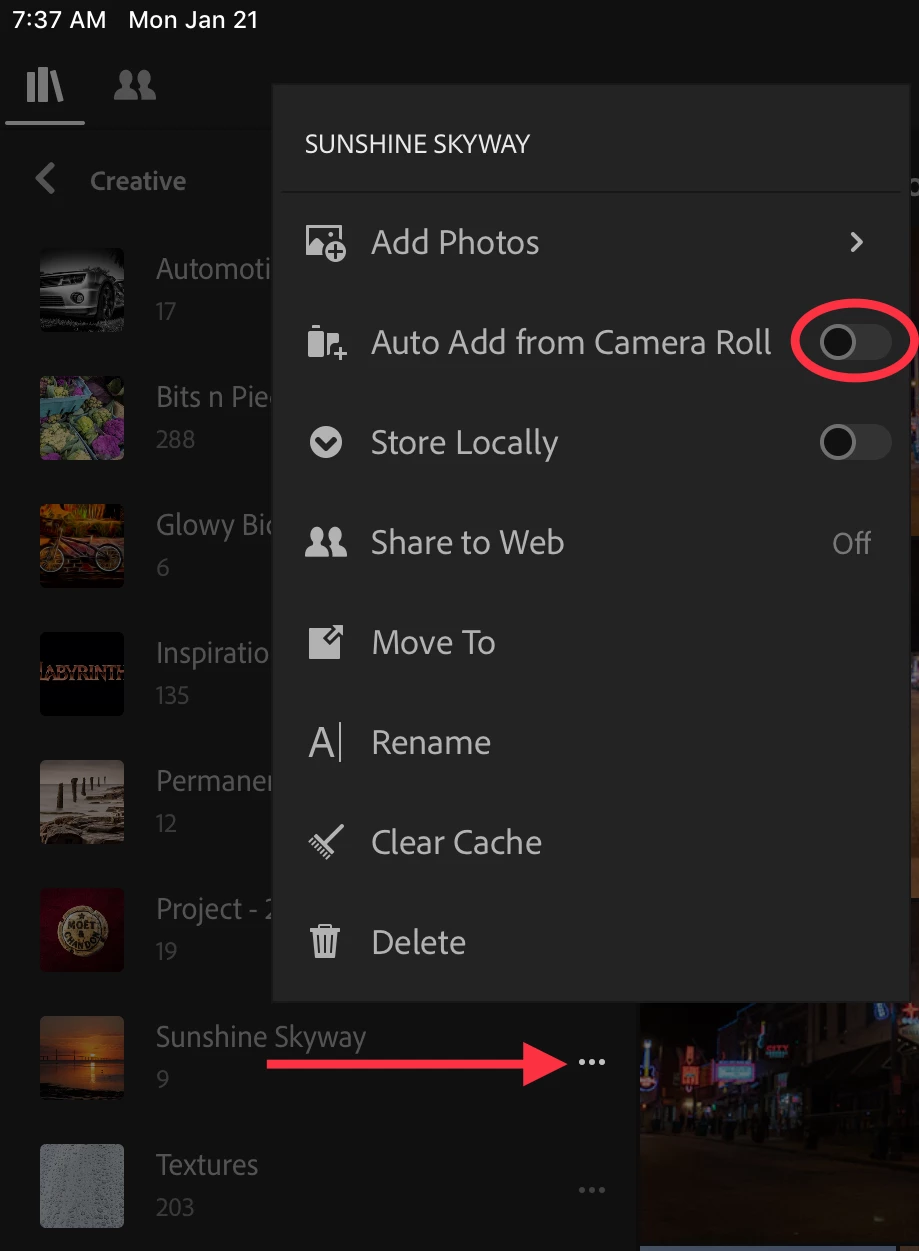
In addition to enabling auto import in settings, you also need to enable it for the album where you want to auto-import. Tap the three dots next to the album and toggle the switch for auto-import (see below). Only one album can have this setting on a device, and after enabling it, a status “Auto Import” shows next to the album name. See the screen shot below.

Lightroom CC does have the ability to search (but not sort) by specific copyright text. I don’t know if that’s a help.

Mike

1 reply

selondon
Community Expert
Community Expert
January 21, 2019

Although the behaviour changed when using the in-app camera directly into an Album, I thought the Auto Import (From Camera Roll etc) still worked as usual.

And yes, I do not think there is any way to search by import device or copyright in the Cloud Based CC at least.

Participant
January 21, 2019

Hi Selondon, the auto add to an album is not working, however they are automatically adding to All Pictures. Do you think you can sort by copyright in Classic - I haven't been able to get that to work either? Thanks

Michael J. Hoffman
Community Expert
Michael J. HoffmanCommunity ExpertCorrect answer
Community Expert
January 22, 2019

Hi Ben,

In addition to enabling auto import in settings, you also need to enable it for the album where you want to auto-import. Tap the three dots next to the album and toggle the switch for auto-import (see below). Only one album can have this setting on a device, and after enabling it, a status “Auto Import” shows next to the album name. See the screen shot below.

Lightroom CC does have the ability to search (but not sort) by specific copyright text. I don’t know if that’s a help.

Mike