Inspiring
September 30, 2023
Answered

Syncing no longer working on iOS

  • September 30, 2023
  • 3 replies
  • 1358 views

Hi

after update to iOS 17, Lightroom 8.5.1 for iOS is no longer syncing apple photos to my Lightroom account, not automatically nor manually.

am I the only one with this problem?

 Thanks 

This topic has been closed for replies.
Correct answer NikonColormatcher

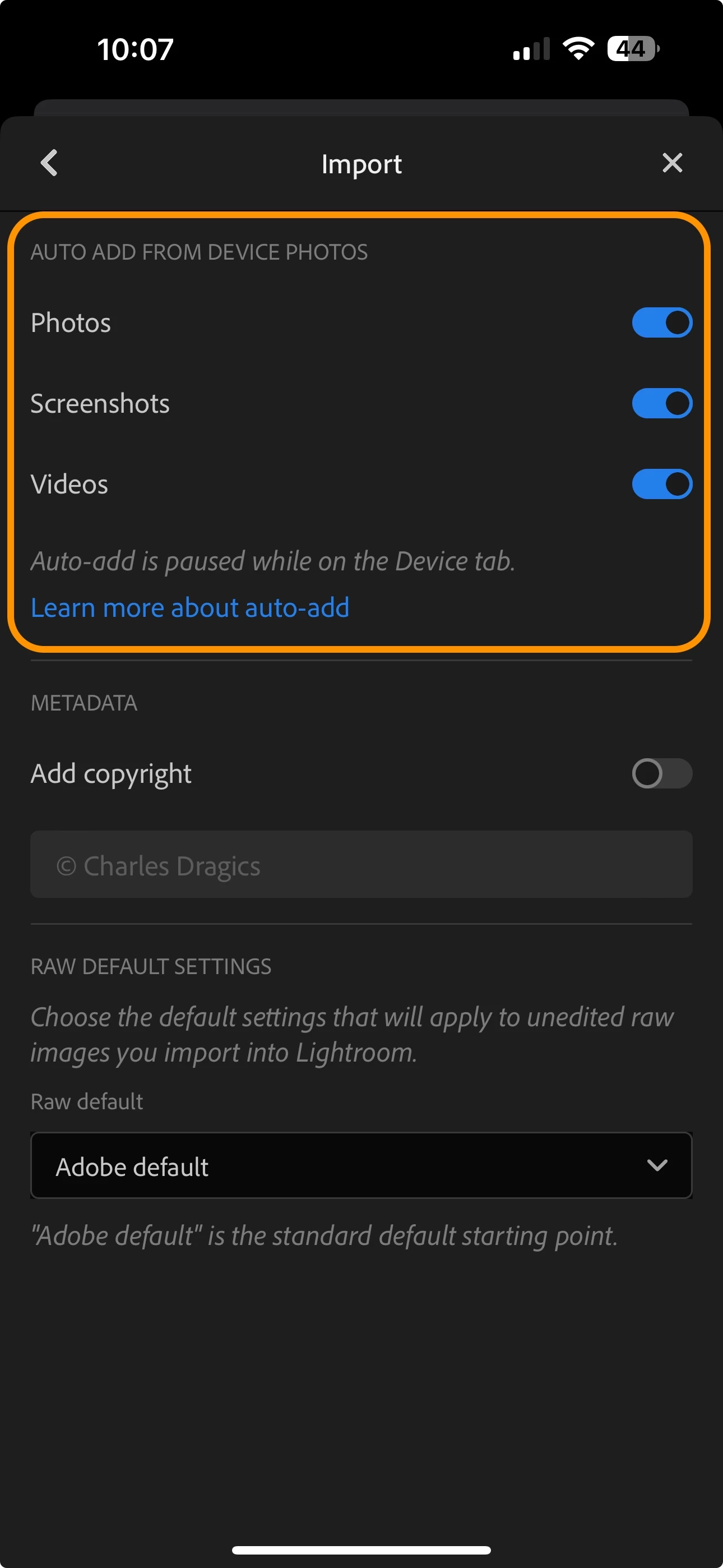
I know I mentioned this in my very first reply, but please check your auto-import settings.  In Lightrroom's in-app settings (tap the 3-dots button at the top right), open the Import options, and confirm you have enables Photos (and perhaps also screenshots and videos if you want those as well):


Hi, I think version 9.0 of the iOS app fixed it. thanks!

3 replies

Participant
October 7, 2023

Hi I have the same problem since upgrading to Sonoma and IOS 17.  I have full access on, rebooted, etc, but nothing new is syncing to lightroom.  This is very frustrating and I need it fixed since I am paying for the service,

Inspiring
October 9, 2023

@Steven5DC8 

Please see my screenshot that I just added to this thread.  in LR Settings > Import, do you actually have auto add enabled for Photos?


If you search for Lightroom in the iOS app store, there is a new version 9.0 that is now available as an update.  Does that app version improve things?

Geoff the kiwi
Community Expert
Community Expert
October 4, 2023

I understand your frustration.. I don't have any issues but suggest just a little patience as there will be a new Version anytime soon to coincide with Adobe Max. There may be some issues resolved with iOS 17 most likely.. let's hope yours is resolved. Also what is your phone modalel??

Inspiring
October 2, 2023

I can reproduce no issue with importing photos from the iOS 17 camera roll or icloud photos into Lightroom, or syncing those to Lightroom cloud storage.  

In your iOS Settings > Lightroom, please ensure Photos has "Full Access"

And in Lightroom app settings, under Import, check that all your Auto Add settings specify the kinds of files you want to import.  If you reinstalled the app, this may have been reset.


You might try rebooting the device, and if you are a paid Lightroom subscriber and the app's cloud status shows no sync is pending, then you could even try reinstalling the app.  If you are using the free app, do not uninstall -- this will delete files and any edits inside Lightroom; only the subscribed app syncs to Lightroom cloud backup


If you are still facing issues, please let us know.  

Inspiring
October 2, 2023

Thanks for replying.

I am a paid subscriber and I did already try everything you mentioned but that didn't solve it.