



scot.hacker
Inspiring
February 14, 2023
Question

Target Album UI behavior

  • February 14, 2023
  • 2 replies
  • 937 views

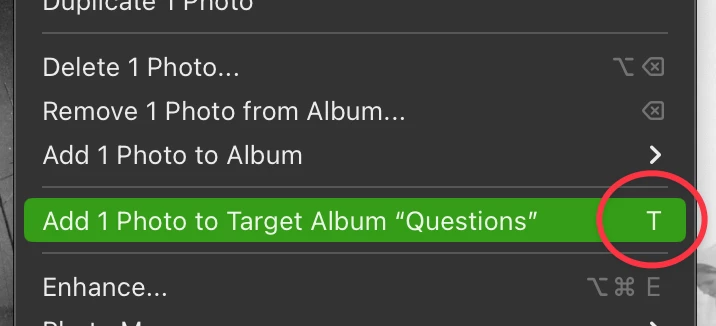
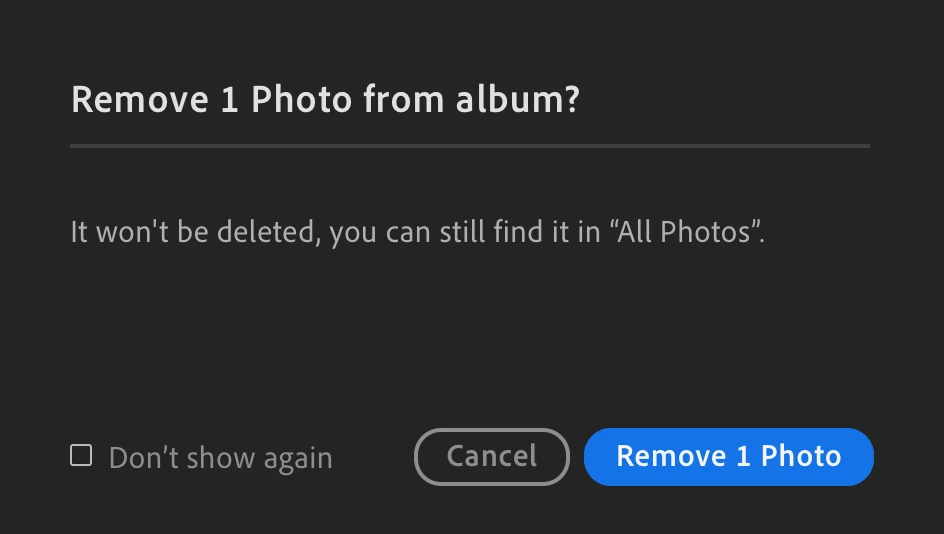
In v6.1 (Mac), if I right-click a photo in grid view, the context menu says that "T" is the keyboard shortcut to send a photo to the Target Album. But if I press the T key, I get a confirmation dialog saying that it wants to remove the current photo. This behavior is different from selecting the context menu item with the mouse, which *does* send it to the Target album.


This topic has been closed for replies.

2 replies

scot.hacker
Inspiring
March 7, 2023

I filed this bug under LR 6.1 and am now on 6.2, returning to report that the bug is still happening. In the previous discussion, I found that quitting and restarting cleared up the problem. Now I'm updating that info to say that quitting and restarting clears it up for a while - maybe 5-10 times it will work properly, then the next time I hit the T key, it goes back to the "Remove?" prompt rather than adding to Target album. It's not just the T key though - when the bug happens, if I right-click and select "Add to target album" it will also prompt me to remove the photo. 


Another data point: If the bug occurs, which sets the T key to the wrong behavior, if I do once "Add 1 photo to album" and manually select the album, it seems to temporarily correct the bug. The next time I hit T, it does the right thing. For a while, until the bug re-occurs.

Jim Wilde
Community Expert
Community Expert
March 7, 2023

OK, I've just tried using "T" on over 100 images and it worked correctly apart from on one when I did see that "Remove" prompt. So I went back and investigated further and found that if I press "T" twice in succession on the same selected image then the second press produces the "Remove" option. Select a different image, press "T" and it works, go back to the previous image and press "T" and it again works.


Thinking about it, that's entirely logical in the context of the "Target Collection"....press once to add, press again to remove. But it's not working completely like that, as returning to an image after adding it to the quick collection (and adding another in between) then pressing "T" does nothing, but I think it should still be removing it from the target collection. That's how the corresponding behaviour in Lightroom Classic works, so I would think this should work the same as well.


Rikk Flohr_Photography
Community Manager
February 14, 2023

I am not able to replicate this. Are you set to English as your language?

Rikk Flohr: Adobe Photography Org
scot.hacker
Inspiring
February 15, 2023

Interesting that you can't replicate, hmm. My language is set to Automatic. Everything in the UI is in English. Can anyone else reading this replicate? 

Jim Wilde
Community Expert
Community Expert
February 15, 2023

No, I can't reproduce the problem either.