


Participant
November 8, 2025
Answered

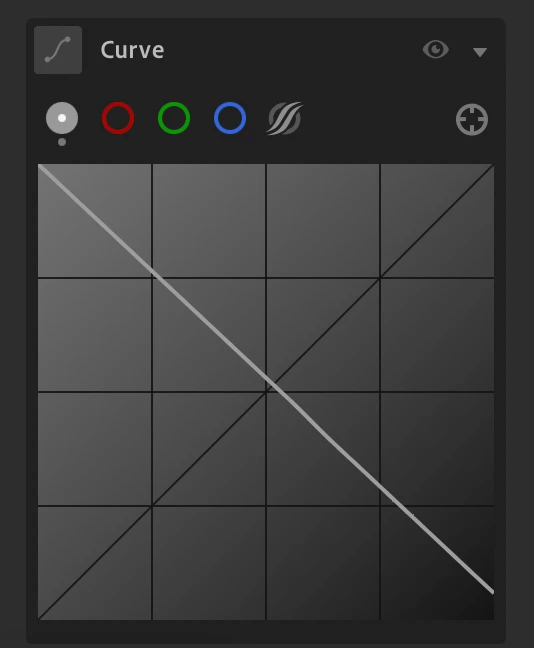
Tone curve missing background Histogram Overlay

  • November 8, 2025
  • 8 replies
  • 161 views

I updated Lightroom today to version 9. I go to edit a black and white negative, and the curve information is gone! It's just a gray mess with no information. I figure I'm doing something wrong, but I don't know what, so any help is appreciated. I'm looking for the graph (?) where I could adjust the white and black points in the curve--there would be a bunch of lines that look like a mountain. Sorry for the low-tech explanation. Thanks!
Correct answer courageous_perfectionaef8

@Victoria Bampton LR Queen  After a fresh install of windows, and adobe, I was able to get it back ! I just had to toggle it back on “show histogram” also I learned that the browser version doesn't show one at all, which is just silly. So when I move back to Linux ill have to rethink that. 

8 replies

Participant
September 17, 2026

I have been having this issue for months Adobe support is impossible to reach really glad they take all this money. Same issue on web, weather is a JPG I import, raw from my camera, my scanner etc. just blank. They tell me its fixed, reset preferences, reinstalled….. NOTHING. 

Participant
September 17, 2026


Victoria Bampton LR Queen
Community Expert
Community Expert
September 19, 2026

A long shot, but what happens if you switch to a different color channel and/or reset the tone curve from its current inverted state? And if you turn the main histogram on/off in the … menu on the right?

Victoria - The Lightroom Queen
Participant
April 21, 2026

I’m struggling with the same issue.

Sameer K
Community Manager
Community Manager
April 22, 2026

Thanks for the comment, ​@defaulth9a35e3nu66q. Could you also include a screenshot and a short video of what you see. 

Thanks!
Sameer K

Participant
November 20, 2025

Hopping on this thread as I have been dealing with a similar issue. Thought it might be a memory limitation but since upgrading RAM I'm still experiencing this.

Community Manager
November 20, 2025

Hi @daelin_6571, welcome to the community!
Does this happen with every photo? Could you try resetting the preferences to see if that helps? You can follow this guide:
https://adobe.ly/4o7JADQ
Thanks so much!
Alek

*(If you mention me with an @, like @Aleke, I’ll get a notification and can respond faster.)*