

Jeff A. Goulden
Inspiring
July 26, 2020
Question

Trying to Install Lightroom 5.7 to Windows 10

  • July 26, 2020
  • 2 replies
  • 1193 views

I was using Lightroom 5.7 on a Windows 7 computer.  I now have a Windows 10 computer and am trying to install Lightroom 5.7 but am running into problems.  It says I am running out of space which,

on my new computer, is not an issue.  I tried pointing the install to a different hard drive but still have the same problem.  Does anyone have any ideas?  See error messages below:
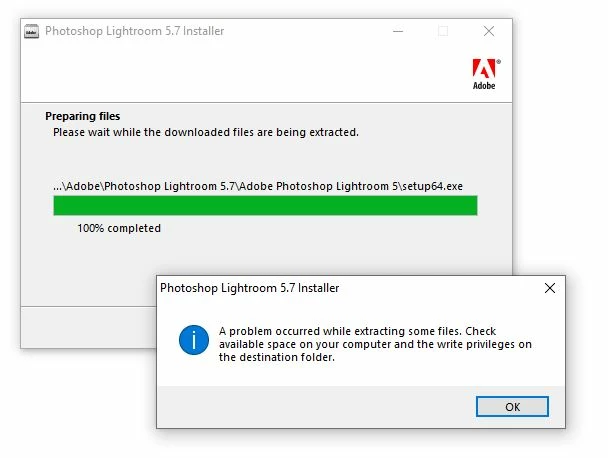
 

This topic has been closed for replies.

2 replies

Rob_Cullen
Community Expert
Community Expert
July 27, 2020

The answer from Jim Hess would also be my reply to the 'Permissions'. Checked all folders?

On other points-

"Lightroom 6" - No, definitely not for sale anymore. (If you see it for sale it is a scam- stay well away.)

"having to keep my files in the cloud" - The most recent upgrade for the standalone Lightroom versions is Lightroom-CLASSIC v9.3. It does not need the Cloud (other than to subscribe, install and activate). It does not store your photos in the Cloud. In fact it operates exactly as Lightroom-5 did. It will upgrade your v5 Catalog and allow you to carry-on as before, with the many new features introduced.

"tried pointing the install to a different hard drive" - Windows program installs always want to go to the C:\Program.. folders. If I remember correctly- the extraction of the installer .exe extracted the files to a folder on the Desktop C:\Users\YourName\Desktop then installed Lightroom.exe in C:\Program.. folder. Does 'Desktop' have permissions ?


Regards. My System: Windows-11, Lightroom-Classic 15.1.1, Photoshop 27.3.1, ACR 18.1.1, Lightroom 9.0, Lr-iOS 10.4.0, Bridge 16.0.2 .
Jeff A. Goulden
Inspiring
July 27, 2020

WobertC thanks for the response.  I checked all the folders.  Full access on all.  I have installed other software in the last couple of days.


So, in theory should I still be able to install Lightroom 5.7 using the Lightroom_5_LS11_win_5_7.exe I used for the original installation?


Thanks for the information on Lightroom Classic v9.  I’ll definitely look into that also.


Jeff

Jeff A. Goulden
Inspiring
July 27, 2020

It seems like a funny location that it is trying to access.  The C drive on this Windows 10 computer is actally a solid state, fairly small drive.  BTW, Isn't "onedrive" a cloud based folder?

JP Hess
Inspiring
July 26, 2020

Check the read/write permissions for the program files folder and maybe even the program files X 32 (I think) folder to ensure that they have both read and write permissions. In fact, check that for the entire C Drive.

Jeff A. Goulden
Inspiring
July 27, 2020
Jim,


Thanks for the response. I ran the install program
"Lightroom_5_LS11_win_5_7.exe" as an administrator. The permissions allow
for full control for administrators. I was thinking maybe that because
Lightroom 5.7 is no longer available that it couldn't extract the necessary
files for installation. I looked for a newer free-standing version of
Lightroom (Lightroom 6) and it didn't look like it was available for sale
anymore. Maybe I will be stuck buying the latest version and having to pay
a subscription? I wouldn't be too happy about that or having to keep my
files in the cloud.


Jeff


Jeff Goulden Photography

Nature, Wildlife and Landscape Photography

www.JeffGouldenPhotography.com

Phone: (253) 863-3265

Mobile: (253) 691-9258