



just eirik
Known Participant
August 1, 2026
Answered

Trying to straighten my photo but it jumps to 0

  • August 1, 2026
  • 5 replies
  • 44 views

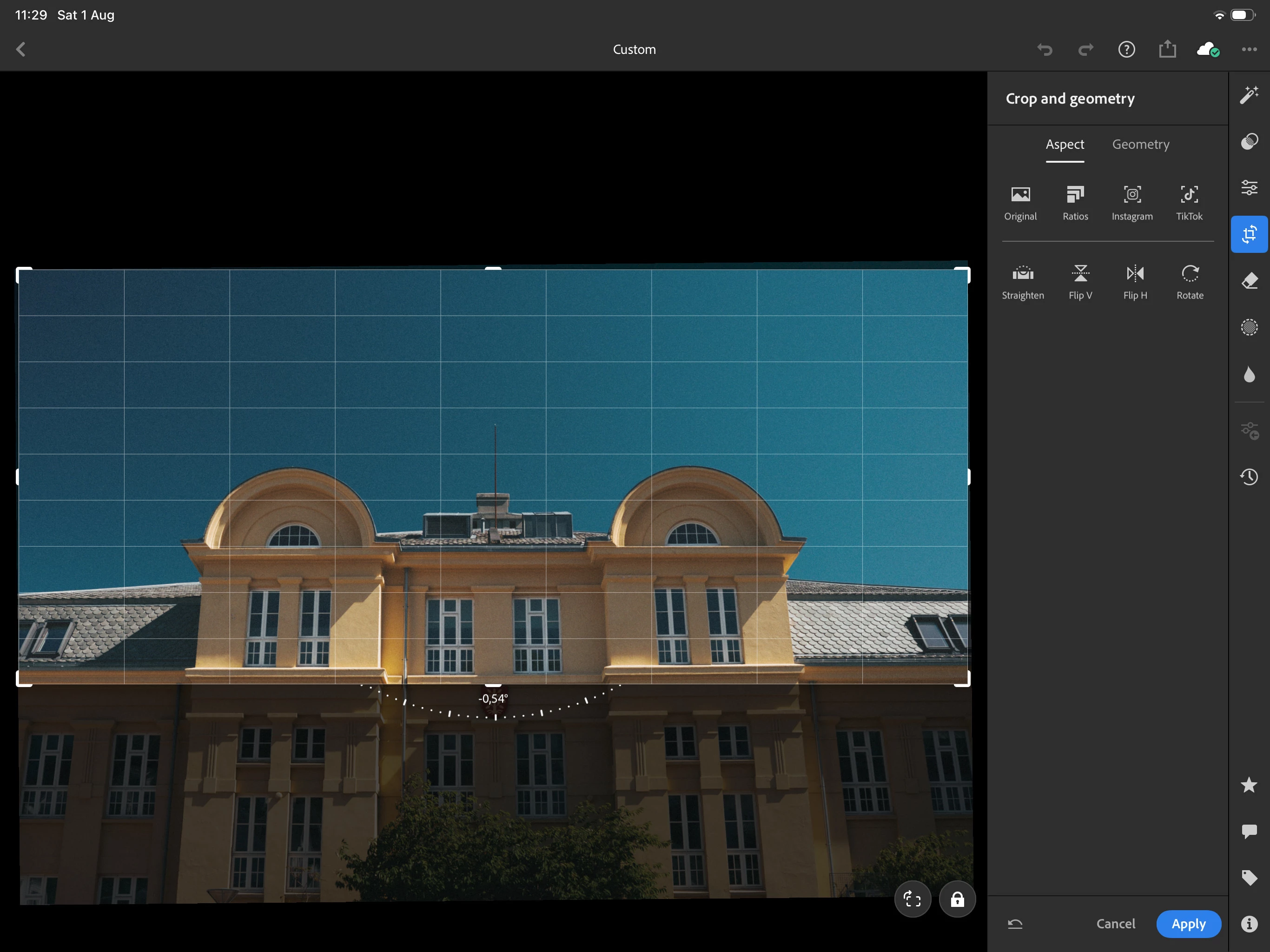
After updating the app, when I’m trying to straighten my photos while in the cropping section, I can’t get smaller angles than 0.54. If I need it to be plus or minus 0.52, I’m not able to straighten my photo.

This tool snapping to 0 can’t be intended behavior, correct? 


    Correct answer Claire H.

    @just eirik Thanks for your feedback, and I am sorry for the inconvenience about the update with the snapping behavior. We will document these changes more clearly to give our users a heads-up about UI/UX changes. I hope you’re back at it in your editing workflow! ^CH

    5 replies

    just eirik
    Known Participant
    August 5, 2026

    This is so frustrating! Here’s another example: I’m trying to rotate the photo so that the line in the car is perfectly level, but the snapping prevents me. Incredibly frustrating!

    This can’t be an intentional design can it? If it’s to help people get it to zero, that’s DUMB! You can already double tap on the angle indicator to zero it out. No need for this snapping. At least make it toggleble in the settings.


    Sameer K
    Community Manager
    Community Manager
    August 5, 2026

    Hey, @just eirik. Thanks for adding the screenshots. You're using Lightroom on an iPad. Are you using an external mouse for navigation? I couldn't recreate this as reported, and it'll help if you could record your workflow and share a video with us. We'll look into this.


    Thanks!
    Sameer K
    (Type '@' and type my name to mention me when you reply)

    just eirik
    Known Participant
    August 5, 2026

    I was using my apple pencil. But after updating this post, I realized that there was an update. The update removed the snapping behavior. Either you’re on a much earlier version, or the current version. But this behavior is not in the app anymore.


    I just wanna say though, nonsense changes like this is why I tend to never update my apps unless it’s 100% required. It’s so frustrating that developers add stuff, or change stuff, in a way that makes it more cumbersome to use. Especially when nothing is gained at all.

    A good example of this is how you guys changed how “share” works in Lightroom on iPad. You used to be able to set that up with the settings you want (file format and all that) and then you could just tap “share” to make LR generate a file with the predetermined settings. Then the iOS/iPadOS window that lets you choose where to put the file would pop up. One tap to get to that window. 1.

    But now you’ve removed almost all the settings from the “share” button, making it useless. Now we have to use the export button instead. Now we have to do 2 taps to get to that window? WHY? In what way is my experience better now? I could have been using the “export” button if I wanted to, but I preferred less friction, so I used the “share” button. 
     

    I don’t understand why you guys make such nonsense changes? Is there a reason? I’m GENUINELY interested in knowing. 
     

    Im also interested in knowing how many people on the development team actually use the iPad version. How much do they use it? I use it many times each day and dumb changes like this is incredibly frustrating. It really feels like the team doesn’t use Lightroom on iPad. I would not be surprised if they only see it on their PC in whatever program is used to develop in. 
     

    Okay I’m done ranting now. Sorry, but I just get so fed up some times.
