
Participant
February 16, 2024
Question

Unable to delete individual versions in Lightroom cloud

  • February 16, 2024
  • 1 reply
  • 210 views

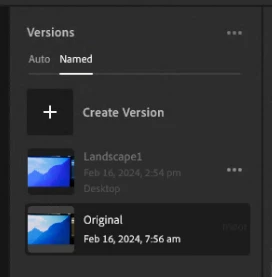
I am using Adobe Lightroom (cloud) v7.1.2 .. and having a problem with versions.  It seems like the 3 dots next to each version (which should allow me to delete individual ones) does not open.  I do seem to be able to click the 3 dots at the top, and delete ALL AutoSaves or Names, but not individually


1 reply

Rikk Flohr_Photography
Community Manager
February 16, 2024

I cannot replicate this failure on Win10, Win11, or Mac 14.3. 

Moving from bugs to Discussions. 

Standard troubleshooting, including the restart of the app, restart of the computer, update of OS, and reset of preference file, should be your next course of action.. 


Rikk Flohr: Adobe Photography Org
Participant
February 16, 2024

App restarted, computer restarted (each day) OS is up to date (just performed a Windows Update) ... where do you reset preference file?


What would happen if I uninstalled Lightroom and re-installed ... presume as all cloud based .. would be fine?