
Participant
April 21, 2022
Answered

Unable to Import new photos from Nikon Z6

  • April 21, 2022
  • 1 reply
  • 365 views

I'm running Lightroom CC version 5.3, on my Macbook that uses Monterrey 12.3.1. I use an external hard drive


I used to be able to import RAW files (.NEF) directly from my Z6 to Lightroom albums. It's been a little while since I've used Lightroom, but now I get an error message that says "These files could not be downloaded" I am unable to import any photos. I uninstalled and reinstalled Lightroom, and updated my camera firmware as well, but nothing has helped. 
This topic has been closed for replies.
Correct answer Sameer K

Hi Colton,


Thanks for reaching out. If you can clarify a few things for me, we can get to the bottom of this.


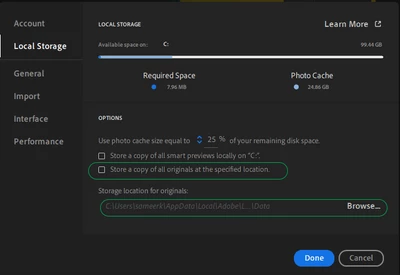
"I use an external hard drive" - please share the screenshot of the following options as shown below from Preferences.


It could be related to Read & Write permissions to the external drive that you are using.


Let us know if these steps help.

Thanks!

Sameer K

1 reply

Sameer K
Community Manager
Sameer KCommunity ManagerCorrect answer
Community Manager
April 25, 2022

Hi Colton,


Thanks for reaching out. If you can clarify a few things for me, we can get to the bottom of this.


"I use an external hard drive" - please share the screenshot of the following options as shown below from Preferences.


It could be related to Read & Write permissions to the external drive that you are using.


Let us know if these steps help.

Thanks!

Sameer K

Participant
May 9, 2022

Thanks Sameer! 


This seemed to have done the trick. I feel like it was the lack of full disk access that was the issue.