Participant
August 9, 2026
Answered

Wasserzeichen ändern + Position verändern nicht mehr möglich

  • August 9, 2026
  • 3 replies
  • 25 views

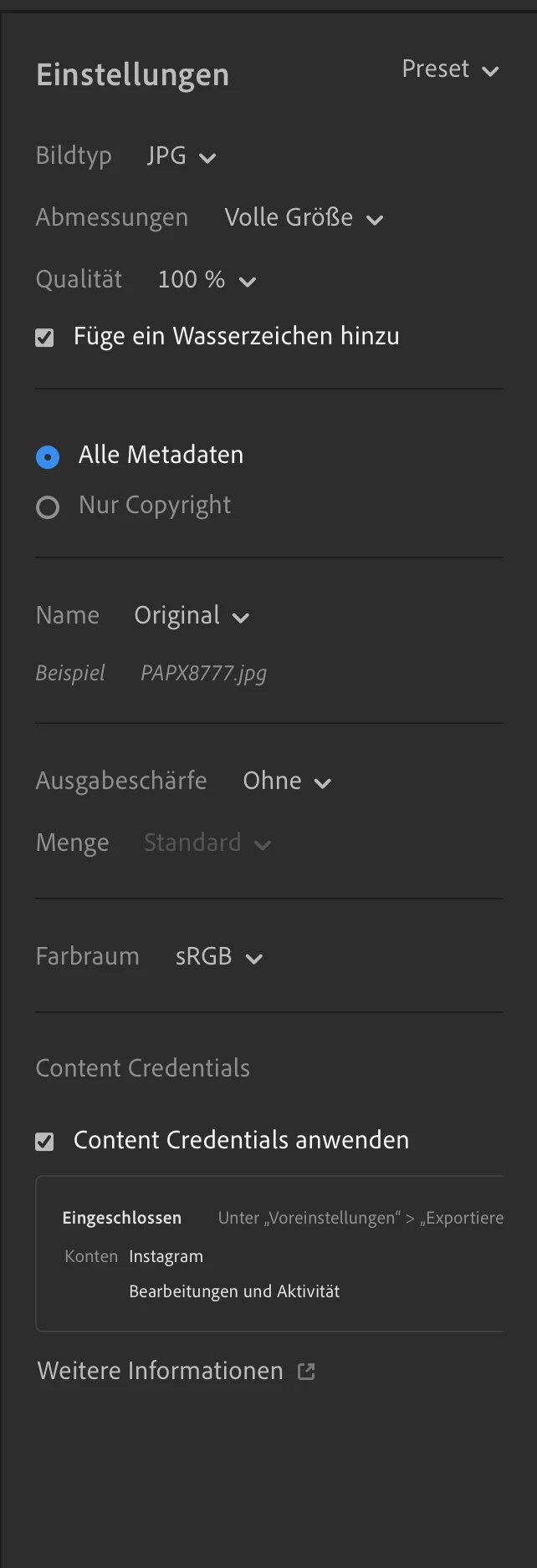
Seit Lightroom Version 9.5 (Mac; App Store Version) ist es nicht mehr möglich, das Wasserzeichen anzupassen. Es also weder hoch zu laden, noch die Position zu verändern (s. Anhang). Hat noch wer anderes das gleiche Problem?


    Correct answer blade4fame

    I've since figured out the problem.

    Unfortunately, several views/tabs on the Mac are poorly programmed. There seems to be a fixed maximum width (I noticed this during export, when cropping (since the new "Expand" feature), and with masks, for example, when no people can be found). Because of the missing (horizontal) scroll bar, it wasn’t immediately obvious that I had to scroll to the right in those specific areas to see the rest of the text or even the gear icon next to the watermark. So I’d like to report a UX bug here. If the problem isn’t explained clearly enough, I’d be happy to provide additional information (such as images or videos).


    3 replies

    Claire H.
    Community Manager
    Community Manager
    August 26, 2026

    Hi ​@blade4fame, Welcome to the Lightroom Community forum! If you don’t see the gear icon to customize your watermark, please verify the following:

    • Watermarks cannot be applied directly to raw files (like DNG or camera Originals) during export. You must change your export file type setting to JPG, TIFF, or PNG for the watermark options to activate.
    • Make sure you are going through the proper export/share workflow. Open an image in Detail view, click the Share (Export) icon, select Export as (or settings on mobile), and toggle on Include Watermark to reveal the Customize button.
    • You are updated to the latest version of Lightroom.

    If all steps have been taken, can you send your system info and a numbered list of the exact steps needed to reproduce it? You can find your system info by going to Help > System Info, copying and pasting it into a text file, and attaching it here.

    In the meantime, I would recommend trying these basic troubleshooting steps:

    1. Clear your cache: Go to the top menu and open Preferences (Edit > Preferences on Windows, or Lightroom > Preferences on macOS). Click the Cache tab, then look for the option to Clear Cache or to adjust the maximum size allowed for stored originals and previews. Remember to check if your cloud sync is fully updated and active before clearing space, so you do not lose unsynced work
    2. Reset System Preferences: https://adobe.ly/4o7JADQ
    3. Use the Adobe Cleaner Tool to reinstall: https://helpx.adobe.com/creative-cloud/apps/troubleshoot/diagnostics-repair-tools/prepare-to-run-creative-cloud-cleaner-tool.html?linkId=100000395089249

    If none of these steps work for you, please send over the requested information so we can continue troubleshooting. I hope this helps! ^CH

    blade4fameAuthorCorrect answer
    Participant
    August 26, 2026

    I've since figured out the problem.

    Unfortunately, several views/tabs on the Mac are poorly programmed. There seems to be a fixed maximum width (I noticed this during export, when cropping (since the new "Expand" feature), and with masks, for example, when no people can be found). Because of the missing (horizontal) scroll bar, it wasn’t immediately obvious that I had to scroll to the right in those specific areas to see the rest of the text or even the gear icon next to the watermark. So I’d like to report a UX bug here. If the problem isn’t explained clearly enough, I’d be happy to provide additional information (such as images or videos).

    Sameer K
    Community Manager
    Community Manager
    August 26, 2026

    Thanks for bringing this up. Please feel free to review this and submit a bug report: https://adobe.ly/4wOk5vu


    Thanks!
    Sameer K
    (Type '@' and type my name to mention me when you reply)