Participant
April 30, 2025
Answered

WHAT VERSION OF LIGHTROOM DO I HAVE??

  • April 30, 2025
  • 2 replies
  • 507 views

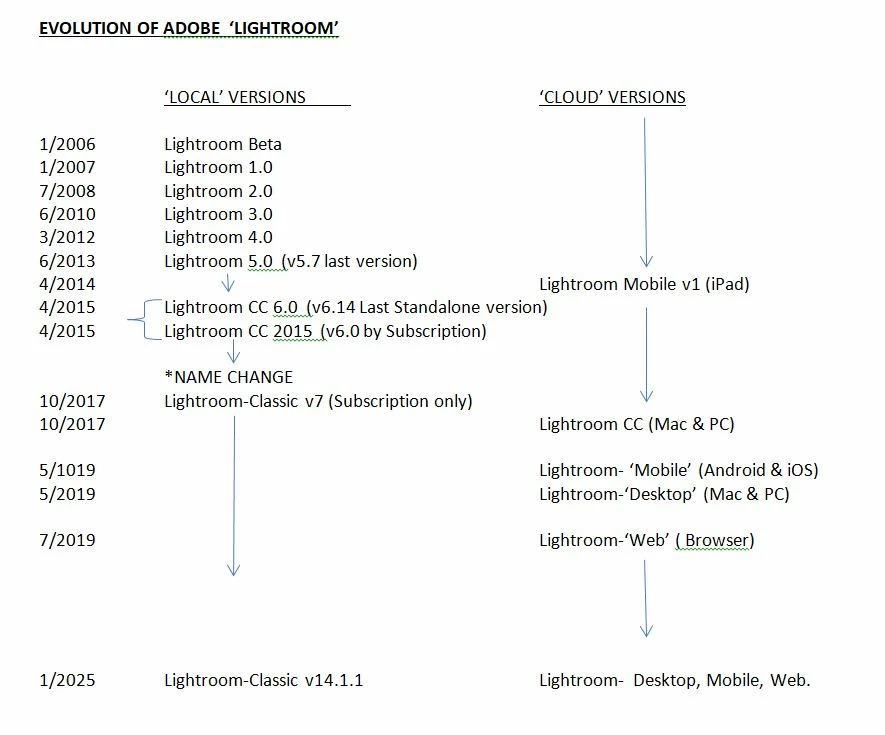
The "About Lightroom" simply says Lr 8.3, yet when I look for help online, there are descriptions of Lightroom Classic or CC or Cloud-based, etc. Are these descriptions or names? And advice for one version doesn't seem to always apply to others. 


Could you like color the Lr icons differently for the different versions? 


When I try looking up something simple on my actual Lightroom like how to move folders the list of suggestions don't seem tailored to my version of Lightroom. If Lightroom wasn't so useful it wouldn't be worth it, but it can do amazing things. The learning curve isn't as steep as PhotoShop but I don't use it every day, so I have to struggle with "how did I do this a few months ago...?"

Post, post, did it post...?
Correct answer Rob_Cullen

COMPARE LIGHTROOM & LIGHTROOM-CLASSIC FEATURES


2 replies

Rob_Cullen
Community Expert
Rob_CullenCommunity ExpertCorrect answer
Community Expert
May 1, 2025

COMPARE LIGHTROOM & LIGHTROOM-CLASSIC FEATURES


Regards. My System: Windows-11, Lightroom-Classic 15.1.1, Photoshop 27.3.1, ACR 18.1.1, Lightroom 9.0, Lr-iOS 10.4.0, Bridge 16.0.2 .
Rikk Flohr_Photography
Community Manager
April 30, 2025

You have Lightroom Desktop version 8.3, which was released on April 24, 2025. This is not Lightroom Classic but is part of the cloud-centric ecosystem of Lightroom Apps. 

Lightroom Desktop is identified by an Lr icon, and Lightroom Classic is identified by an LrC icon. Lightroom Classic is currently version 14.3. 

Brian Matiash has many tutorials for Lightroom Desktop. 

Rikk Flohr: Adobe Photography Org