'Learn & Discover' is in Lightroom
The 'Saved' presets will (automatically) appear under [Yours] in [Saved from Discover] when you edit one of your own photos-
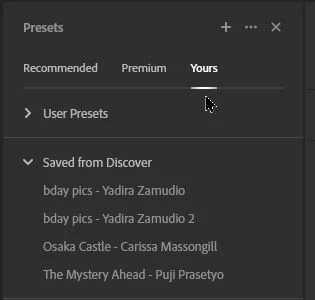
I did learn that if you 'save' a Preset while in the Lr-Web browser interface, the preset will not appear in the Lr-Desktop interface until the Browser version is closed and Lr-Desktop re-opened.
So it's learn & discover for me!
Edit: And if you want the saved preset in Lightroom-CLASSIC, I presume you must Export the preset from Lr and Import it to LrC.
Regards. My System: Windows-11, Lightroom-Classic 15.6, Photoshop 27.8, ACR 18.7, Lightroom 9.4, Lr-iOS 10.4.0, Bridge 16.0.3 .





 AdChoices