
juergh12393364
Known Participant
May 31, 2018
解決済み

Where is the "preset folder" on Mac and how can I arrange and share presets?

  • May 31, 2018
  • 返信数 2.
  • 36860 ビュー

Since the new version I cannot find the presets on my Mac.

- Where is the Lightroom CC 2018 preset folder on my mac?

- How can arrange my presets nowadays?

And why o why do you always change stuff and we need to figure it out? Grrrrrr.

Thanks ;-(
解決に役立った回答 Akash Sharma

Hi Juerg,

Sorry about all the trouble caused,

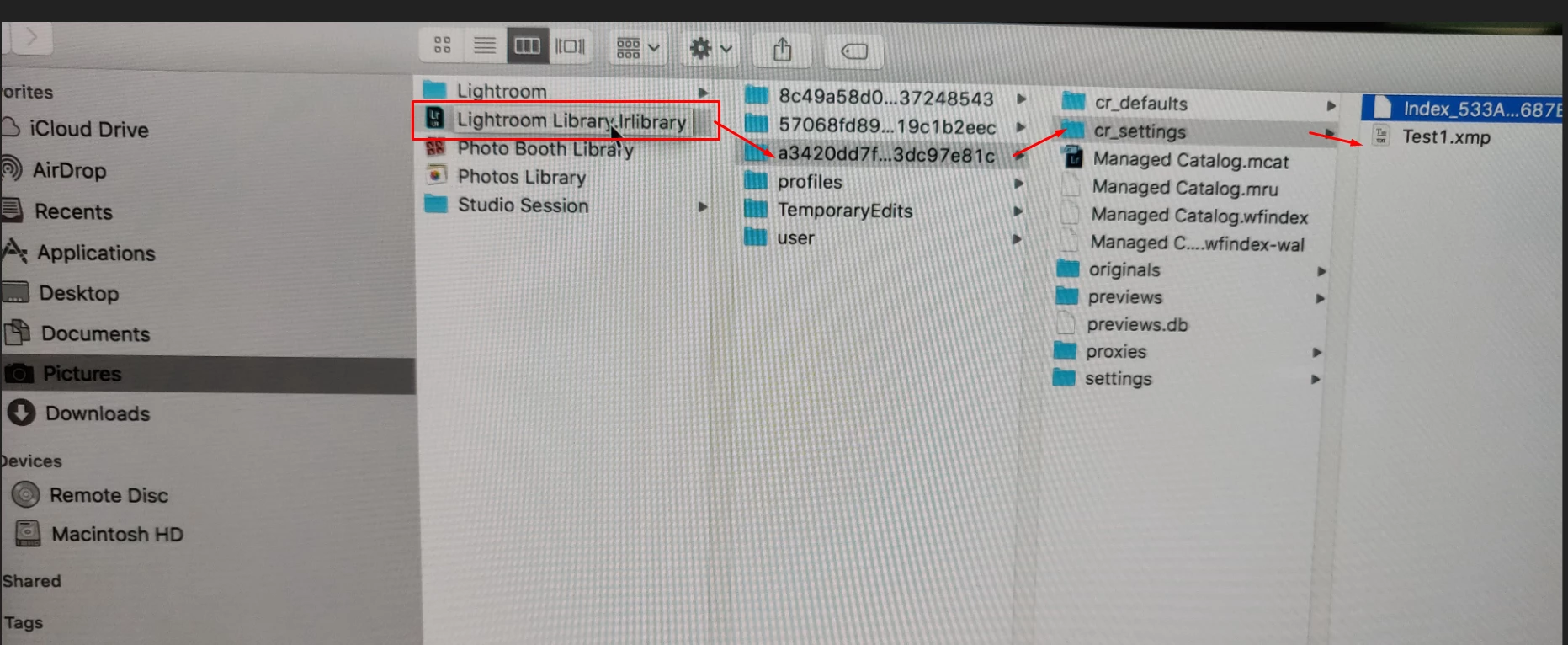
To locate your Lightroom CC presets, please navigate to the below location:

  • Pictures folder> right click the file Lightroomlibrary.lrlibrary and select "show package contents".
  • Open the folder that starts with an alphabet (in this case it starts with "a".
  • Select cr_settings folder and you should see your Lightroom CC presets.

Screenshot for reference:-

Thanks,

Akash

返信数 2

juergh12393364
Known Participant
June 7, 2018

Sorry, but I don't have this folder on my Macbook Pro and with the latest LR Version.

I cannot believe how Adoboe - a million dollar company - changes stuff like this and over a week I cannot get feedback that helps me.

In the old version it was absolutely no problem.

Please help further - i don't have these folders - cannot find them with Apple and F nor with the spyglass

juergh12393364
Known Participant
June 7, 2018

Dear Akash

Are you working at Adobe?

Can you please help me? it’s really crazy - either i just don’t understand what is going on or it’s really a glitch in the program changes of the new version.

I cannot find my own presets anywhere on the mac - i wish to save them and send them to somebody. Please help.

I also want to kick some out and create other folders. Please help.

Juerg

Akash Sharma
Akash Sharma解決!
Legend
June 7, 2018

Hi Juerg,

Sorry about all the trouble caused,

To locate your Lightroom CC presets, please navigate to the below location:

  • Pictures folder> right click the file Lightroomlibrary.lrlibrary and select "show package contents".
  • Open the folder that starts with an alphabet (in this case it starts with "a".
  • Select cr_settings folder and you should see your Lightroom CC presets.

Screenshot for reference:-

Thanks,

Akash

Akash Sharma
Legend
May 31, 2018

Hi juergh12393364,

Sorry that you've having problems finding the presets in Lightroom CC.

Presets are now saved as XMP files, making them compatible and accessible across Camera Raw, Camera Raw as a filter in Photoshop, and all of the Lightroom desktop products.

To import presets, click the three dots menu in the presets panel and choose Import Presets. Navigate to a preset, select it, and Lightroom CC will automatically install it.

Regards,

Akash

juergh12393364
Known Participant
May 31, 2018

Thanks.

I post the questions again since the answer doesn't answer the questions really. Here is my request again from above:

Where is the "preset folder" on Mac and how can I arrange and share presets?

Juerg HostettlerLevel 1

Since the new version I cannot find the presets on my Mac.

- Where is the Lightroom CC 2018 preset folder on my mac?

- How can arrange my presets nowadays?

...............................

All together there are 3 questions

1 Where is the preset folder?

2 How can I arrange the presets (clean up, delete etc) my presets

3 How can I share the presets (like I want to send a friend one I made)