Participant
March 7, 2022
Answered

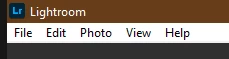
"Window" Menu is missing

  • March 7, 2022
  • 2 replies
  • 605 views

Hi all,

as displayed below, some menus such as the "window" dropdown in the very top left of my Lightroom are missing. I've searched for the issue online extensively but all I'm getting is issues that have to do with other menus or other versions of Lightroom. I'm using version 5.2 on Windows 10 (Desktop).

I also found that it might have to do with the grafik card driver but I checked and mine is up to date. I have two NVIDIA GeForce GTX 780 Ti.

Can anyone help me with that? Thanks in advance!

Best wishes,

Fabian



This topic has been closed for replies.
Correct answer Rob_Cullen

The "Window" menu ony appears in the Lightroom-CLASSIC version of the Lightroom 'Family'.

It is not available in v5.2 Lightroom.

COMPARE LR & LR-CLASSIC (Lr Queen)


2 replies

Participant
March 9, 2022

Okay, I think I finally got it. Thanks a lot!

Rob_Cullen
Community Expert
Rob_CullenCommunity ExpertCorrect answer
Community Expert
March 7, 2022

The "Window" menu ony appears in the Lightroom-CLASSIC version of the Lightroom 'Family'.

It is not available in v5.2 Lightroom.

COMPARE LR & LR-CLASSIC (Lr Queen)


Regards. My System: Windows-11, Lightroom-Classic 15.1.1, Photoshop 27.3.1, ACR 18.1.1, Lightroom 9.0, Lr-iOS 10.4.0, Bridge 16.0.2 .