
Participating Frequently
February 11, 2020
Question

Wrong Aspect Ratio Ligthroom web gallery

  • February 11, 2020
  • 2 replies
  • 642 views

Is everyone experienced a problem with stretched photos with wrong aspect ratios, shown in Lightroom web gallery? They are OK in Lightroom, but shows in wrong way in web version..... This is so bad, I just show them to the client..... For Example:
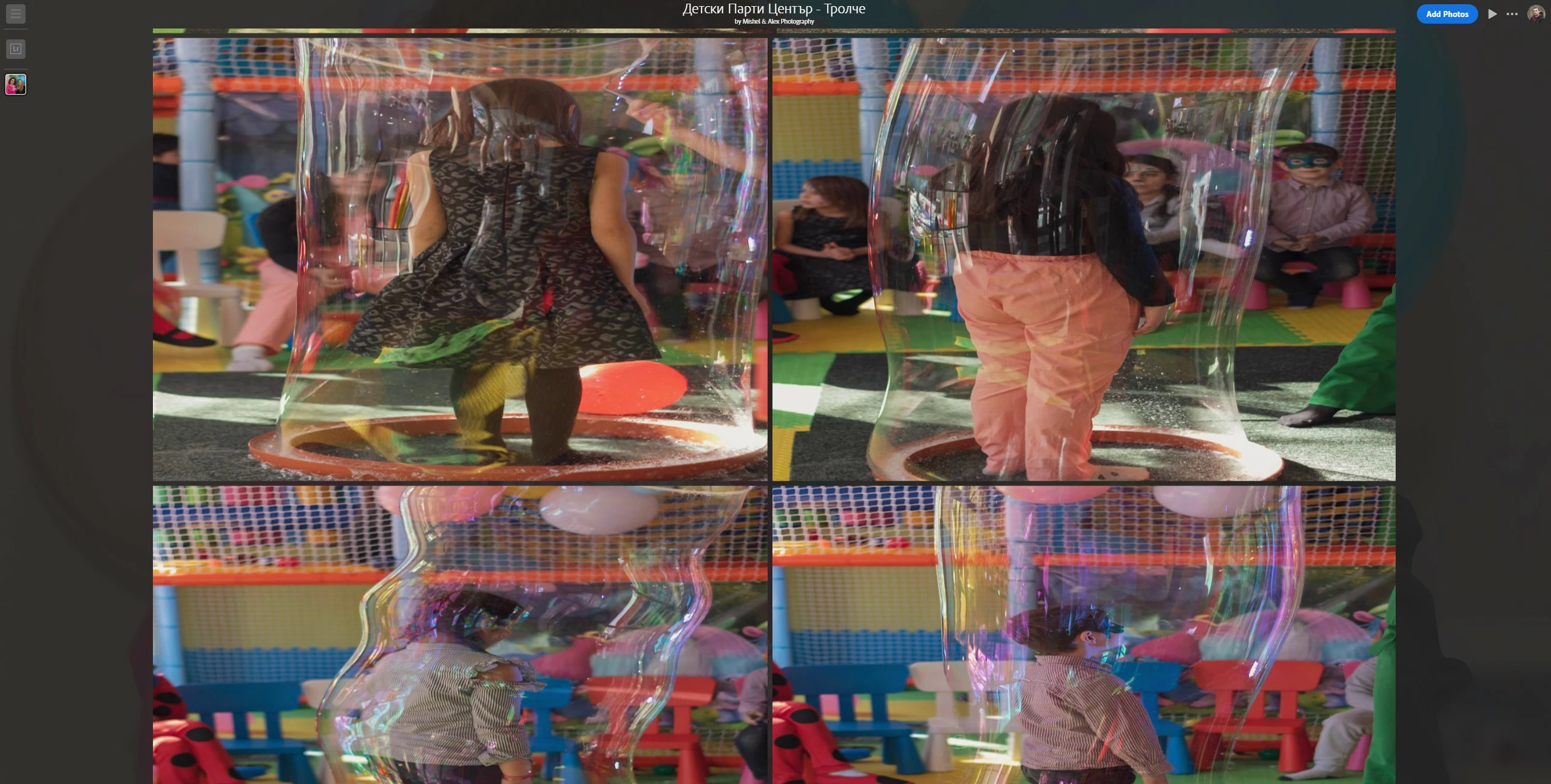
I suppose it's a bug, I have no control on how they look here!..... Please, Adobe, this is rediculous...

2 replies

Noel Orridge
Community Manager
Community Manager
July 21, 2025

Hi @pavel_2608, Thank you for reaching out! I'm sorry to hear about your issue.


Lightroom Web generates previews based on smart previews or cached thumbnails, which sometimes ignore or misread the metadata orientation embedded by your camera. Could you please share a screenshot of how the images look in Lightroom Web? Also, please share a RAW image that is affected by this problem. Upload the problematic files to WeTransfer, Dropbox, Google Drive, or a similar free service and post the sharing link here. 


While we wait, you can try out these fixes and see if they solve the issue.


1) Clear your browser Cache.


2) Open Lightroom Web in an incognito/private window to temporarily bypass the cache. This is a quick way to test whether the issue is cache-related.


3) You could create a custom preset that applies a tiny crop or rotation and apply it in bulk to affected images. This would trigger a preview refresh and keep your edits consistent across devices.


Let us know how it goes! 

Cheers!

Noel
Participant
July 21, 2025

I have the same problem in LR 8.4. Importing pictures from Canon R5 , all looks good in lightroom, but in album view some get width dimentions swapped  with height (so toll narrow looks short and wide). It happens with many but not all portrait oriented pictures. I found a workaround for now. In the web view start editing each of those pictures, go to crop, change crop by very little. That fixes the problem. But it is very time consuming and now my pictures are out of sync with my local versions.   

Akash Sharma
Legend
February 12, 2020

Hi there,


Sorry that Lightroom is showing you incorrect aspect ratio in Web Gallery of Lightroom Web. How exactly have you stretched the images? Have you used any preset to edit those images? Does all of the images with larger aspect ratio look different in Lightroom Web?


Thanks,

Akash

Participating Frequently
February 12, 2020

Hello,

The images are not streched by me! They are ok, some of them are cropped, some are just as shot. In Lightroom Classic CC they appear just fine. When I share the gallery to WEB, some ot them shows like this - streched with wrong aspect ratio. This is the problem.

Participating Frequently
February 18, 2020

Anyone with this problem? With every Collection sync, this problem persists on the another device. Web, mobile or desktop - no difference. Some images are Ok in Library section, but in Develop, they stretch...?!