


Question
Auto Rigger won't track
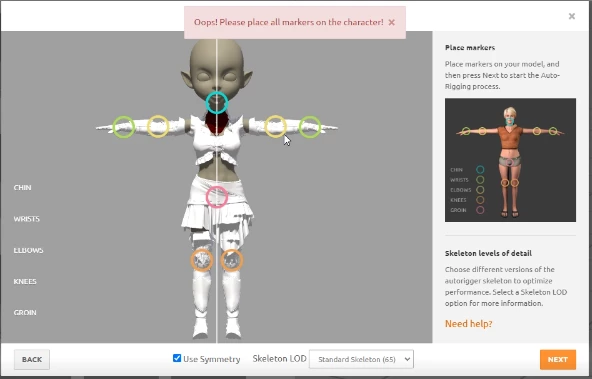
I have encountered an odd, random issue. I can upload my character just fine, but when it gets to the auto-rigging, it encouters an error when it can'y "see" the points. I have gone back and notices when I click on the circles to readjust them, it shows a blank screen in the targetting box until I move the circle, then my character's wrist, etc pops into view. I have no idea what's going on, but it refuses to map this character.
I have a video showing the process and error - forgive me, I don't know how to edit so feel free to skip ahead after I click the auto-rig button to see the error. Cheers
Edit: Well, I have a video but can't upload it here for some reason. So here's an image of the rror instead...
 AdChoices