Participant
October 18, 2021
Answered

Blending (not sequencing) Mixamo animations in C4D, Blender, or other program

  • October 18, 2021
  • 1 reply
  • 1264 views

Hi,

There's plenty of tutorials out there on how to sequence Mixamo animations in various software programs and make them seamless (for example, running followed by a jump).

However, I'm interested in blending characteristics of two animations. Specifically, there's a "YMCA" animation on Mixamo that I'd like to blend with basic walking. In other words, I want the upper body doing the YMCA animation with the lower body walking. Is there anything out there on how to do this in C4D, Blender, or other program?

Thank you.
This topic has been closed for replies.
Correct answer andersh33075760

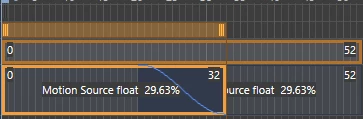
I've been trying to figure this out within Cinema 4D for a while now, and all the tutorials I've seen just drag the motion clips on top of one another and the transition between the two is always the same curve. When you say you "blended the two motion clips together using spline blending that I made completely flat" did you mean that this curve?

And the two motion clips are completely overlapped? I have been trying to figure out how to make this curve flat but I can't seem to get it. 
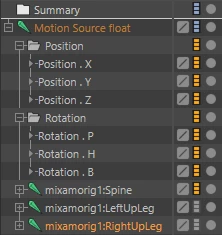
By turning off the hierarchy do you mean disabling the tracks for each part of the rig that shouldn't be moving?

I want to disable the legs so I turn them off and they no longer have animation. 

Anyways, thanks for at least giving me hope that this can be achieved in C4D, just wish I could figure out the details. 

1 reply

Ussnorway7605025
Legend
October 19, 2021

so the hip\ pelvis bone down is walking while the spine bone up is doing different?

yes that is doable and I have do a few in Iclone but Blender should also be able to cut them together if you ask someone that uses that software

Participant
October 23, 2021

I was able to figure it out in Cinema 4D. I made motion clips out of each animation, then used the hierarchy to turn off the animation in the body parts that needed to be merged with the other animation. So, I turned off all leg animations for the YMCA one and turned off all upper body animations with the walking one. I then blended the two motion clips together using spline blending that I made completely flat. Presto...I had a walking skeleton doing the YMCA while walking.

andersh33075760Correct answer
Participant
June 8, 2022

I've been trying to figure this out within Cinema 4D for a while now, and all the tutorials I've seen just drag the motion clips on top of one another and the transition between the two is always the same curve. When you say you "blended the two motion clips together using spline blending that I made completely flat" did you mean that this curve?

And the two motion clips are completely overlapped? I have been trying to figure out how to make this curve flat but I can't seem to get it. 
By turning off the hierarchy do you mean disabling the tracks for each part of the rig that shouldn't be moving?

I want to disable the legs so I turn them off and they no longer have animation. 

Anyways, thanks for at least giving me hope that this can be achieved in C4D, just wish I could figure out the details.