


Feb 15, 2021 2:31 AM UTC
Question

I cannot see my model inside of mixamo

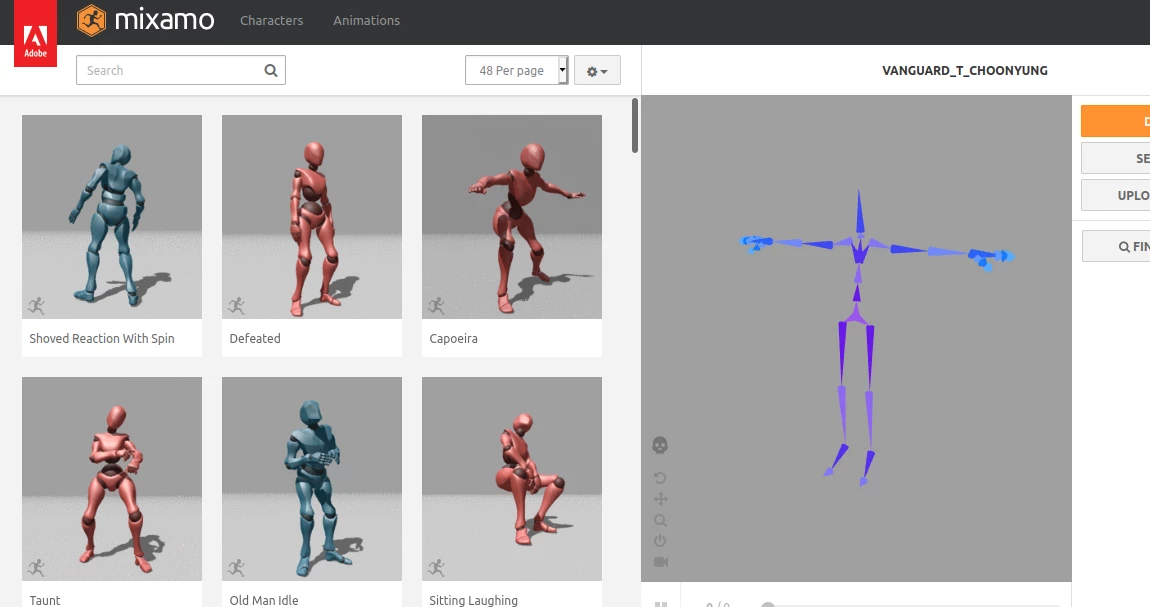
The model will not display inside of the preview window in Mixamo even when I'm using one of the pre-made models provided by Adobe. I can turn on the skelton inside of the preview window and watch animations that way. I can also download the model with animation from Mixamo and have it work perfectly fine. I've been searching online for a solution and haven't found anything please help if you can.
12 replies

Ussnorway7605025
Legend
Aug 10, 2022 1:14 PM UTC

Mixamo looks at location zero, zero, zero so yes if your character is standing 3 metres to the left and 20 foot underground that will block things

Translate
Participant
Aug 11, 2022 6:32 AM UTC

Hi Ussnorway.

It still doesn't work. I've attached a screencapture  to show the problem. I am not using custom characters. I cannot see the mesh. I can see the skeleton when I click on Enable Skeleton.


System specs: Chrome Version 104.0.5112.79 on Linux Mint (Kernel: 5.15.0-46-generic x86_64 bits: 64 compiler: N/A Desktop: Xfce 4.16.0
tk: Gtk 3.24.20 wm: xfwm4 dm: LightDM Distro: Linux Mint 20.3 Una
base: Ubuntu 20.04 focal)


Thanks


A

Translate
Ussnorway7605025
Legend
Aug 11, 2022 10:00 AM UTC

try picking one of the standard Mixamo characters 1st then add animation ... if it doesn't show then the issue is your browser doesn't read standard web-animation data and the fix is to use another browser

Translate
Participant
Apr 27, 2022 11:25 AM UTC

cant see the character I've just uploaded


By @Devin5F9E


Translate
Participant
May 29, 2022 8:30 PM UTC

i dont know which it was but when i scaled my character up (x1.5) and set it to the origin of Blender it worked

Translate
Participant
Aug 10, 2022 6:24 AM UTC

omg this helped so much! I think its when you set you character back to the world origin that its visable again

Translate
Participant
Oct 3, 2021 2:09 PM UTC

Hello @Am It  and @Devin5F9E:

    I hope you guys had found a solution if you did, can you please share it with us?

    and thank you.

Translate
Participant
Sep 26, 2021 12:10 PM UTC

Hi Devin,

I have the same problem. I can see the bones when I toggle bones view, but cannot see the mesh. Did you manage to solve the problem on your computer?

Thanks,

A

I'm on Linux (5.4.0-86-generic x86_64 bit)+ Chrome 94.0.4606.61


Translate
Ussnorway7605025
Legend
Feb 20, 2021 8:35 AM UTC

is this a different model to your first post {the screengrab shows you are in bone view}?


can you share the zip file and I'll test it for you?

Translate
Participant
Jul 19, 2022 7:21 PM UTC

Hi, I have same problem, is that possible to help me to check my model? thanks a lot.

Translate
Ussnorway7605025
Legend
Feb 15, 2021 6:33 AM UTC

click the skull mate

Translate
Participant
Feb 20, 2021 8:02 AM UTC

Hey. When I upload my character zip file into maximo to start rigging it on the 'Auto rigger' screen/pop up window i dont see my character. Why is that? Can you help?

Translate