


Participant
May 17, 2025
Answered

Mixamo Adds Weird Shadowy/Noisy Overlay to Exports in Unity

  • May 17, 2025
  • 1 reply
  • 320 views

Hi there,


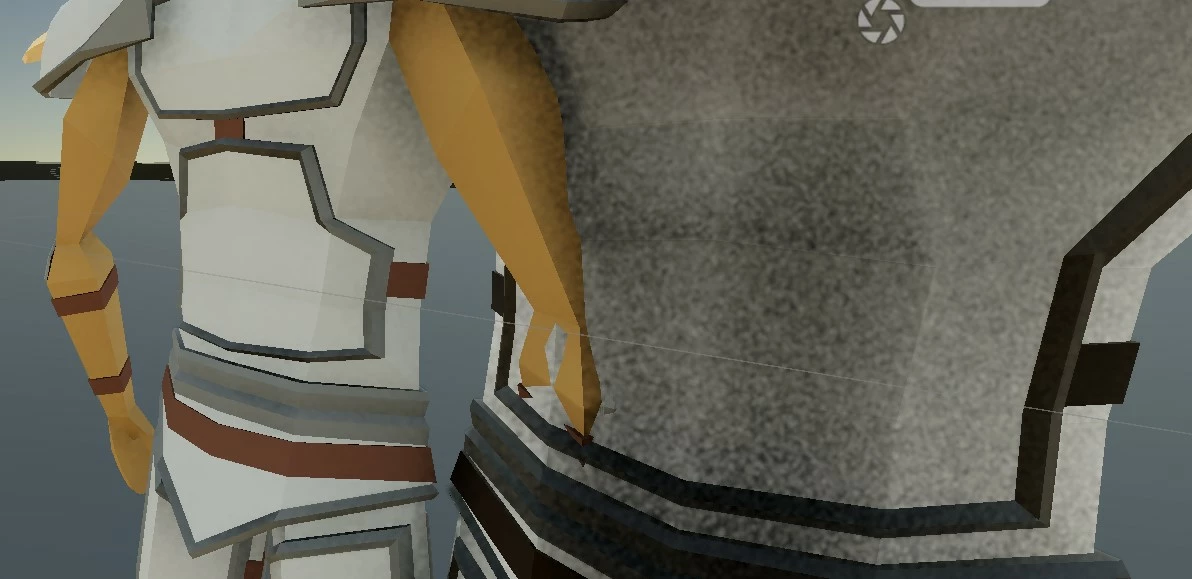
I've been trying to figure out what is causing this all night - I've made a model in Blender that uses materials to color it. It works fine with Mixamo and rigs/animates properly, but when I export it and then import the FBX into Unity it always has a weird shadowy/noisy overlay on the surface of the mesh that I can't get rid of, even if I change the materials. It doesn't seem to be related to lighting (I just have environmental lighting with no shadows)... I feel like I'm missing something really simple, any ideas?

The screenshot shows the same models next to each other - the noisy one has been through Mixamo. Aside from that they seem to have exactly the same settings, except the Mixamo one uses a Skinned Mesh Renderer rather than a mesh renderer.
Correct answer Ussnorway7605025
  1. Unity is misreading the texture info because it uses the metal drivers instead of Nvidia standard
  2. the best/ easy fix is go back to Blender and make the base model with an image texxture instead of plot colours
  3. reguardless this is a Unity issue and has zero to do with mixamo

1 reply

Ussnorway7605025
Ussnorway7605025Correct answer
Legend
May 19, 2025
  1. Unity is misreading the texture info because it uses the metal drivers instead of Nvidia standard
  2. the best/ easy fix is go back to Blender and make the base model with an image texxture instead of plot colours
  3. reguardless this is a Unity issue and has zero to do with mixamo
Participant
May 19, 2025

Thanks for your reply - you're right, this issue had nothing to do with Mixamo itself. I think it was a combination of what you suggested + my Unity lighting settings being dodgy (I'm quite new to this). Either way I appreciate the response a lot.