
Inspiring
January 12, 2025
Question

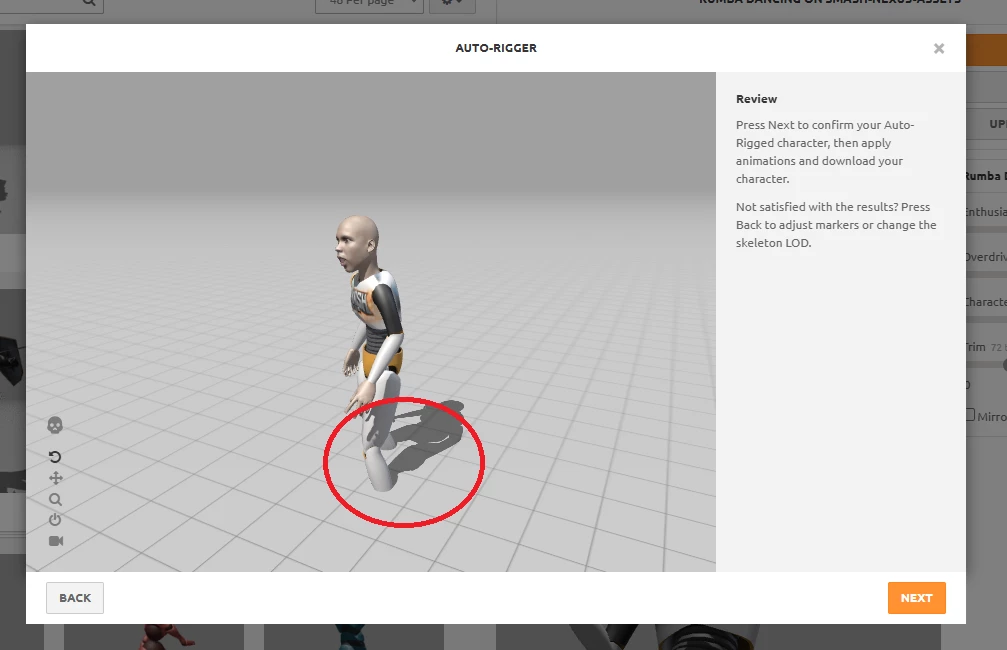
Mixamo loads FBX model below ground level

  • January 12, 2025
  • 2 replies
  • 418 views

I exported a model whose origin is correctly placed at the level of the sole of the shoes and between both legs. When I export this FBX and also test it reimport in Blender, it still looks correctly positioned above the +z axis. But when I load the model in Mixamo it is below ground level. How do I tell Mixamo to adjust this? Can the develelopers of Mixamo fix this bug or is there a workaround to this?
 

2 replies

cromai
Participant
March 5, 2026

I had a similar problem and fixed it by adjusting the origin of the model to be at the bottom of the feet in blender and by making sure the model was above the x-axis.

I’m not sure what else it could be.

The other issue I had was not using a T-Pose but an A-Pose  and this causes issues with the mixamo animations where the arms will be inside the bodies etc.


Ussnorway7605025
Legend
January 13, 2025

its not a bug the ground plan is not set correct which prob means your type of Fbx file is not one of the standards... the way you would test that is to upload the model in [wavefront] Obj just to see where it sits