Participant
June 28, 2021
Question

not uploading / uploaded has texture isuses
  • June 28, 2021
  • 2 replies
  • 184 views


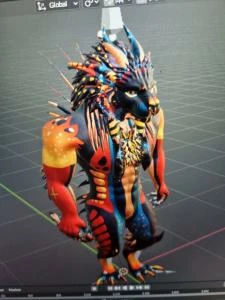
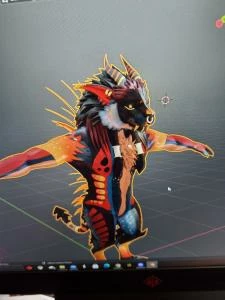
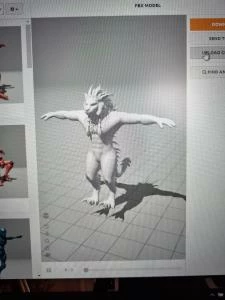
so 3 days ago I uploaded a model, not 100%humanoid (yes it worked fine) the animation worked and basically everything else until I clicked Z rendered, the texture was way off also in layout it seemed unfixable after hours of trying and so I tried to upload the edited file of the model and it says 'sorry unable to map you exsisting skeleton" while the model uploaded before? and even with "chat support" they didnt have a clue and just kept sending links ending nowhere.


ive added images as proof that it can actually be uploaded to maximo adn what the texture is supposed to look like compared to the mixamo version(the one with all the colours in the main is the wrong texture of mixamo)


so if anyone knows how i can fix the texture issue or re-upload the edited mode, please help me!


This topic has been closed for replies.

2 replies

Ussnorway7605025
Legend
June 28, 2021

the issue will be a proxy i.e, your network or your browser or Adobe server is saving the file to reuse


easy test is to upload it from a different computer at a different campus


as more the model itself I'd assume your polly count is too high to add textures and you are hitting file size limits but yes chat is worthless

Ko.Maruyama
Community Expert
Community Expert
June 28, 2021

YEAH - that is wacky.

BUT - - As long as your mesh is good, you don't really need the textures in Mixamo.  You can download the keyframes then retarget them to your existing model in the 3D software you're using.

Presumably your UVs are good in your 3D software, so things should be fine.


Grab the animation data you need, see if it checks out.


ps. that is a FUN SCULPT on that head! nice!