
Participant
May 24, 2023
Question

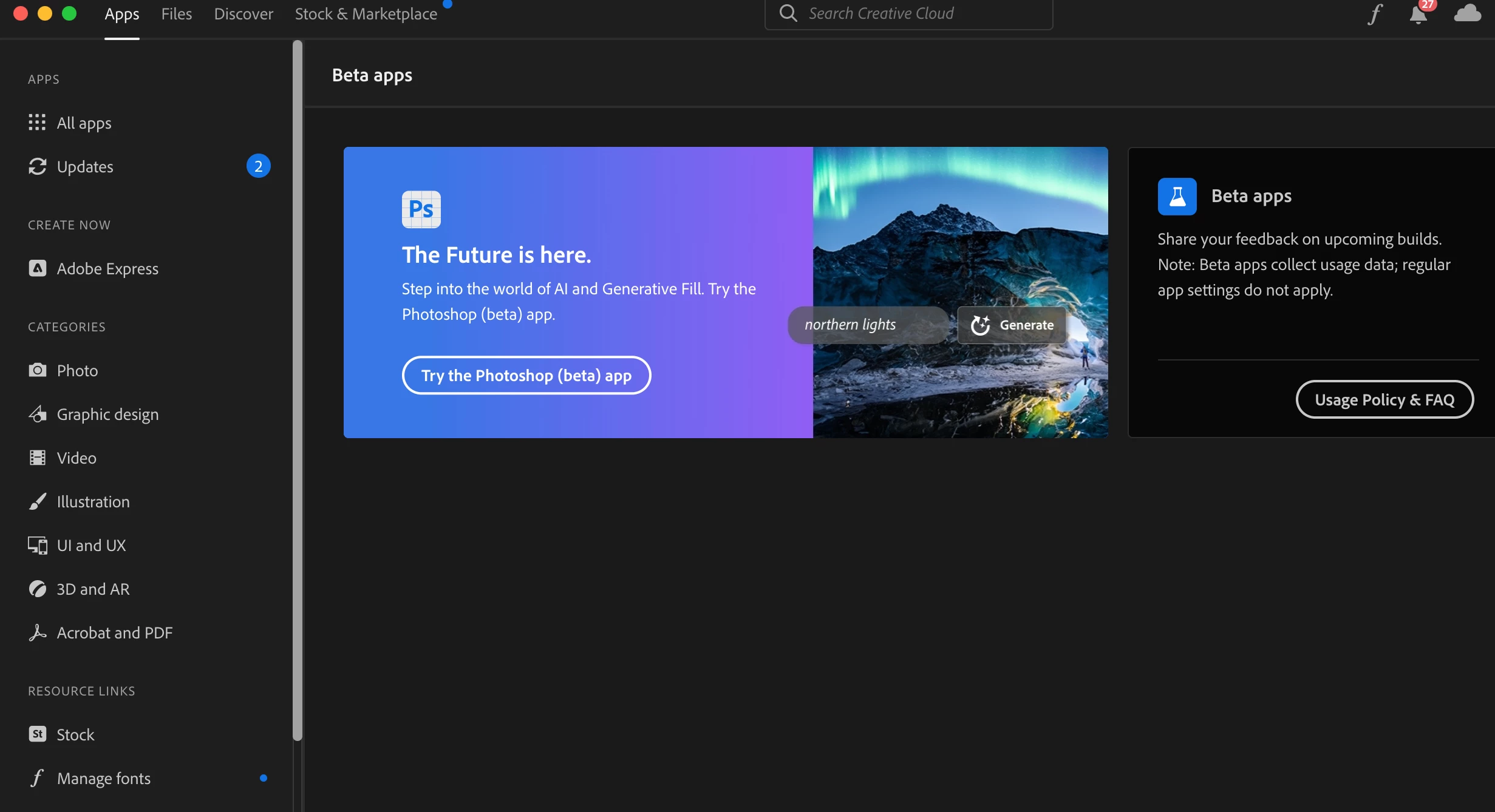
Can't click "Try the Photoshop (beta) app" in Creative Cloud installer

  • May 24, 2023
  • 36 replies
  • 13113 views

When I try to click the "Try the Photoshop (beta) app" button in the Creative Cloud installer under the Apps tab, it doesn't do anything. A hand icon appears when I hover over it, but clicking on the button itself does not result in any action. Please advise. Or, if there's another way to access the beta, please let me know. 
 

This topic has been closed for replies.

36 replies

Known Participant
July 20, 2023

Same for me. I click the button. Nothing happens.

Kevin Stohlmeyer
Community Expert
Community Expert
July 20, 2023

Hi @Graham272638908qg7 are you in your Creative Cloud Desktop app? Do you see the beta listed here?

Known Participant
July 20, 2023

 I dont have that option.


craigr30049577
Participant
July 7, 2023

Are you in the right brower? It didn't work for me on Firefox but it does in Google Chrome.

Participant
June 29, 2023

Hey, same issue here - Beta Panel is visible and I am able to install every other Beta App from the list of Desktop Apps, only Photoshop is not possible when clicking on the banner. Maybe you could add a Photoshop entry into the list - i think that could fix it in some cases.

Participant
June 29, 2023

Open Creative cloud app, navigate to blue circle icon on the top right corner next to cloud icon in Creative
cloud app and then click on sign out.
Turn off the all firewalls under your system settings and then sign in again on Creative cloud and check if you're able to
access PhotoshopBeta app.

Participant
July 18, 2023

This actually worked for me I couldn't click the button to try now and photoshop beta wasn't showing in the beta apps list but all the others were there.. So I Did this and it worked straight away 

Participant
June 26, 2023

Same issue here, university account

Participant
June 26, 2023

Switzerland btw.


Kevin Stohlmeyer
Community Expert
Community Expert
June 26, 2023

Hi @Aljosa307232082w6s you need to contact your plan administrator to allow Beta apps access and access to new versions within 30 days of release. There is nothing Adobe customer care or anyone here can help with unfortunately - your account is managed by your university IT.

Kevin Stohlmeyer
Community Expert
Community Expert
June 19, 2023

Hi @irr825 When you go to the Creative Cloud desktop app - do you see the Beta section on the left under Apps?


Participant
June 19, 2023

Can someone at Adobe help here? I'm having this same issue. I purchased Photoshop specifically for the Generative Fill feature for something I need to work on right now. It's insane that an error in the UI would be the friction that causes people to not be able to use your product. Please help!

CShubert
Community Manager
Community Manager
June 26, 2023

@irr825 could you share more about what issue you are seeing? Your subscription should allow you to use Ps beta and Generative Fill, but if you are not able to see or download it we are happy to try to find out why.


Also, GF is not for commcercial use at this time so your work should not be impacted by not being able to use it at this moment:

https://www.adobe.com/legal/licenses-terms/adobe-gen-ai-user-guidelines.html


Participant
July 26, 2023

Dear Cory, 

Im afraid i have the same issue, the button for installing the beta version of photoshop wont do anything or take me anywhere. Please find the screenshot attached.

Looking forward to your reply! Thanks & Kind regards!

Participant
June 5, 2023
Participant
June 3, 2023

Thanks for answers. Geographic issues seems not to be reason. Some people I know here are able to download beta.

Participant
June 2, 2023

@Kevin Stohlmeyer  have an higher ed account, does that mean I won't be able to access the beta apps?

Kevin Stohlmeyer
Community Expert
Community Expert
May 31, 2023

Hi @andresa10295620 there are geographic restrictions on betas. They may not be available in your area.