


MeredithStotzner
Community Manager
Community Manager
May 23, 2023
Answered

Generative Fill in Photoshop Beta

  • May 23, 2023
  • 106 replies
  • 144208 views

Dream Bigger with Generative Fill - now in the Photoshop (beta) app 
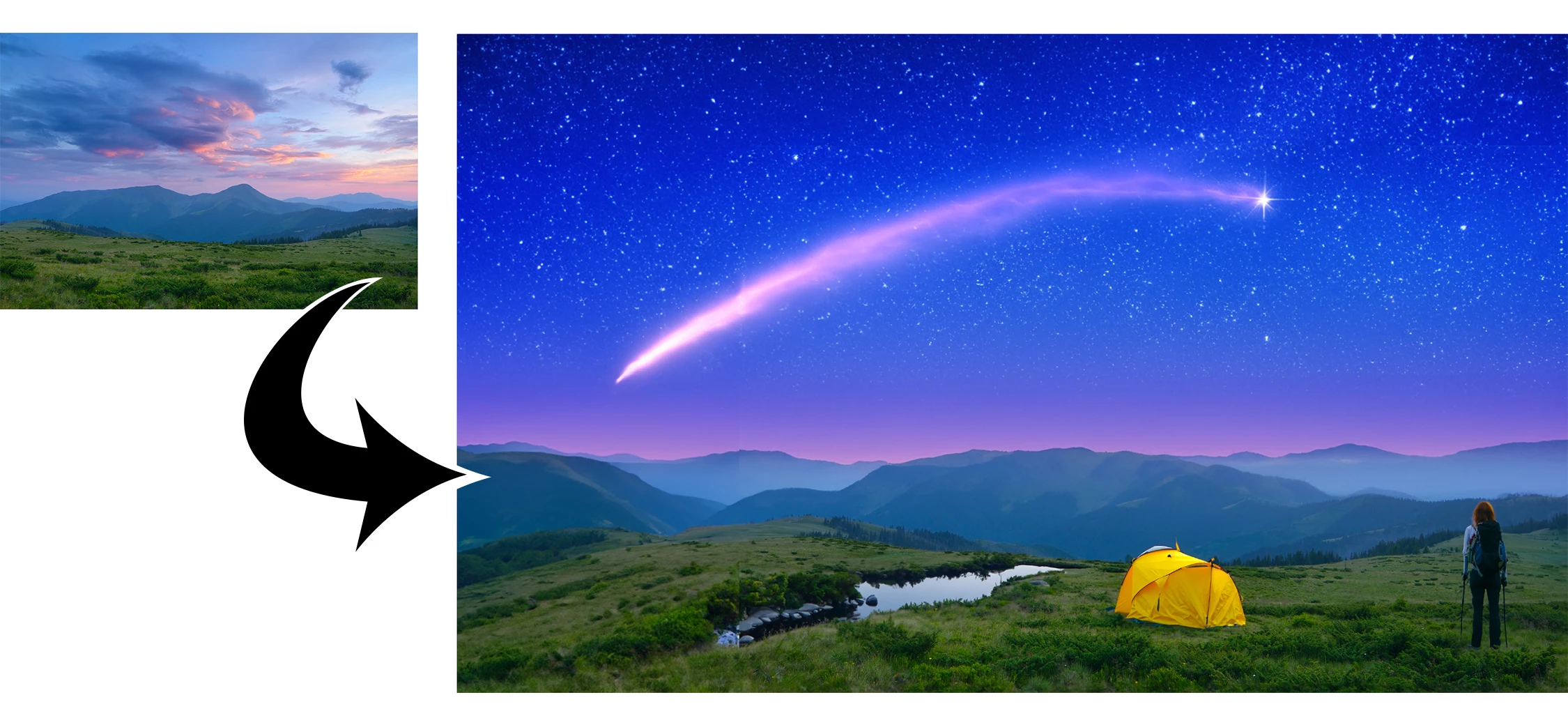
 

This under-construction, revolutionary new AI-powered Generative Fill allows you to create/generate new content in your image or remove objects like never before!

The process is simple: make a selection – any selection, then tell Photoshop exactly what you want placed there. The GenAI models will return an object or scene you described. You can:
 

Generate objects: Select an area in your image, then describe what you’d like to add.

 

Generate backgrounds: Select the background behind your subject, then generate a new scene from a text prompt.

 

Extend images: Expand the canvas of your image, then make a selection of the empty region. Generating without a prompt will create a seamless extension of your scene.

 

Remove: Select the area you want to remove, then let the GenAI technology make it disappear.
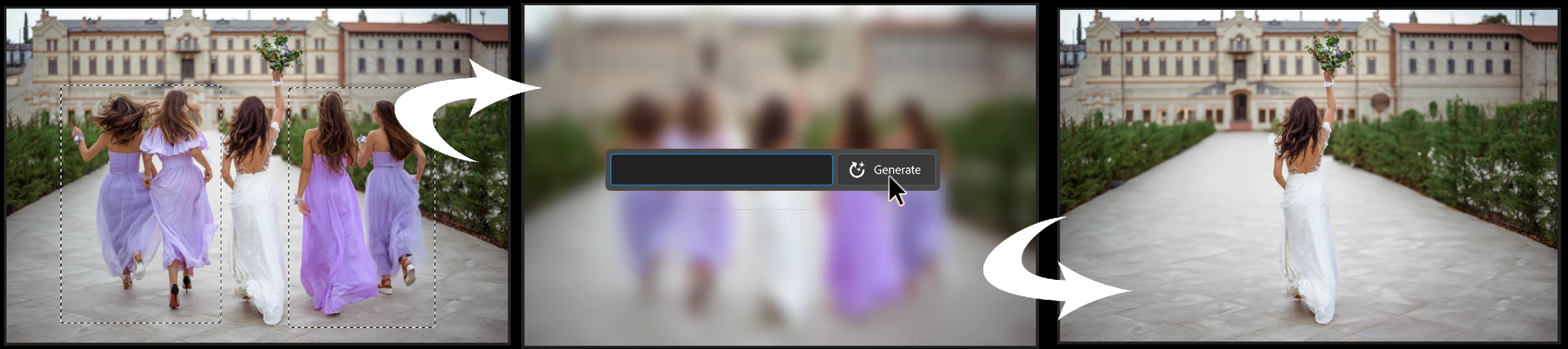
 

And more… Generative fill is incredibly versatile. Discover new ways to use this powerful feature.


How to use Generative Fill

Full instructions and helpful links are here:   https://helpx.adobe.com/photoshop/using/generative-fill.html


Rate the results!
Releasing this amazing new technology as a public beta allows Adobe to hear from you!

Let us know if the Generative Fill feature is meeting your expectations!
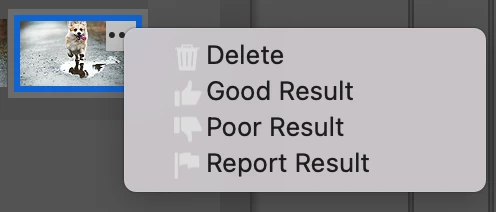
As you use Generative Fill, please rate each variation image.

Simply hover over the [•••] on the thumbnail and give it a thumbs up, or thumbs down, then follow the link to tell us more.


Report Result option
Prompts may also unintentionally generate problematic or offensive images; in such cases you can use the Report Result option to let us know.


Provide Feedback and help shape Generative Fill

If you would like to provide feedback on the overall experience, report any bugs, or suggest new features please let us know in this thread! If you prefer Discord, you can find us there too!


Helpful Tips

  • Use simple language
    Leave out commands like “add” or “remove” - Example: asking to "remove the red boat" will generate more red boats.
    Try using 3-8 words to describe what you want to see.
    Include a subject with descriptive language.. Example: A red barn in a field of flowers.
  • Select part of the original image when extending 
    Make sure you select part of the image along with the empty part of the canvas. This will give a better result that will blend in with the rest of your image.
  • Get inspired and inspire others
    Share what you create with the beta community!
    Check out the 
    Adobe Firefly Gallery to see what others have created with Adobe Firefly and Generative Fill. Click on an image to see the prompt that was used.


Related Links:

          Learn about and install Photoshop (beta) app

          Experience the future of Photoshop with Generative Fill

          Firefly FAQ

          Stock and Firefly FAQ

          Make selections in your composites

          Retouch and repair images


Correct answer Kevin Stohlmeyer

Try entering a basic prompt. We are seeing a high volume of failures for GF without prompts.

106 replies

Participating Frequently
June 9, 2023

Beta or not, I do not think the gen fill will ever have the ability to redraw a selected element, like a bear paw, to scale and attach it to the arm where the original paw was located. I have done many, many tests on that simple request, redrawing a somewhat realistic cartoon bear paws to decrease the paw (has no claws) from 4 fingers to 3. (I tried other similar tasks without success, but the bear paw is simple to explain.)

When you tell Mid Journey, Bing Image Generator  (Dal-E) and even this PS beta to draw something using prompts it does the request, on a blank page, but that is incredibly more simple then gen fill within a piece of art, although what Mid Journey, etc. does is mind blowing.

But Gen Fill is different! It will be impossible to fill a small area of a drawing accurately. It only reads the pixels around it and doesn't have human eyes and brain to understand what it is seeing. Other full drawings like discussed above does NOT need to see and understand what the pixels around the area means. Like, "Oh, this is a bears arm. I need to add the new paw right here. and I have to get the scale right."  So I got so many weird things in a small area where I was trying to (auto fiill) redraw one paw. I tried many, many prompts and auto fill. Absolutely nothing came even remotely close to the original paw. The original paw did not have claws, but the gen fill gave weird claws including one with candles as claws. One fill gave white, mickey mouse gloves. And nothing came close to attaching a revised paw to the arm. The new fill showed new crazy paws (all sizes) pointing everywhere. Worse is that there is no way it can understand how to create at the proper scale. Maybe creating a bear claw through commands on a blank page then resizing it and rotating it and blending to the arm would work after a lot of work, but that it not gen fill. 

Inspiring
June 7, 2023

Does it work with an older Intel Mac? I tried installing it on my work machine, a 2019 MBP but it just gave me the beach ball when I launched it. Could be that VPN thing, I suppose, but I need IT to turn it off, and they won't let me use the machine without it (working from home). That said, I did also install the beta on my personal machine that's a newer MBP with M1 and it worked like a charm! I hear what people are saying about accuracy, etc., but for my purposes, comping labels that have photogrpahy, I'm mostly using stock already and either compositing a composition for the photoshoot, or extending surfaces and that kind of thing. Saved me a TON of time. Really looking forward to the release version, where I'm sure the resolution issues and other things will be more buttoned up.

Inspiring
June 9, 2023

Note, yesterday I uninstalled on the work machine after I sent that, then today I reinstalled and no beach ball. It's still not showing under all apps, or updates though. 

Participant
June 6, 2023

Thanks. I'm looking forward to trying it. Wondering if it's available on photoshop for iPad as I've just bought a new iPad Pro?

Participant
June 4, 2023

Participant
June 2, 2023

Is there a way to fix the tecture of the generated image? all results doesn't reflect the orginal photo image. example below:

Generated part on the left.


Participating Frequently
June 2, 2023

Is your image high resolution? Right now in beta, the maximum resolution of generated edits is 1024×1024, so you'll see a huge difference if your original image is a higher resolution than that. 

Participant
June 1, 2023

Great start adobe with the generative tool! Just used it for the first time and I'm wondering if in the future you could select your own content to be merged with the background image. Say I already had a mouse juggling cheese rolls on one layer and I wanted it to embed into the scene matching lighting, perspective etc, it would be awesome to drag the subject layer into the Generate text box and let it do its thing. 

Participant
May 31, 2023

Hi, I recently use generative fill but it is always loading with the green panel, nothing show up, anyone experience?


Trevor.Dennis
Community Expert
Community Expert
June 3, 2023

Have you fixed this yet?  If not, show us a full res screen shot of your workspace.

Participant
May 31, 2023

Hello, my previous message dissappeared, does anyone have the problem that beta is installed in creative cloud it activates the open button but does not open, it is not present in the launchpad. All updates installed on both Creative Cloud and MacOS 13.1.

Thanks

Participant
May 30, 2023

My Generative fill AI is currnetly unavailable, any help?


Participant
June 4, 2023

you need to find and install another version of Photoshop. Look for "Photoshop beta"

ddjanni
Participating Frequently
May 30, 2023

This is really cool, but it does a bad job on people's faces, and warping arms and legs in weird unnatural ways. 

ddjanni
Participating Frequently
May 30, 2023

Graham24508943nobd
Known Participant
May 30, 2023

yeah hands are really bad. Lots of bleeding occurs as well