


MeredithStotzner
Community Manager
Community Manager
May 23, 2023
Answered

Generative Fill in Photoshop Beta

  • May 23, 2023
  • 106 replies
  • 144208 views

Dream Bigger with Generative Fill - now in the Photoshop (beta) app 
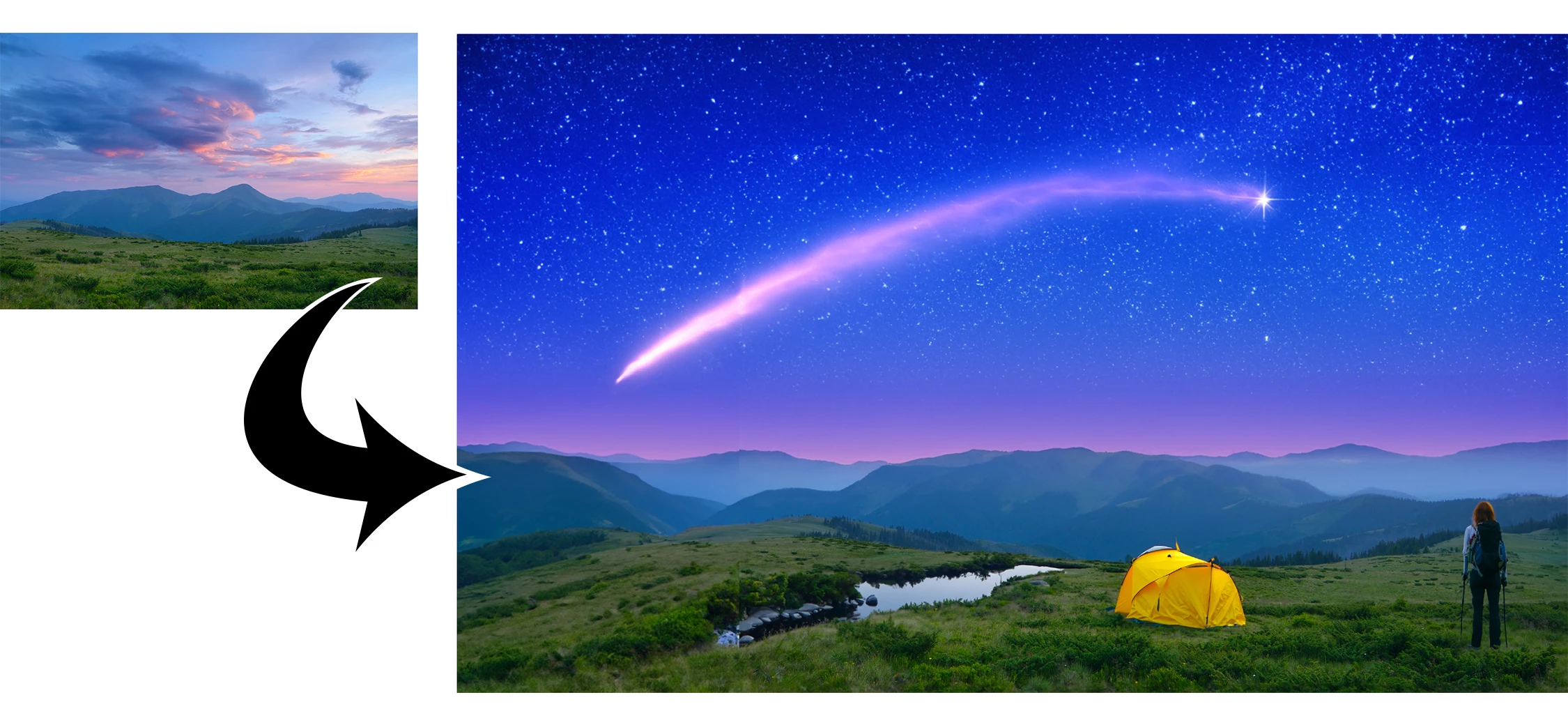
 

This under-construction, revolutionary new AI-powered Generative Fill allows you to create/generate new content in your image or remove objects like never before!

The process is simple: make a selection – any selection, then tell Photoshop exactly what you want placed there. The GenAI models will return an object or scene you described. You can:
 

Generate objects: Select an area in your image, then describe what you’d like to add.

 

Generate backgrounds: Select the background behind your subject, then generate a new scene from a text prompt.

 

Extend images: Expand the canvas of your image, then make a selection of the empty region. Generating without a prompt will create a seamless extension of your scene.

 

Remove: Select the area you want to remove, then let the GenAI technology make it disappear.
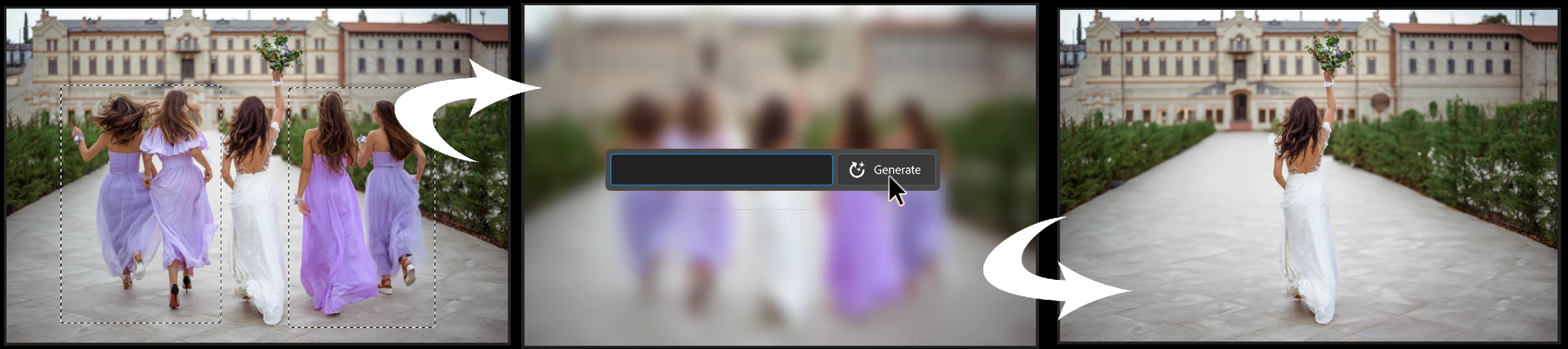
 

And more… Generative fill is incredibly versatile. Discover new ways to use this powerful feature.


How to use Generative Fill

Full instructions and helpful links are here:   https://helpx.adobe.com/photoshop/using/generative-fill.html


Rate the results!
Releasing this amazing new technology as a public beta allows Adobe to hear from you!

Let us know if the Generative Fill feature is meeting your expectations!
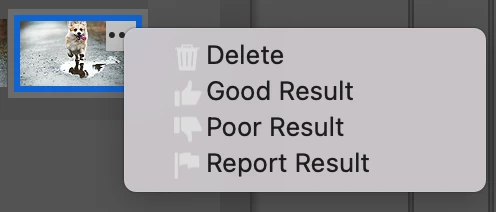
As you use Generative Fill, please rate each variation image.

Simply hover over the [•••] on the thumbnail and give it a thumbs up, or thumbs down, then follow the link to tell us more.


Report Result option
Prompts may also unintentionally generate problematic or offensive images; in such cases you can use the Report Result option to let us know.


Provide Feedback and help shape Generative Fill

If you would like to provide feedback on the overall experience, report any bugs, or suggest new features please let us know in this thread! If you prefer Discord, you can find us there too!


Helpful Tips

  • Use simple language
    Leave out commands like “add” or “remove” - Example: asking to "remove the red boat" will generate more red boats.
    Try using 3-8 words to describe what you want to see.
    Include a subject with descriptive language.. Example: A red barn in a field of flowers.
  • Select part of the original image when extending 
    Make sure you select part of the image along with the empty part of the canvas. This will give a better result that will blend in with the rest of your image.
  • Get inspired and inspire others
    Share what you create with the beta community!
    Check out the 
    Adobe Firefly Gallery to see what others have created with Adobe Firefly and Generative Fill. Click on an image to see the prompt that was used.


Related Links:

          Learn about and install Photoshop (beta) app

          Experience the future of Photoshop with Generative Fill

          Firefly FAQ

          Stock and Firefly FAQ

          Make selections in your composites

          Retouch and repair images


Correct answer Kevin Stohlmeyer

Try entering a basic prompt. We are seeing a high volume of failures for GF without prompts.

106 replies

Participant
June 26, 2023

Hi, at least 60% of the time, the beta does a better job when I don't provide a prompt. Can there be an auto-generate button that simply performs the function rather than having to click generate then click again to have the PS start generating a fill?


Dax


#generative #ai


[Mod: Moved to the Photoshop Beta forum]

Participant
June 24, 2023

after the update i think generative fill is far worst than the previous beta version. now it seriously generates random objects and clothes irrespective of the context. previous version at least that use to generate elements that it typed in contextual box. but now it is very much random. if right jacket it creates blouse, you write denim jeans it generates boots with gown. either the generation model is changed or the training of the model gone too complicated for photoshop to handle.

Graham24508943nobd
Known Participant
June 24, 2023

I agree with you 100 % it has GOTTEN WORSE. However, what I CAN create is amazing.

jackm10818096
Participating Frequently
June 22, 2023

Using generative fill to remove background produces this image

Participant
June 22, 2023

it's impossible for me to generate content.
I've updated to 24.7.0.
But as soon as I launch a request to generate content, I get a message telling me that given the current high demand, it's impossible to complete my request.


What happen? 😞


Graham24508943nobd
Known Participant
June 19, 2023

Hi Folks Here's what CAN be done using this amazing new tool RIGHT NOW !!   ALL the pictures I used in this video were created in the new AI feature with a few add ons by myself. The video itself was mixed in Captracks. The music was played BY MYSELF direct into my yamaha Tyros 5 keyboard and I used double tracking as well. No tweaks to the sound.

Hope you don't mind me posting this here, but I thought the team could do with some praise for a wee change ! 


https://youtu.be/7pt0Wn3xKA0

Inspiring
June 19, 2023

So I think the announcements asked for feedback.  I found using the generative tool very frustrating.  The only time I got even close to what I wanted was placing small objects in unobstructed places in the image and even then it was frustrating.  For example when I asked for a rabbit it gave me all these weird versions that clearly were not from North America which is where I am logged in.  It took three attempts and very specific wording to get something useful.


I spent a lot of time trying to duplicate the Washington Post article where the author put a multicolored fright wig on his head.   I never got anything close and I  could never find the right wording.  For a "multicolored clown wig on head" I kept getting these little scullcaps and they never came close to fitting the head that I outlined with Lasso.  I gave up.


Finally the generated images didn't blend that well with the rest of the image.  They were clearly generated which I suppose is a way to avoid legal difficulties but it would require a bunch of post processing to make them really fit.

Participant
June 19, 2023

I'm a female portrait photographer. This "generative fill" sometimes refuses to work, probably because he sees a female body in photo. AI thinks wrong, I ask him to fill in the background, and not do something with the body. Once I had to fill in a small corner in the background, and even then he refused to do so.

Participant
June 14, 2023

Hi Adobe!
I was using the new Beta app and yesterday the Generative Fill disappeared and I noticed that the Beta version is no longer an offer to be downloaded.  This morning I woke up and the icon is gone. What's going on?  Is it being replaced by Adobe Express Beta?

Thanks!

Participant
June 14, 2023

Follow-up to my question.
I had to restart my computer and the Beta app so everything is working fine now.

But I have another question.  In Lightroom under the mask tool you can highlight the sky.  Is there a way to remove the sky rather than replace it?  What about in Beta?  I am doing a multi-layer photograph showing a moving object. ie: bouncing ball. I know there are other ways to do it but throught with all the new features there's a faster way to do it.
Thanks!

Participant
June 10, 2023
until a few days ago everything was working properly, now I can't use generative fill because it keeps getting connection error in photoshop. i tried 3 different networks and uninstalled and reinstalled photoshop beta updates but nothing.... has anyone had the same problem?
Participant
June 9, 2023
replace my face to one of the shirtless guy