


MeredithStotzner
Community Manager
Community Manager
May 23, 2023
Answered

Generative Fill in Photoshop Beta

  • May 23, 2023
  • 106 replies
  • 144208 views

Dream Bigger with Generative Fill - now in the Photoshop (beta) app 
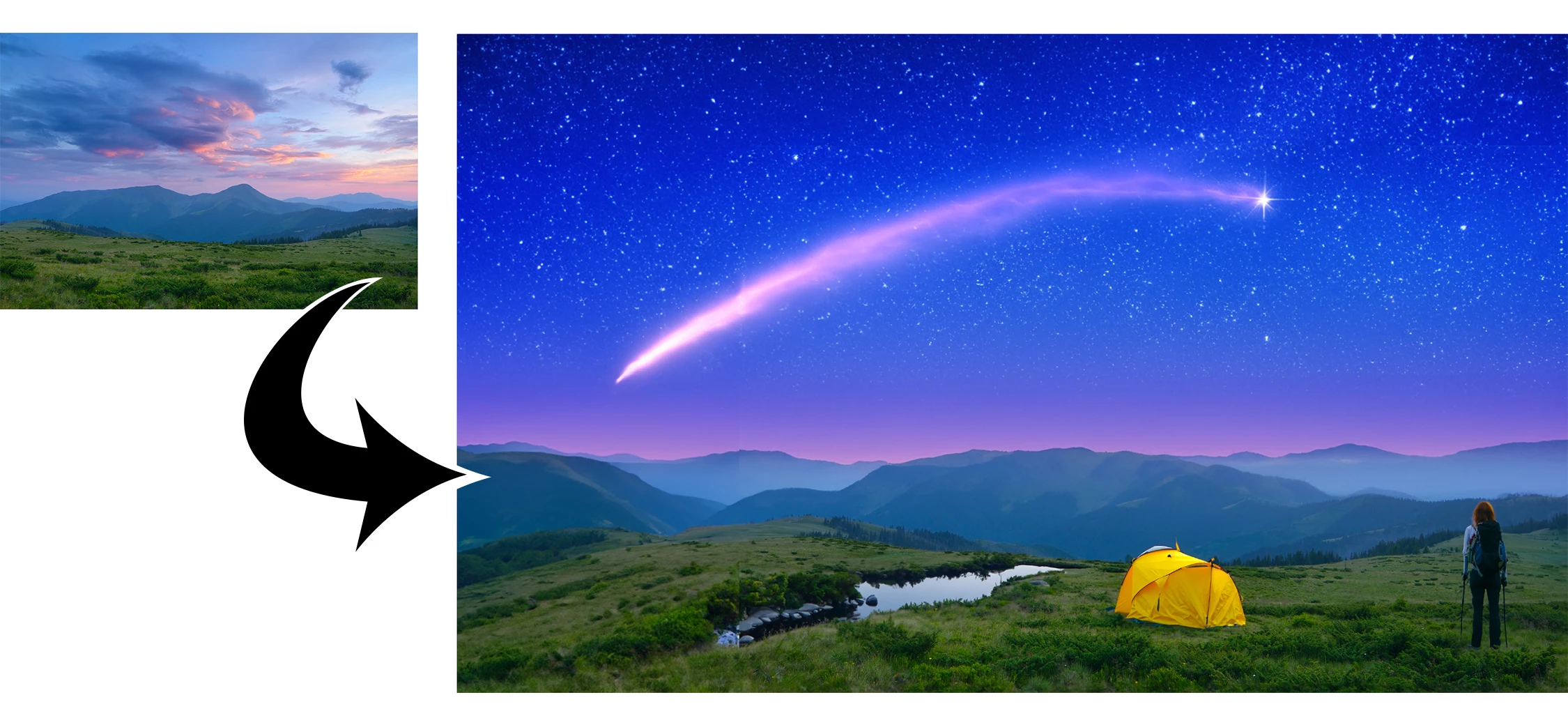
 

This under-construction, revolutionary new AI-powered Generative Fill allows you to create/generate new content in your image or remove objects like never before!

The process is simple: make a selection – any selection, then tell Photoshop exactly what you want placed there. The GenAI models will return an object or scene you described. You can:
 

Generate objects: Select an area in your image, then describe what you’d like to add.

 

Generate backgrounds: Select the background behind your subject, then generate a new scene from a text prompt.

 

Extend images: Expand the canvas of your image, then make a selection of the empty region. Generating without a prompt will create a seamless extension of your scene.

 

Remove: Select the area you want to remove, then let the GenAI technology make it disappear.
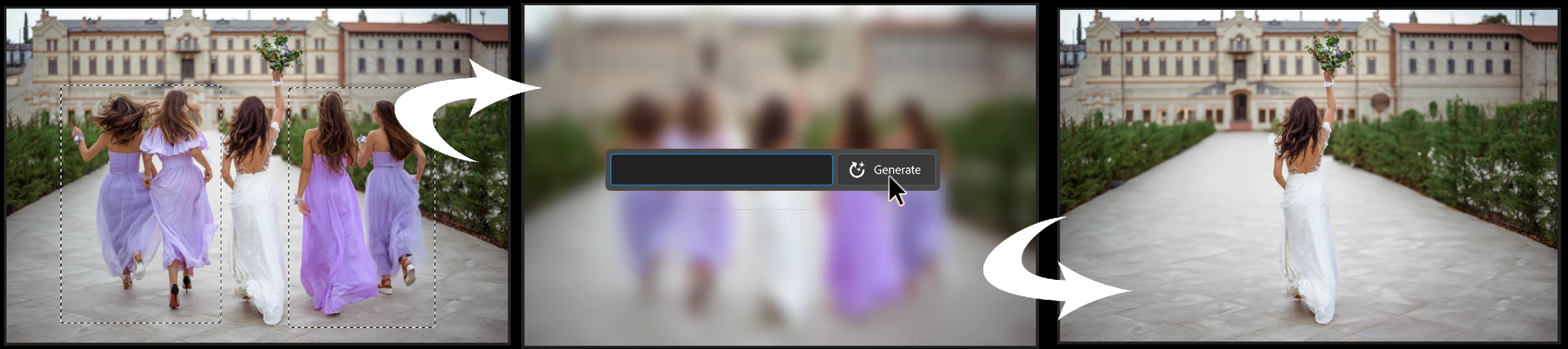
 

And more… Generative fill is incredibly versatile. Discover new ways to use this powerful feature.


How to use Generative Fill

Full instructions and helpful links are here:   https://helpx.adobe.com/photoshop/using/generative-fill.html


Rate the results!
Releasing this amazing new technology as a public beta allows Adobe to hear from you!

Let us know if the Generative Fill feature is meeting your expectations!
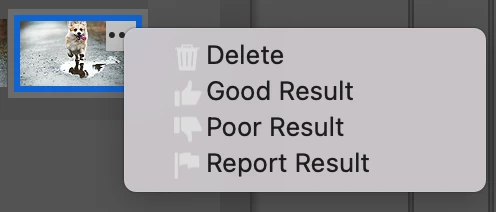
As you use Generative Fill, please rate each variation image.

Simply hover over the [•••] on the thumbnail and give it a thumbs up, or thumbs down, then follow the link to tell us more.


Report Result option
Prompts may also unintentionally generate problematic or offensive images; in such cases you can use the Report Result option to let us know.


Provide Feedback and help shape Generative Fill

If you would like to provide feedback on the overall experience, report any bugs, or suggest new features please let us know in this thread! If you prefer Discord, you can find us there too!


Helpful Tips

  • Use simple language
    Leave out commands like “add” or “remove” - Example: asking to "remove the red boat" will generate more red boats.
    Try using 3-8 words to describe what you want to see.
    Include a subject with descriptive language.. Example: A red barn in a field of flowers.
  • Select part of the original image when extending 
    Make sure you select part of the image along with the empty part of the canvas. This will give a better result that will blend in with the rest of your image.
  • Get inspired and inspire others
    Share what you create with the beta community!
    Check out the 
    Adobe Firefly Gallery to see what others have created with Adobe Firefly and Generative Fill. Click on an image to see the prompt that was used.


Related Links:

          Learn about and install Photoshop (beta) app

          Experience the future of Photoshop with Generative Fill

          Firefly FAQ

          Stock and Firefly FAQ

          Make selections in your composites

          Retouch and repair images


Correct answer Kevin Stohlmeyer

Try entering a basic prompt. We are seeing a high volume of failures for GF without prompts.

106 replies

Participant
July 5, 2023

Generated content fails to match the grain structure of the original image.  Note the distinct diagonal line across the top right quadrant of the image where the leaf was removed.


This is version 24.7 on PC, Windows 11.  It was a lasso and replace.  All the generated results showed this discontinuity.  I've had this issue before.  It simply fails on grainy backgrounds. 

Participant
July 5, 2023

Note - the issue is obvious on my monitor, but appears all but invisible when re-created in this forum. 

Participating Frequently
July 1, 2023

Photoshop Beta 24.7.0, Mac OS Ventura 13.4.1

Prompt: full body photorealistic render of female ballerina in knee length tutu

2 renders are MALE and one is NOT full body.


Graham24508943nobd
Known Participant
July 3, 2023

I've asked many rimes for a woman and often had a male. The results CAN be hilarious when the face is disfigured and you select only the head.  A bearded male in a pretty summer dress is not the kind of thing you want before going to sleep  🤣🤣🤣

Participant
June 30, 2023

i type night sky with milky way a wrong result

Graham24508943nobd
Known Participant
June 30, 2023

when I tried night sky all I got was stupid cartoon style images    grrrrrr

Known Participant
June 29, 2023

When lassoing or selecting an item or person that I want to disappear, generative fill frequently fills the space with another generated person rather than leaving the area empty of any sublect.  Help.

Caity.psd
Community Manager
Community Manager
June 29, 2023

Hi @sandyh21400989 please see this thread related to the topic: https://community.adobe.com/t5/photoshop-beta-discussions/generative-fill-in-photoshop-beta/m-p/13897263#M4835


I find success when I select the entire person (including feet/etc even if overlapped by other subjects or objects). I also refine my selection rather than drawing a rectangle. Hope this helps!

Known Participant
June 29, 2023

Thanks so very much.

Participant
June 28, 2023

Tried simple requests - couple doing tango, kid playing with toy truck, woman selling ice cream, rendering is terrible...

Is it to early to expect better? 

Participant
June 28, 2023

just an fyi- it's funny more than anything- i'm working on something for a fried chicken place. the ai for the generative fill seems to not be able to forget the word chicken. Every time i generate a live chicken image in a document- any additional layers of generative fill always contain chickens- regardless of what you put in the prompt. I've even tried things as simple as "a glass of water" or " a book", just to test it out, and it just keeps generating chickens 🐓  (honestly i kinda love it, like it's an easter egg, but you might want to know)

Jeremy808
Participant
June 27, 2023

Why would Adobe, a company dedicated to support for photographers (and other creators), allow Generative Fill to remove watermarks from photos?  Any photographer posting their work for sale online can now look forward to thievery enabled by Adobe.  Adobe blocks other uses of Generative Fill - why can't they protect creators like photographers? 

Bakhtiar Uddin
Participating Frequently
June 27, 2023

I believe this is the most recent and finest update for imagine image editing.

Participant
June 27, 2023

I tried the generative fill for hand fixing, and it still cannot do it, thanks !


Best regards,

Timmy Lau

Graham24508943nobd
Known Participant
June 27, 2023

Agreed although, I generate several times and just have a period plpace in the prompt box. Often works

Participating Frequently
June 26, 2023

when i use the lasso tool to select a person in the background that i want to remove generative fill  replaces them with another person which is not what i want.it is in sport action images.

Caity.psd
Community Manager
Community Manager
June 26, 2023

Hi @tomf35092362, are you adding a prompt to remove or leaving the prompt field blank? It may be worth trying the word "remove" in the your prompt.


Feel free to post the before and after image here if you want us to take a better look + what your selection looks like.

Participating Frequently
June 26, 2023

thanks

i have tried all different prompts and blank and it still does not work.