




Pete.Green
Community Manager
Community Manager
February 24, 2024
Question

Hover layer bounds is now in Photoshop beta!

  • February 24, 2024
  • 39 replies
  • 20387 views

Hi Photoshop beta friends!


We have just added a new feature for the Move tool called "Hover layer bounds" to the Photoshop beta, and it is available to you now!


What does it do?

This new feature adds the ability to mouse over an object on your canvas and show an outline of that layer. Additionally the corresponding layer will be highlighted in the layers panel. It also has additional function with layers with masks that display both the shown and hidden pixel data.
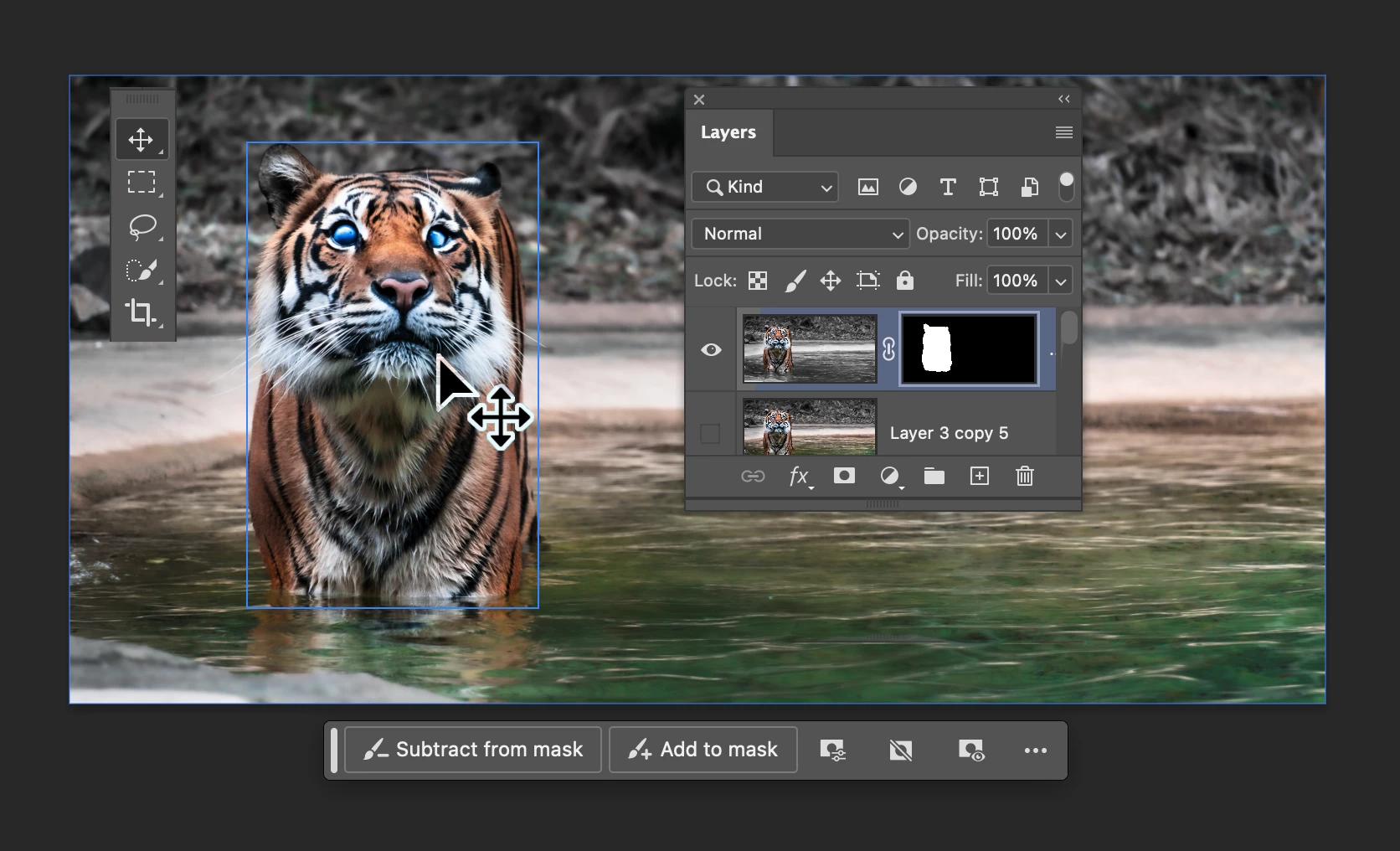
 

Hover layer bounds also works in the reverse direction as you mouse over layers in the Layers panel.


Hover layer bounds is very customizable;

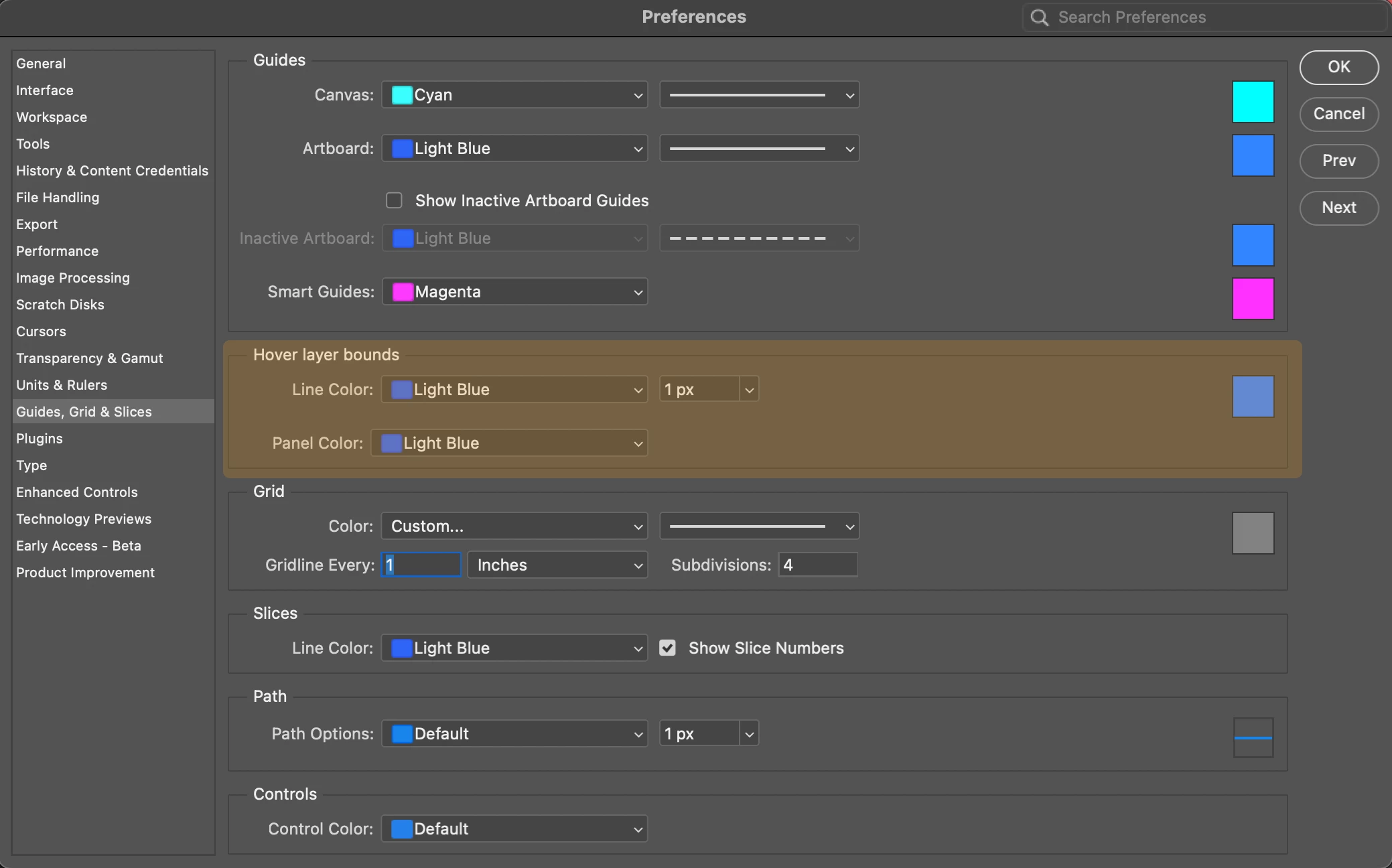
  • You can customize the colorthickness, and the Layers panel highlight color in Preferences > Guides, Grid & Slices
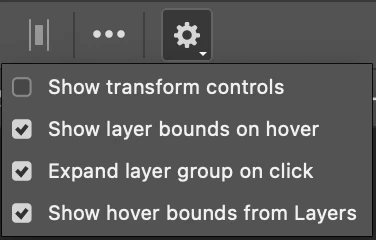
  • and customize the behavior in the new Move tool gear menu in the Options bar.
 

We would love for you to give hover layer bounds a try!

Please let us know what you think and how we could make improvements to this feature.


Thank you!

39 replies

Bonnie Bright
Known Participant
June 27, 2024

I am trying to figure out where to turn off layer bounds on hover.  I was able to turn it off by going to View, and turning of Extras, but every time I save, the layer bounds on hover feature comes back.  Annoying.


daniludvig
Participant
June 27, 2024

Incredibly annoying. Having to google how to turn it off is also annoying. I'm sure it's useful but it should be disabled by default

Inspiring
May 24, 2024

If I disable Extras/Layer edges under the View menu it is immediately re-enabled if I paste anything into Photoshop.  This problem started in Photoshop 25.7, and is still a problem in 25.9.  I'm using Windows 10.  For now it is impossible to turn off layer edges.

Ged_Traynor
Community Expert
Community Expert
May 24, 2024

@Kuttyjoe just tested with Photoshop version 25.9 on my system and cannot replicate the issue, have you tried manually resetting your Photoshop preferences
https://helpx.adobe.com/ie/photoshop/using/preferences.html#Manually
Remember to back up your settings before doing the preference reset
https://helpx.adobe.com/ie/photoshop/using/preset-migration.html

repeatt16112551
Participant
May 16, 2024

Ультра хуйня. У меня очко сгорело в перый раз. 

Participant
May 14, 2024

I do not want this feature and it slows down processing, how do i get rid of it

Known Participant
July 27, 2024

Yea it's a bad feature, right click will always be best. 

Participant
May 14, 2024

how do you turn it off? Please?


Participant
May 11, 2024

I am here because I immediately googled how to disable this annoying distraction

Known Participant
May 7, 2024

So annoying and intrusive please SHUT IT DOWN

Participant
May 3, 2024

Please consider having a new updates popup "Do you want us to change all the settings and add new features for beginners?" Because many Adobe users dont want or need these tools that are awesome for some but a confusing unnecessary nusance for the rest of us

Trevor.Dennis
Community Expert
Community Expert
May 4, 2024
quote

Please consider having a new updates popup "Do you want us to change all the settings and add new features for beginners?" Because many Adobe users dont want or need these tools that are awesome for some but a confusing unnecessary nusance for the rest of us


By @vikkifangz


You just need to stay with whatever version best suits your workflow. 


A few years back, I thought that Photoshop had pretty much stagnated.  The annual major updates had no significant new features.  But in the last year or two — or maybe more since Sensei powered features were introduced — Photoshop has got better in crazy big steps.  The vastly improved selection tools alone make huge improvements to how quickly and accurately we can work.  These new features obviously involve a learning curve, and even changes that are essentially just to the User Interface, need to be learned.


I tend to agree that the UI changes, while welcome in the long run, did not come with the support they should have done.  The functionality moved (and/or duplicated) to the Properties panel caught me out at first, and I didn't see anything telling me to watch this short video etc.  I run with Tool Tips turned as well (but not Rich Tool Tips).

Participant
May 2, 2024

Oh thank god you have the option to turn this off! I booted up the new update and all these boxes were appearing over EVERYTHING and it was slowing the whole program down 😞 Why is this the default when you update? A lot of people are going to experience performance issues due to a feature that, frankly, is way more annoying than useful. If I need guides, I turn them on. If it's not broken, why "fix" it?