




Pete.Green
Community Manager
Community Manager
February 24, 2024
Question

Hover layer bounds is now in Photoshop beta!

  • February 24, 2024
  • 39 replies
  • 20392 views

Hi Photoshop beta friends!


We have just added a new feature for the Move tool called "Hover layer bounds" to the Photoshop beta, and it is available to you now!


What does it do?

This new feature adds the ability to mouse over an object on your canvas and show an outline of that layer. Additionally the corresponding layer will be highlighted in the layers panel. It also has additional function with layers with masks that display both the shown and hidden pixel data.
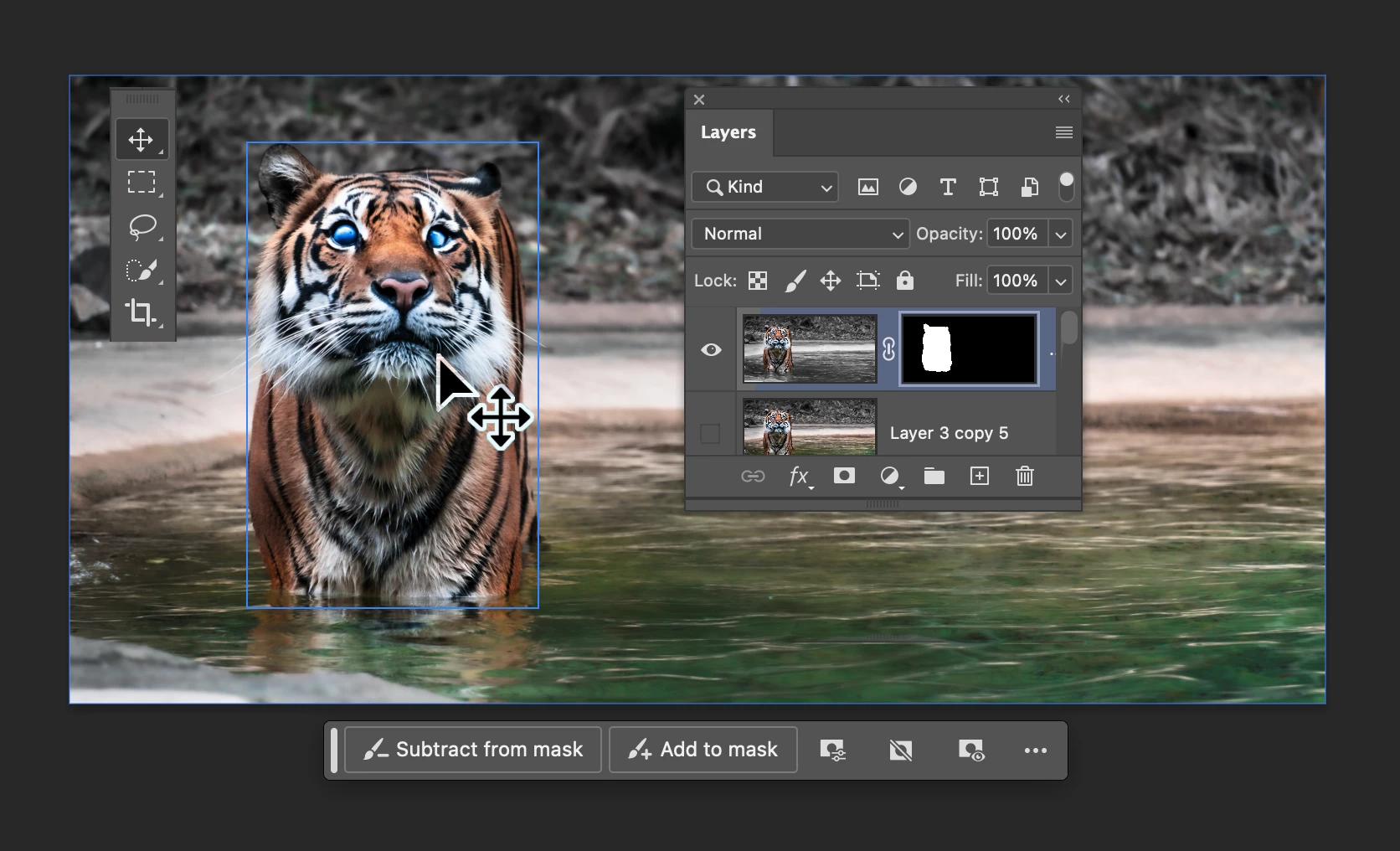
 

Hover layer bounds also works in the reverse direction as you mouse over layers in the Layers panel.


Hover layer bounds is very customizable;

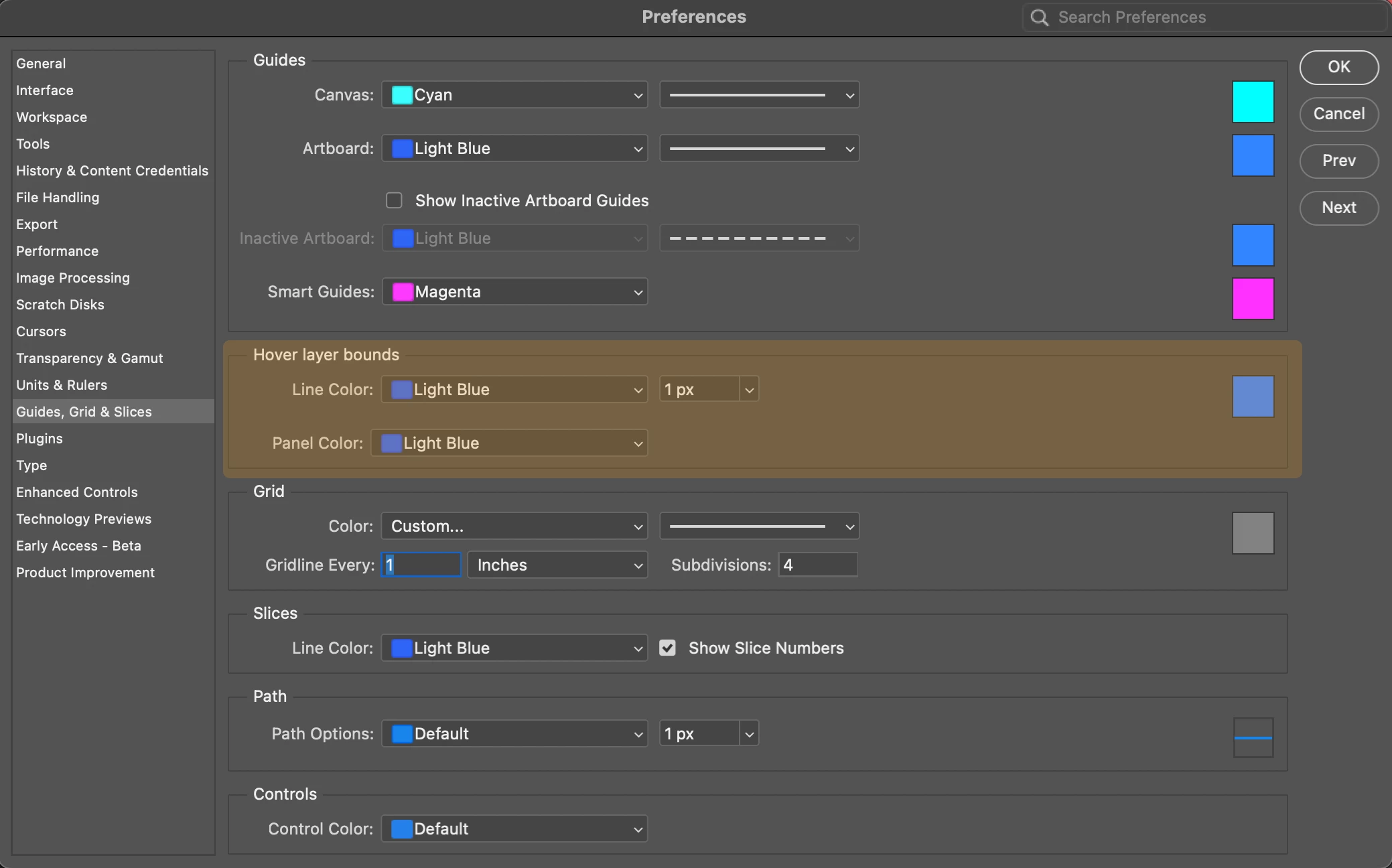
  • You can customize the colorthickness, and the Layers panel highlight color in Preferences > Guides, Grid & Slices
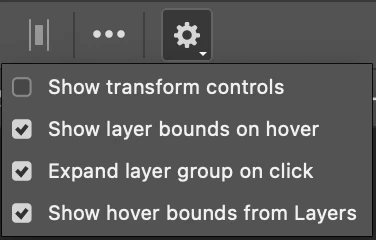
  • and customize the behavior in the new Move tool gear menu in the Options bar.
 

We would love for you to give hover layer bounds a try!

Please let us know what you think and how we could make improvements to this feature.


Thank you!

39 replies

Trevor.Dennis
Community Expert
Community Expert
March 22, 2024

@Pete.Green  I have been using this for a while now, and mostly like it. 


I am finding the border difficult to see at times, depending on background, so it would be good to have some control of the colour.  Perhaps in Preferences > Guides Grid and Slices?


The border does not appear if the layer is covered by another higher up the stack. This is when hovering over an object in the document window.  The blue outline does appear when selecting the layer.   i.e. If the copy merged (green highlight) is turned on, the blue outline does not work on layers lower down the stack.

Note I have temporarily set the UI to light grey to make the dark blue border more visible.


I love that a hovered over object's layer is highlighted in that solid blue, but here again, only if not covered by a layer higher up the stack. Note that the copy merged/overlay layer is turned off in this screen shot.  This is a huge help at times.

Note: I was embarrassed into naming the layers before making thses screen shots.  This only has 51 layers, but the statue with guitar SO is another 60 layers, so I was getting a bit lost and appreciated the new feature.

So I would love to be able to set this to All Layers, and be able to change the bounding box colour.

Trevor.Dennis
Community Expert
Community Expert
March 22, 2024

It occurred to me to try setting that copy merged/overlay layer to 0% opacity and fill, so it is having no affect on the layers below, but it still prevents the hover layer bounds working on layers lower down the stack.

Participant
March 20, 2024

not at all usefull for me, very annoying...  i remove it at once.

athletic_curiosity5C0E
Participant
April 25, 2024

CTRL+H turned it off for me. Incredibly annoying and unwanted.

Participant
March 12, 2024

Since the last update my mouse wherever is hoving highlights all different layers in blue bounding box on the current document and on the layer window it turns blue, its incredibly annoying and horrible designing, I need to turn it off but I cant find where!


marliton
Community Expert
Community Expert
March 12, 2024

Hi. With the Move tool active, Click the gear icon in the options panel and uncheck the second and fourth options like in the image.


Marlon Ceballos
Carola_BHG
Inspiring
April 24, 2024

Thank you, I was going crazy over all this highlighting!

Participant
March 11, 2024

I keep hiding extras with command+H but the outline blue frame keeps showing up around my layers when I open new files and it's so annoying that I can't turn it off permanently. 

CShubert
Community Manager
Community Manager
March 11, 2024

Hi @Simon27331721g8fe have you tried unhecking the Show layer bounds on hover?


Thanks,

Cory - Photoshop Product Manager

Valentino Summo
Participant
March 8, 2024

Hello people,


Im having this issue which is driving me crazy.

I am editing and wherever I move my coursor there's a blue selection following, as you can see in the layers pannel. It also creates blue boxes on the artboard. I have been trying to turn this off because it also makes it hard to work, the selection is weird.


I have been working with Ps for 8 years and I never had this problem before.

if anybody knows I will be very grateful!


didiermazier
Community Expert
Community Expert
March 8, 2024

is it photoshop 25.5.1 ? And Sonoma?

Known Participant
March 8, 2024

While I'm not 100% sure about how to implement this feature in specific cases, the general idea looks very useful to me. I think that some kind of ability to quickly and easily identify which layer/group corresponds to what visual element(s) can really facilitate editing and navigating through documents with many layers.


I've tried it on the beta and I'm looking forward to seeing it in the standard version! Thanks.

Pete.Green
Community Manager
Community Manager
February 26, 2024

@Trevor.Dennis and @marliton many thanks for your initial thoughts, and glad you're enjoying the functionality so far!


Regarding the "selecting the top-most layer when layers have overlapping pixel content at the mouse position", we're working on a solution for that to be able to select the layer content underneath as well, but that didn't quite make it into the first iteration of Hover bounds in beta yet, stay tuned for that it's coming soon!


If other thoughts on ways this could be improved come to mind, let me know! I'm all ears 🙂


Regards,

Pete 

Trevor.Dennis
Community Expert
Community Expert
April 12, 2024

Colin Smith has just uploaded a video on Hover Layer Bounds and tells us the square bracket keys will toggle up and down overlapping layers.  He mentioned a bug that was crashing Photoshop when using this, but m.2581 seems to have fixed it.  Least ways it's working for me on on Windows 11.


He has a tiny spoken typo at 6:00 minutes getting Windows/Mac Cmd/Ctrl back to front, so he may take the video down and upload it again, so just got to Photoshop Cafe if the link below is broken.

Trevor.Dennis
Community Expert
Community Expert
February 25, 2024

That is actually really cool.  I especially like how it highlights the layer in the layers panel.   The old trick of right clicking was OK, but if you had several layers under the cursor position, and you were not super good with naming your layers, you had to guess which was the layer you were after.  It does not highlight the layer if it is already selected, and AFAICT if two or more layers have content at the cursor position, it only highlights the upper one.


I also especially like that it shows the outline of the layer's off-canvas content — I can think of a few forum threads asking for that.  It would be nice if there was a quick and easy way to select the highlighted layer.  Right now, I can only think of moving the mouse to the Layers panel, or reading the highlighted layer's name, and right clicking and selecting it from the fly-out list.   That might sound nit-picking, but my periferal screens are currently both in landscape mode (because I have been using PremPro) so it's a looooong way to the layers panel and back.


Still a very welcome new function Pete, and much appreciated.

Trevor.Dennis
Community Expert
Community Expert
February 25, 2024

OK, I have worked it out.  Hover over and Ctrl/Cmd click same as always, except now you know for sure which layer will be selected.

marliton
Community Expert
Community Expert
February 24, 2024

Simple but useful. Tks!


Marlon Ceballos
Inspiring
April 25, 2024

Not a fan. I immedatley Googled how to disable this feature.

Trevor.Dennis
Community Expert
Community Expert
April 26, 2024
quote

Not a fan. I immediately Googled how to disable this feature.


By @Tom Roylance


Perhaps i t would be better with spring loaded modifier key to enable it, but you can already do that. Disable Hover Layer Bounds, and Ctrl/Cmd will bring up Smart Guides showing outside the document window bounds.  Not with all the functionality of HLB, but you can click to select the upper most layer beneath the cursor.


I like it personally, but I need all the help I can get with layer management. 😞