




Live Gaussian Blur filter is now available in Photoshop Beta (Mac only)
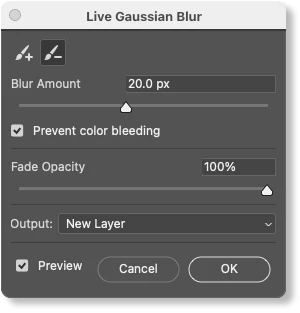
Use the Live Gaussian Blur filter to add improved artistic blur effects to your image. Live Gaussian Blur leverages the power of the GPU and enables "live", painting of - on canvas blur effects that preview real-time, non-destructively without using the Smart Object workflow. Additionally, users will be able to interact with Photoshop outside the dialog with limited functionality, for example, change brush settings, pan, zoom, apply Layers Panel blend modes, opacity, and toggle layer visibility.
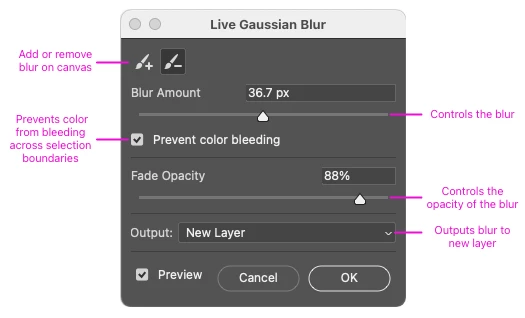
You can add or subtract and fine-tune the blur by brushing directly on the canvas, adjusting the blur amount, and fade opacity, and outputting the results to a new layer.
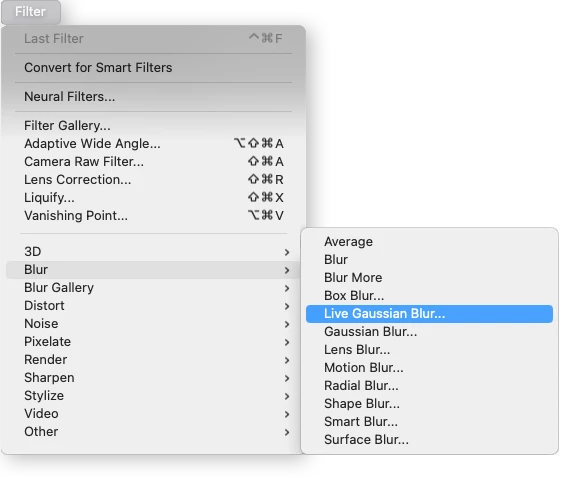
Go to Filter > Blur > Live Gaussian Blur
Please try it out and let us know any feedback you have right here in this thread!
 AdChoices