
Trevor.Dennis
Community Expert
Community Expert
October 10, 2023
Answered

P: Layer Mask Icons in 25.1

  • October 10, 2023
  • 21 replies
  • 25988 views

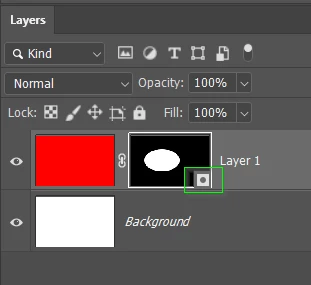
Someone has asked about this in the main Photoshop forum.  I'd not opened 25.1 and can't find any information — like a what's new.  @CShubert can you explain how the new layer mask icons work?  Thanks.
 

Correct answer Kevin Stohlmeyer

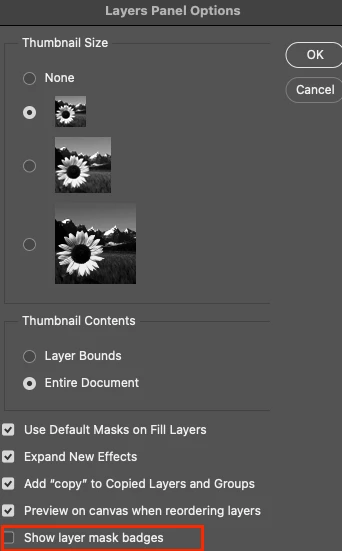
Hi all - happy to announce that this feature has been added as an option in the latest public release 25.2. Update your Photoshop 2024 to access via the Layers Panel Menu.

BONUS - it was off by default after update.
 

21 replies

Kevin Stohlmeyer
Community Expert
Kevin StohlmeyerCommunity ExpertCorrect answer
Community Expert
November 27, 2023

Hi all - happy to announce that this feature has been added as an option in the latest public release 25.2. Update your Photoshop 2024 to access via the Layers Panel Menu.

BONUS - it was off by default after update.


Dominique_R2
Known Participant
November 28, 2023

That is good news, thank you. However, all my Creative Cloud Desktop offers as of today is version 25.1. Do you know when 25.2 will actually be available, as Creative Cloud tells me there is nothing to update for the moment?

Known Participant
November 28, 2023

Same here, 25.1 is the newest version I could (re-)install. Looks like they roll out the update in stages (not for all available at the same time).

Participant
November 22, 2023

Hi everyone! In the new Photoshop update, there's a large icon on every mask, is there any way to remove this? It's so big that I can't tell what the mask is at a glance.


I've attached a screenshot for reference. Thanks!


Known Participant
November 22, 2023

Yes annoying… This Bug is a feature 😉
Hope Adobe removes this or gives us an option to switch off this little ba••ard.

Trevor.Dennis
Community Expert
Community Expert
November 27, 2023

You have to use this option with extreme caution.


Sonkai
Participant
November 21, 2023

Please, remove the new layer mask symbol, or add some option to switch it off, it is a nonsense.

Inspiring
November 13, 2023

Don't you just wish folk would read the comments before jumping in to say there's an option in Beta?

Trevor.Dennis
Community Expert
Community Expert
November 19, 2023
quote

Don't you just wish folk would read the comments before jumping in to say there's an option in Beta?


By @FitzFoto12089247


To be fair, it's a lot to expect people to trawl through a long thread.  Especially when it started a very long time ago.   That's one of the reasons I ask people to start a new thread when they hang their issue on a thread linked to different Photoshop versions.  But the main reason I don't get antsy when people appear to have not read the entire thread, is because I almost never do so myself.  😞

Known Participant
November 20, 2023

Does anyone know if you can switch off this icon in the layer mask icon in PS 2024? It covers half of the icon and you can no longer recognise the content of the layer mask. In PS 2023 it was still correct now it is totally annoying. Nobody needs such bad improvements…

Right PS2023:


Bad: PS 2024

Known Participant
November 10, 2023

It also prevents me from painting on the mask and Youtuber Lenscraft reports that it is screwing up luminosity masks.

Participating Frequently
November 11, 2023

So long as we have the little badge that tells us that layer is a smart object. That was useful, in that it gave one useful info, and didn't obscure anything.  

All they need to do is revert the icon status to 25.0. That was perfect. 

Known Participant
November 21, 2023

Personally, I wouldn't mind relocating the smart object icon as well. I don't know why the solution has to be to put the icon ON the thumbnail. It could be to the side, below, beneath, or very small and next to the thumbnail. It could even be some kind of treatment to the edges. The purpose of a thumbnail is to preview. And for any of us that work on mobile devices and the imagery that goes on them, these icons or "badges" obscure a tremendous portion of the thumbnail in portrait aspect ratios. My workflow requires that I can quickly assess a layer before I go digging into it.

Participating Frequently
November 8, 2023

I thought something was wrong when I saw this.  I updated to 25.1 just prior to teaching a class.  It confused me while I was trying to explain masking to my class!!!  Please don't make changes to the interface like this that surprises longtime users!

Inspiring
November 6, 2023

Who on earth at Adobe thought this was a good idea? Was there any consultation with acutal users? I just updated today, found this darn ridiculous box that obscured my mask, went on the hunt for a solution, and found this thread.


So now I have to use the largest thumbnail, that takes up more valuable space to actually see the mask......


Unfreaking believable.... 


Please give us the option to turn this stupid, obstructive, icon off!

Known Participant
November 5, 2023

@Adobe: These badges are completely useless and are only getting in the way.
The difference between Vector-masks and Pixel-layer-masks was obvious already.

PLEASE REMOVE THE BADGES ASAP, thank you.

(And please stop ruining a good workable interface over and over again.)

Participant
November 6, 2023

@Adobe And pelase don;t make people have to install a Beta version of your software to be able to disable the feature(if you can even call it that) . I'm on the non beta version 25.1 and there is no option to disable. 

Participant
November 6, 2023

Which "smart developer" (who actually uses photoshop) put this "very useful" icon in the layer mask, obscuring important parts of the layer mask WITHOUT ANY OPTION TO TURN IT OFF.  On version 25.1.0 and the layer mask option to remove this is not there.  Simply stellar.  Great job. 

Leave these "fine faeatures" in beta until the "feature" is worked out.  

Known Participant
November 4, 2023

PS Beta 25.2 on Apple M1 Pro running Sonoma:

The "Show layer mask badges" in the layer panel option resets to ON once Photoshop is closed and relaunched. (and I really need it to stay off )


Trevor.Dennis
Community Expert
Community Expert
November 4, 2023

This is a known issue.  I am sure it will be fixed in a future update.

Participant
November 2, 2023

Yep...terrible idea by PS wizards. I think everyone wants the normal looking mask icon so they can get a rough idea what the mask looks like. Disable permanently!
