


MeredithStotzner
Community Manager
Community Manager
May 23, 2023
Pregunta

Show Off Your Generative Fill Creations from Photoshop beta

  • May 23, 2023
  • 55 respuestas
  • 32235 visualizaciones

 The team cannot wait to see what you've created with this thrilling, new, beta technology!
This is the FUN sharing post.
We've been having such a blast exprimenting and playing for the past few months, it's so exciting to have you join in the joy!


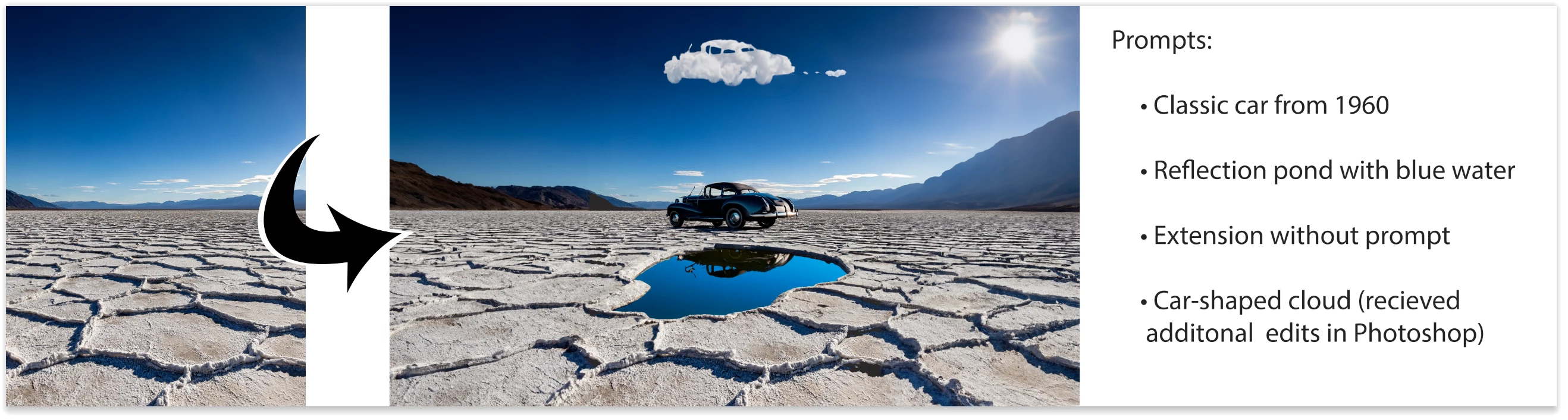
Show off those creations! Bonus if you also upload the orignal image and the prompts.
Ready! Set! GO!
Thank you for trying out Photoshop (beta).


P.S. Provide Feedback and help shape Generative Fill: If you would like to provide feedback on the overall experience, report any bugs, or suggest new features please let us know in the beta community announcement.

If you prefer Discord, you can find us there too!


Este tema ha sido cerrado para respuestas.

55 respuestas

pavel_vis
Participant
June 26, 2023

Just have fun with that new generative fill tool! It's fantastic and exciting to see what will be next in the final version. So, I've created this from scratch, first was a sky with dry grass, after the barn house, etc, 

Graham24508943nobd
Known Participant
June 21, 2023

This is an image I created this afternoon. I changed her dress, mouth, eyes and nose. The background was plain black so I changed it to suit


 A face that could grace the front cover of any magazine on the planet. 🥰

Inspiring
June 18, 2023

So how do you scaled the generated objects?  Deer is too small and racoon is too big...


Pete.Green
Community Manager
Community Manager
June 20, 2023

You could experiment with the size and shape of your selection. Also you could use Free Transform on the generated layer then hit Generate again.

Participating Frequently
June 11, 2023

Participant
June 28, 2023

What prompts did you use?

Dukal
Participating Frequently
June 10, 2023

I'm really enjoying the possibilities of 'Generative Fill' within Photoshop, it's undoubtedly an amazing tool for photo retouching but it also opens new avenues for creativity.
I'm attaching one of the first experiments of many that Im doing.
Starting from a portrait generated in Adobe Firefly then I use Generative Fill to expand, modify and even add effects (as overlays) and end up in this 360º Panorama (in FaceBook format).
Partial conclusions:
1. It works perfectly, even with a PC machine already a bit old.
2. The ban of some words are a small annoyance, hopefully it will be cleared up soon (it feels like censorship).
3. Adobe's AI Model(s) works wonderfully in terms of photography, speaking of artistic styles its still very poor from my point of view (and the experience with other AI Models), I guess there's plenty of material to train a model without getting into copyright conflicts (Adobe could even hire artists to train models ad hoc, not everyone hates AI).
The day Adobe enables 'Generative Fill' in the standard PS version ¡we will have a Big Bang!
Cheers!


The starting image:


and the finished 'collage' 360º panorama


thomas_bredenfeld
Community Expert
Community Expert
June 10, 2023

Learning more about using generative fill and how it's behaving
after the panorama i've saved from trash can with filling the hole of 2 missing images with the new generative fill (i posted it here a few days before), i tried another one.

this time it's a sloppy made handheld cylindrical pano taken with a sony a7R (36 MP) and a 50 mm lens. the unstable weather and a lot of miles left to hike made me hurry and so it's a pretty incomplete panorama with large missing parts in the cloudscape and in the foreground (we'll do this later in post ... 😄 ).

as the total size of the pano is about 66k x 11k pixels the resolution limit of 1024 x 1024 pixel for the generative patches made it a bit tedious to fill in all missing parts one after another. but this step-by-step-process also allows for some control over the process as you have always 3 suggestions presented to you by the generative fill engine. another control you have is the edge where you begin to add new generated content.
some points i found out during this test:

  • it's always better to have 2 (or even better 3) sides of existing content for a new 1024 x 1024 square.
  • if you've larger holes of missing edge areas start from several points/sides
  • make always sure your selection includes 10 to 50 pixel wide egdes of existing content.
  • also, make sure you're adding up content towards transparent areas. a black or white background isn't working.
  • the offered generative content doesn't have always the same image quality. sometimes i noticed less sharp suggestions. so it's recommended choose from best match and best quality.
  • for (very) large images it may be an advantage to work with a higher resolution and scale down the result.
  • in cloudscapes the generative content obviously tends to shift the hues of the blue sky in an unwanted direction. some color correction on such parts may apply.
  • in cloudscapes you can exceed the fill area limit if the structure is soft by nature.
  • the same applies in soft, out-of-focus areas in the foreground

again i was absolutely amazed about the AI generated content suggestions made based my the existing photographic content.

the result (scaled down from 66k to 48k width) can be viewed here: https://panobu.ch/drusentor

fun fact: the panorama is taken exactly on the border between austria and switzerland. can you spot the #1 border marking made in 1937? 🙂

jorihlen
Participant
June 6, 2023

Creating fantastic beings with Firefly & Photoshop.
I extended the result obtained with Firefly horizontally and added an ivy on the tree.

thomas_bredenfeld
Community Expert
Community Expert
June 6, 2023

as a professional 360° photographer i often need to retouch panoramic images after the stitching is finished. usually, this is limited to removing the tripod and its shadow in full spheric panoramas, and sometimes some moving people.
recently i did a (beginner's) mistake i was very sorry about: during a panorama shooting i needed to swap my memory card and after this i resumed my capture at the wrong image in my series (instead of better starting over).
later in the office, the disappointment was huge as this was a place i won't come back to very soon: 2 images out of 16 were missing 😞
as the images for the panorama were taken with a wide-angle lens the hole in the panorama was pretty large and it went to the collection with failed stuff.


when i heard about the generative fill, i tested it and then remembered this panorama. after fiddling around with the best way to fill this huge missing area in the panorama i ended up in using a 1024x1024 pixel square selection to iteratively fill the hole with 13 generative patches.

hopefully, this feature will be able to handle larger resolutions in the future!
so the new generative fill literally saved this beautiful panorama from the trash can.

after this very pleasant experience i tested the generative fill with a routine task: eliminating the tripod and its shadow. i choose just the same panorama for this.

after 10 generative fill layers, i was simply amazed about the visual quality this method provides compared to the healing brush or using the clone stamp tool. no annoying repetitive cloning patterns anymore, vivid, believable structures and lighting!

besides all creative applications, the generative fill feature is a huge time saver and enhances the quality of professional 360° retouching significantly.
feel free to see this panorama interactively in full 16000 x 8000 pixel resolution here: https://panobu.ch/aipatchedpano

ProDesignTools
Community Expert
Community Expert
June 6, 2023

Fantastic, Thomas – thanks so much for sharing! What a terrific job it did... You would never know there used to be a hole. Really beautiful pano!


Curious, where is that exactly?

thomas_bredenfeld
Community Expert
Community Expert
June 6, 2023

thank you!
indeed i'm thankful for this feature that has saved this pano for me as it's such a lovely and so impressive place. and there was such great weather and an awesome atmosphere on this day.
it's here: https://goo.gl/maps/Vv4rKJyScN6HK7S37 - going up there is a great trip. strongly recommended 🙂

Participant
June 5, 2023

Arber Elezi Photography
Participant
June 3, 2023

Arber Elezi Photography