


MeredithStotzner
Community Manager
Community Manager
May 23, 2023
Question

Show Off Your Generative Fill Creations from Photoshop beta

  • May 23, 2023
  • 55 replies
  • 32235 views

 The team cannot wait to see what you've created with this thrilling, new, beta technology!
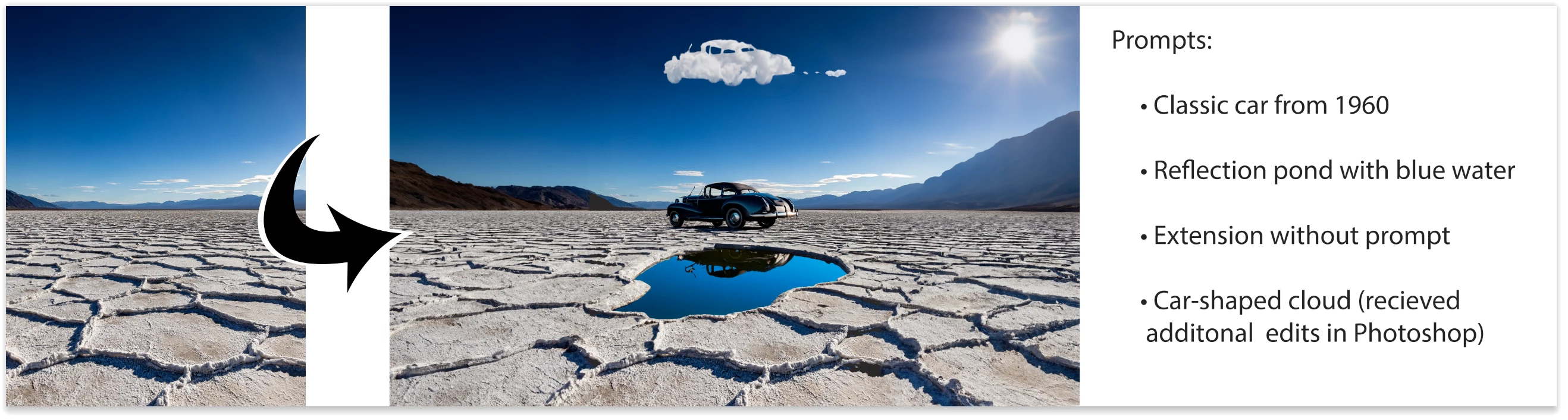
This is the FUN sharing post.
We've been having such a blast exprimenting and playing for the past few months, it's so exciting to have you join in the joy!


Show off those creations! Bonus if you also upload the orignal image and the prompts.
Ready! Set! GO!
Thank you for trying out Photoshop (beta).


P.S. Provide Feedback and help shape Generative Fill: If you would like to provide feedback on the overall experience, report any bugs, or suggest new features please let us know in the beta community announcement.

If you prefer Discord, you can find us there too!


This topic has been closed for replies.

55 replies

Participant
June 3, 2023

I don't understand why in my version in the bar I don't get the possibility to use the Generative Fill.
Can someone help me ?

Glenn 8675309
Legend
June 5, 2023

I had to unistall the  Beta version then redownload and install it.   When I did that, during reinstallation I had a little pop up window for a bit about installing Genrative fill components. 

Once you get it reinstalled:

make a selection / draw a box selection , right mouse inside that selection-

The beta for right right now won't boot up other wise I would post a screenshot.

Glenn 8675309
Legend
June 2, 2023

Sometimes I think I'm being really creative.... this might be one of those times.   No, I'm not sure about the text- but I'm hungry and thinking "Man a  couple of eggs would go down good right now...."

Often times I will enter "black leather jacket" and it produces a different black leather jacket each time.

This time I entered stuff like "black rockabilly jacket" or "black sweater" to get what you see here. 


Participating Frequently
June 3, 2023

My son looked so cute and pensive in this picture from 2005, but the background was busy and annoying. I cycled through a few options and got this result using "sand and lake with out of focus trees in the background at sunset."


Of course, now I'm noticing a weird thing behind his right elbow, but hey.

Anže Barle
Participant
June 1, 2023

I did a quick try, how well will Generated Fill change the colour of model's top from pink into black  -good work.

Glenn 8675309
Legend
May 31, 2023

Participating Frequently
May 31, 2023

I was just typing random song titles, some of which resulted in images that went against guidelines like Michale Jackson's "Smooth Criminal" but Sade's "Your love is king" resulted in something rather nightmarish...

Trevor.Dennis
Community Expert
Community Expert
June 4, 2023

Oh My Ged!  If anyone questions that Ai is crap with hands and faces, show them this image. Yep, that'll give you nightmares all right.

Participating Frequently
May 30, 2023

Before:

After:

thomas_bredenfeld
Community Expert
Community Expert
June 10, 2023

as i'm (currently) way more interested in image replacement and supplement usages of photoshops AI generative fill tool than to any (let's say) »creative« applications ;-), i find this a great example! thumbs up!

Community Expert
May 30, 2023

Here's a first pass at doing an infinite pull out.


Pete.Green
Community Manager
Community Manager
June 1, 2023

Awesome!

Glenn 8675309
Legend
May 29, 2023

My prompt was simply "Black leather Jacket."

Participating Frequently
May 29, 2023

Before:

After:

Community Expert
May 30, 2023

They're here!

Participating Frequently
May 29, 2023

Fun!