
Participant
May 2, 2024 11:33 AM UTC
Answered

Text bullet Photoshop beta

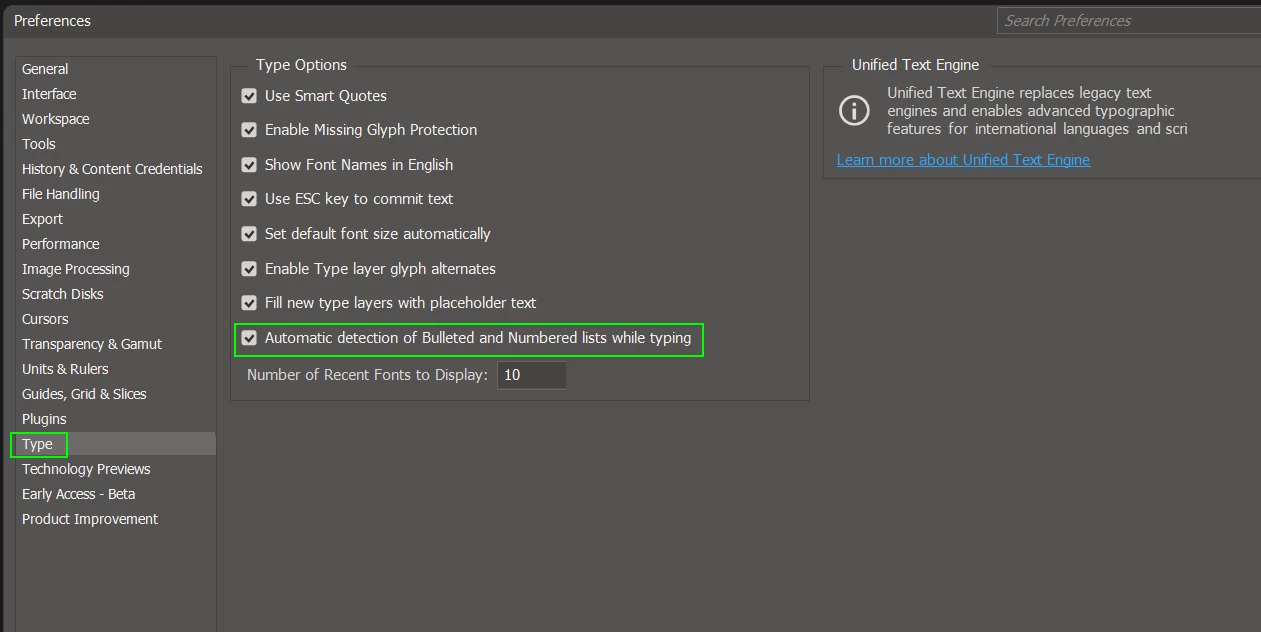
Does anyone know if there's a way to disable automatic bullet points on Photoshop? I've been using the new beta version and when a create a text layer he creates a bullet text automatically and i can't edit the bullet point.

This topic is closed to new replies. Start a new post to keep the conversation going.
Trevor.Dennis
Trevor.DennisCorrect answer
Community Expert
Jul 3, 2024 9:39 AM UTC

Hi Arthur.    You can turn that feature off in Preferences > Type.


9 replies

Trevor.Dennis
Community Expert
Trevor.DennisCommunity ExpertCorrect answer
Community Expert
Jul 3, 2024 9:39 AM UTC

Hi Arthur.    You can turn that feature off in Preferences > Type.


Translate
Participating Frequently
Jul 3, 2024 10:19 AM UTC

There is no such selection line in my Photoshop Preferences.

Translate
c.pfaffenbichler
Community Expert
Community Expert
Jul 3, 2024 10:44 AM UTC

What is your exact Photoshop version? 

Please read this (in particular the section titled "Supply pertinent information for more timely and effective answers”):
https://community.adobe.com/t5/using-the-community/community-how-to-guide-tips-amp-best-practices/td-p/11601738?page=1

Translate
Participating Frequently
Jul 3, 2024 9:22 AM UTC

If you have an unwanted bullet on the first line of the text you can't remove that bullet or number of numbered list. I have tried without luck. But you can start a new text block. Don't copy line where unwanted thing is. Rewrite that manually. This is a very akward and could easily be corrected by Adobe with selection "kill bullets/numbering" in current text block.

Translate
c.pfaffenbichler
Community Expert
Community Expert
May 6, 2024 10:41 AM UTC

Could you please post screenshots taken at View > 100% with the pertinent Panels (Toolbar, Layers, Character, Paragraph, Options Bar, …) visible? 

Does this also happen if you create a new Type Layer and start typing? 

Translate