

Ivny Coura
Inspiring
September 7, 2023
Answered

Unable to Update Photoshop Beta Error 190

  • September 7, 2023
  • 13 replies
  • 10121 views

Hi!


Today I got a message asking me to update Photoshop Beta to the latest version (25.1). Anyway, I kept getting this error:

Exit Code: 190
-------------------------------------- Summary --------------------------------------
 - 2 fatal error(s), 0 error(s), 0 warnings(s) 

FATAL: Sanity check for installation failed. Current OS version 10.0.19044 doesn't satisfy OS requirements.
FATAL: Error occurred in install product workflow with error code 190 error message 
-------------------------------------------------------------------------------------


But, from what I checked, my device meets the minimum system requirements for installing the application, as you can see:

  • Windows 10 PRO 21H2 version
  • Intel(R) i5-9400F CPU 2.90GHz
  • 32GB RAM
  • Monitor resolution 2560 x 1440
  • GPU AMD ASUS Radeon RX 6600
  • Hard disk space: 510 GB of available hard-disk space


Any idea to fix it? TIA.
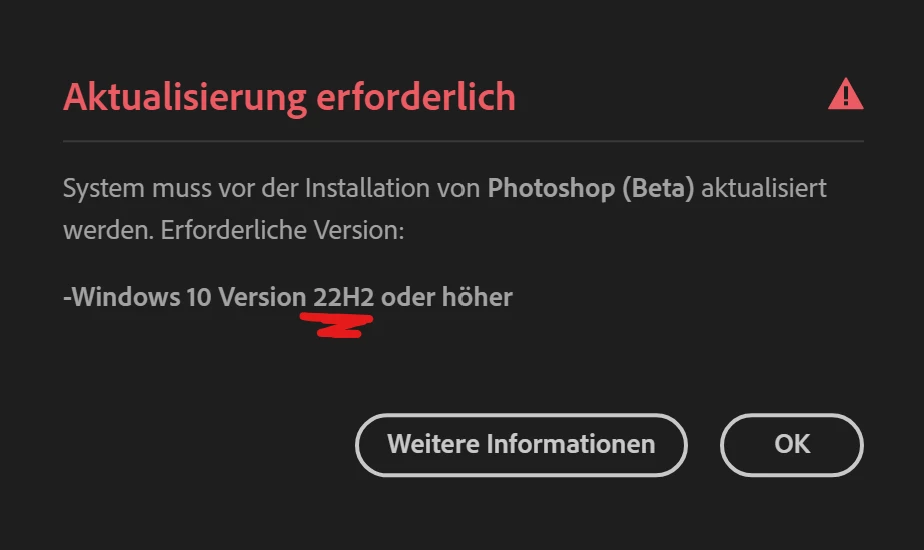
Correct answer

Found the Problem... deinstalled it completely and  then another report popped up. 

13 replies

Participant
April 26, 2025

Quindi dopo acquisto licenza, dovrei cambiare anche computer secondo Adobe...per colpa dell'errore (190)

Poveretti!

Known Participant
September 13, 2023

Same problem with this update.

Please do something.

I'm working in an administration and we can't change anything in our computer's system

LAZAROS LOUSAS
Participant
September 13, 2023

Unable to Update Photoshop Beta Error 190

Participant
September 11, 2023

Hola! me sale error al intentar instalar la actualización V25.1 del photoshop Beta, me sale el error 190. 

Alguien sabe como solucionarlo?

Ivny Coura
Inspiring
September 11, 2023

Mira cual es su versión del Windows, para instalar la actualización 25.1 es necesario tener la version 22H2 de Windows.

Known Participant
September 10, 2023

Hi Everyone,

I've been trying to update my Beta PS to 25.1 and I keep getting this error 190 "System requirements not meet.  See the minimum system requirements for more details).  I've been running BETA PS for quite some time w/o too many issues.  My system hardware is definitely more than what is required based on docs.

MY SPECS: 

OS - Running Windows 10

CPU - AMD Ryzen 9 3900X 12 Core

Graphics:  NVIDIA GeForce RTX 3090

Monitor:  Dual LG 27" UHD IPS displays

RAM - 64GB

NIC - 10GB

M.2 1TB storage w/500GB+ free


Any insight would be greatly appreacited.


Randy Brogen, M.Photog.M.Artists.Cr., CPP
Participating Frequently
September 11, 2023

I get the samme error 😔.

Where did you find the system requirements for Photoshop Beta? I can only find those for the regular Photoshop.

Participant
September 9, 2023

Please.


Need Help to update version Beta Photoshop

AxelMatt
Community Expert
Community Expert
September 9, 2023

Please see here: Fix download, install, or update errors for your Adobe apps

It seems that your system doesn't match the system requirements.


My System: Intel i7-8700K - 64GB RAM - NVidia Geforce RTX 3060 - Windows 11 Pro 25H2 -- LR-Classic 15 - Photoshop 27 - Nik Collection 8 - PureRAW 5 - Topaz Photo
Participating Frequently
September 11, 2023

where are the system requirements for photoshop beta?

Participating Frequently
September 9, 2023

Photoshop beta v25.1 update failed (Error 190)

Exit Code: 190
-------------------------------------- Summary --------------------------------------
 - 2 fatal error(s), 0 error(s), 9 warnings(s) 

FATAL: Sanity check for installation failed. Current OS version 10.0.19044 doesn't satisfy OS requirements.
FATAL: Error occurred in install product workflow with error code 190 error message 
WARN: GetIEProxyInfo - Failed to get proxy for the url, error:12180
-------------------------------------------------------------------------------------

Edition Windows 10 Pro
Version 21H2
OS build 19044.3086
Experience Windows Feature Experience Pack 1000.19041.1000.0

----------

Processor AMD Ryzen 9 3900X 12-Core Processor 3.80 GHz
Installed RAM 128 GB
System type 64-bit operating system, x64-based processor


Exid all Photoshop minimum requirements that are posted by Adobe.
Any idea why?

Participant
September 11, 2023

You have v 21H2 and you need Windows 22H2 

Ivny Coura
Inspiring
September 8, 2023

Actually I just came to say the same. It needs to be under 22H2. It should be clear on the system requirements page. Anyway, I'm happy we both got the solution. 😄

Correct answer
September 8, 2023

Found the Problem... deinstalled it completely and  then another report popped up. 

September 8, 2023

i´ve got the same problem... 


 AMD Ryzen 9 3900XT 12-Core Processor 3.79 GHz
 RAM 32,0 GB

NVIDIA GeForce RTX 2080 Ti

Windows 10 Pro Version 21H2

Monitor resolution 3840 x 2160

Hard disk space: 500GB SSD 1 TB HDD


Windows 10 Pro is our only main thing in common, maybe this causes the problem since the error code says something's wrong with the OS?