
Participant
July 14, 2023
Question

Update notification stuck on screen
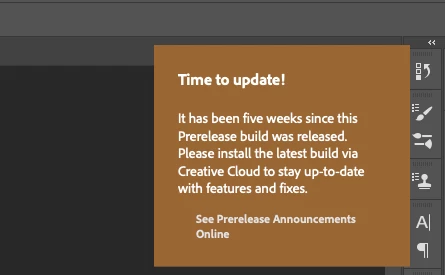
  • July 14, 2023
  • 2 replies
  • 276 views

This will not go away - cannot update Beta as its running the most upto date version 24.6

Macbook Pro - Ventura 13.4.1

Open the app and it loads auto, will not move and is in the eay of some function, minimise the screen says on main screen, have to quit app for it to disappear


This topic has been closed for replies.

2 replies

CShubert
Community Manager
Community Manager
July 14, 2023

Hi @DKirky please update to the latest Ps beta - Adobe Photoshop Version: 24.7.0 20230712.m.2239 0f0768a x64


We see you have an enterprise account, so you may need to ask your IT Admin to allow this:


https://community.adobe.com/t5/enterprise-teams-discussions/photoshop-beta-not-available-in-creative-cloud-desktop-application/td-p/13834355


Kevin Stohlmeyer
Community Expert
Community Expert
July 14, 2023

Hi @DKirky 24.6 is not the most updated version. Try uninstalling 24.6 then going to the Creative Cloud desktop app and holding Opt+Cmd+R to relaunch the CC desktop app. Check your beta tab for 24.7 after the relaunch.