



Question
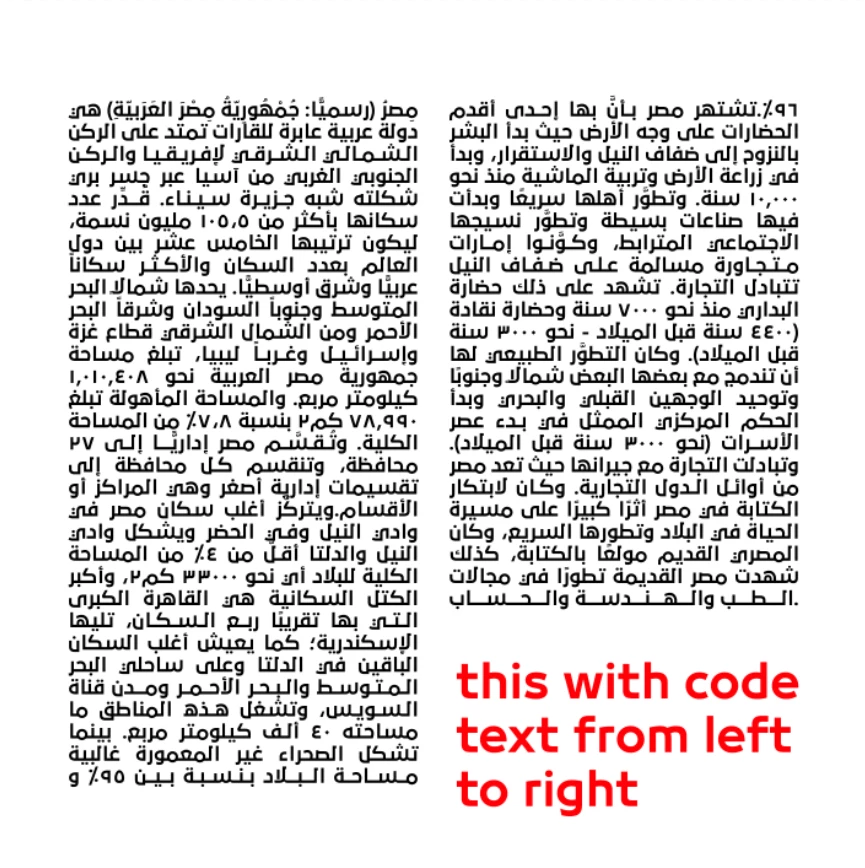
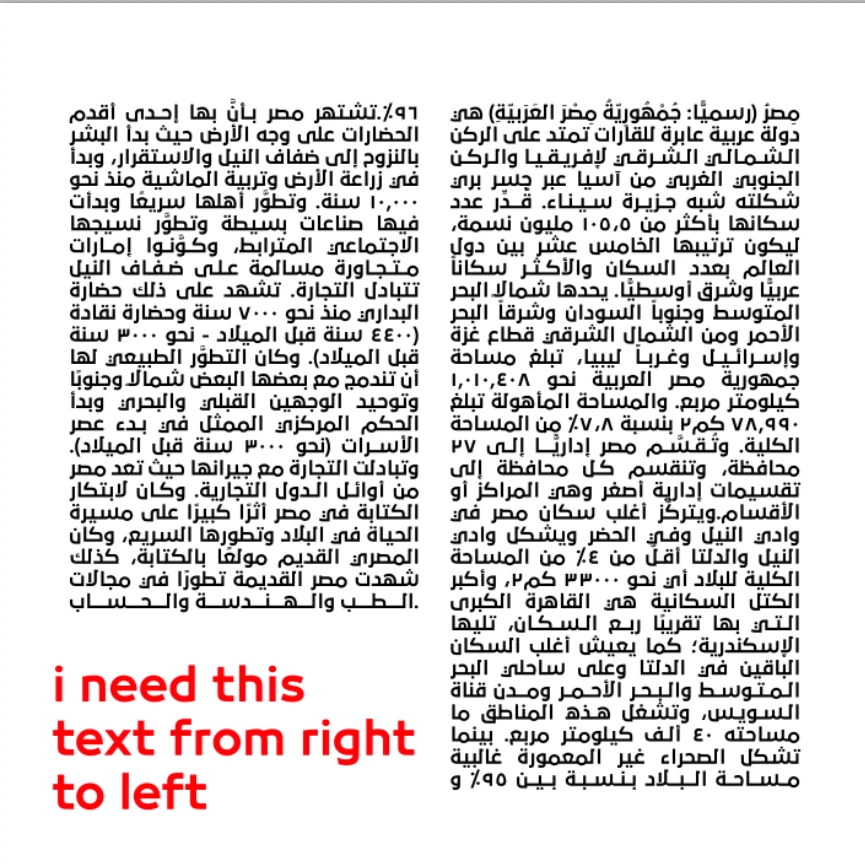
how can modify this code to distribute the text within the columns in reverse
Dear forum people
And people with great programming experience
I am working on creating a magazine in Photoshop, which consists of distributing the texts on the page evenly and with good layout
I know that InDesign is excellent at such things, but I am not good at working on it
I found this code to divide the text into columns very well, but it is excellent at distributing the text from left to right
But the project I am working on requires me to do the opposite, which is to create and distribute texts from right to left. I have tried a lot to modify this code to help me, but I have failed.
Now I have come to you so that you can help me, please, please
this code :
//------------------------------------------------------------------------------
// File: "[M] Text columns 1.1.jsx"
// Version: 1.1
// Release Date: 21. 4. 2018
// Copyright: © 2018 Jaroslav Bereza <http://bereza.cz>
// Licence: GPL <http://www.gnu.org/licenses/gpl.html>
//------------------------------------------------------------------------------
// This program is free software: you can redistribute it and/or modify
// it under the terms of the GNU General Public License as published by
// the Free Software Foundation, either version 3 of the License, or
// (at your option) any later version.
//
// This program is distributed in the hope that it will be useful,
// but WITHOUT ANY WARRANTY; without even the implied warranty of
// MERCHANTABILITY or FITNESS FOR A PARTICULAR PURPOSE.  See the
// GNU General Public License for more details.
//
// You should have received a copy of the GNU General Public License
// along with this program.  If not, see <http://www.gnu.org/licenses/>.
//------------------------------------------------------------------------------

/*
    <javascriptresource>
    <name>[M] Text columns 1.1</name>
    <enableinfo>true</enableinfo>
    <category>Magic</category>
    </javascriptresource>

    VERSION HISTORY:
    ================
    1.1:
    - Fixes CS6 workaround
    1.0:
    - Initial release.

    ALGORITHM
    =========
    - read text descriptor
    - modify text descriptor - column function is already built-in but has no UI so I just set value
    - apply text descriptor
    - that's all


    TODO:
    -

    KNOWN ISSUES:
    - in PS CS6 and CC(without year) - if none layer is selected then it takes top layer in layers panel
*/

#target Photoshop
app.bringToFront();

cTID = function(s) { return cTID[s] || (cTID[s] = app.charIDToTypeID(s)); };
sTID = function(s) { return app.stringIDToTypeID(s); };
idTS = function(id) { return app.typeIDToStringID (id);};


const psVersion=app.version.split('.')[0];
var startDisplayDialogs = app.displayDialogs;
app.displayDialogs = DialogModes.NO;


initialize();
function initialize(){

    if(app.documents.length==0){
        alert("Please open some document and select paragraph text layers (not point text layers)");
        return;
    }

    var selected = getSelectedLayers ();
    selected = filterEditableTextLayers (selected);

    if(selected.length===0){
        alert("Please select non-empty paragraph text layer(s) (not point text layers)");
        return;
    }

    app.activeDocument.suspendHistory("[M] Text columns","main(selected);");
    app.displayDialogs = startDisplayDialogs;
}


function main(selected){
    var originalTypeUnits = app.preferences.typeUnits; // remember current setting
    app.preferences.typeUnits = TypeUnits.PIXELS;

    var win,
        windowResource;

    windowResource = """dialog {
        orientation: 'column',
        alignChildren: ['fill', 'top'],
        text: '[M] Text columns 1.0',
        margins:15,
        alignChildren: ['fill', 'fill'],

        grpColumns: Panel {
            margins:10,
            orientation:'row',
            lblColumns: StaticText{
                text: 'Columns:',
                characters: 6
            },
            txtColumns: EditText{

            },
            lblDummy: StaticText{
                text: '   '

            },
            lblGutter: StaticText{
                text: 'Gutter:'

            },
            txtGutter: EditText{
                characters: 6
            },
            lblGutterPx: StaticText{
                margins: 0,
                text: 'px'
            },
        },
        bottomGroup: Group{
            statsLabel: StaticText{alignment:['right', 'bottom']},

            cancelButton: Button { text: 'Cancel', properties:{name:'cancel'}},
            applyButton: Button { text: 'Change columns', properties:{name:'ok'}},
        }
    }"""
    win = new Window(windowResource);
    win.bottomGroup.applyButton.onClick = function() {
        var columns = win.grpColumns.txtColumns.text;
        var gutter = win.grpColumns.txtGutter.text.replace(",",".");

        // zero columns can cause Photoshop crash
        if(isNormalInteger(columns) && isNumeric (gutter)){
            for(var i=0, len = selected.length; i < len;  i++){
                var textDescriptor = getTextKey (selected[i]);
                var properties = {
                    columnCount:columns,
                    columnGutter:gutter
                }

                // changing text descriptor properties
                textDescriptor = setColumnsToDescriptor(textDescriptor,properties);

                // apply modified descriptor
                applyTextKey (textDescriptor, selected[i]);
            }
            win.close();
        }else{
            alert("Columns must be positive whole number.\nGutter must be decimal number");
        }

    }
    win.onShow = function(){
        var inputData = getValuesForDialog(selected);
        win.grpColumns.txtColumns.text = inputData.columns;
        win.grpColumns.txtGutter.text = inputData.gutter;
    }
    win.onClose = function(){
        app.preferences.typeUnits = originalTypeUnits;
    }
    win.show();
}

///////////////////
// Helpers
///////////////////

function isNormalInteger(str) {
    var n = Math.floor(Number(str));
    var result = String(n) === str && n > 0;
    return result;
}

function isNumeric(n) {
    var result = !isNaN(parseFloat(n)) && isFinite(n);
    return result;
}

/*
function pointsToPixels(points){
    var pixels = points * 72 / app.activeDocument.resolution;
    return pixels;
}*/

function pixelsToPoints(pixels){
    var points = (pixels / app.activeDocument.resolution) * 72;
    return points;
}


function setColumnsToDescriptor(textKey, properties){
    var textShapeList = textKey.getList(sTID ('textShape'));
    var textShapeItem = textShapeList.getObjectValue(0);
    textShapeItem.putInteger(sTID ('columnCount'),properties.columnCount);
    // if you read value it's based on text preferences units
    // but if you write this values it's always points WTF Adobe?
    textShapeItem.putDouble(sTID ('columnGutter'),pixelsToPoints(properties.columnGutter));
    //Some other properties. It can change text but I don't see usefulness
    //textShapeItem.putInteger(sTID ('rowCount'),1);
    //textShapeItem.putDouble(sTID ('rowGutter'),20);
    //textShapeItem.putDouble(sTID ('spacing'),0);
    //textShapeItem.putBoolean(sTID ('rowMajorOrder'),false);
    //textShapeItem.putDouble(sTID ('firstBaselineMinimum'),5);
    /*
    alignByMinimumValueRoman
    alignByAscent
    alignByCapHeight
    alignByLeading
    alignByXHeight
    alignByMinimumValueAsian
    */
    //var transform = textShapeItem.getObjectValue(sTID('transform'));
    //transform.putDouble(sTID ('xy'),0);
    //transform.putDouble(sTID ('tx'),0);
    //textShapeItem.putObject(sTID ('transform'),sTID ('transform'),transform);

    textShapeList.clear();
    textShapeList.putObject(sTID ('textShape'),textShapeItem);
    textKey.putList(sTID ('textShape'),textShapeList);

    return textKey;
}

function applyTextKey(textKey, index){
    var layerRef = new ActionReference();
    layerRef.putIndex( cTID('Lyr '), index );
    var idsetd = charIDToTypeID( "setd" );
    var desc151 = new ActionDescriptor();
        desc151.putReference( charIDToTypeID( "null" ), layerRef );
        var idT = charIDToTypeID( "T   " );
        var idTxLr = charIDToTypeID( "TxLr" );
        desc151.putObject( idT, idTxLr, textKey );

    executeAction( idsetd, desc151, DialogModes.NO );
}

// check if it is box text or point text
function isTextBoxType(textKey){
    var textShapeList = textKey.getList(sTID ('textShape'));
    var textShapeItem = textShapeList.getObjectValue(0);

    var textType = textShapeItem.getEnumerationValue(sTID ('textType'));
    var textType = idTS (textType);

    if(textType == "box"){
        return true;
    }
    else{
        return false;
    }
}

function getBgCounter(){
    var backGroundCounter = 1;
    try {
        var dummy = app.activeDocument.backgroundLayer;
        backGroundCounter = 0;
    }
    catch(e){;} //do nothing
    return backGroundCounter;
}


function getSelectedLayers() {
    var selectedLayers = [];
        var backGroundCounter = getBgCounter();
        var ref = new ActionReference();
        var keyTargetLayers = app.stringIDToTypeID( 'targetLayers' );
        ref.putProperty( app.charIDToTypeID( 'Prpr' ), keyTargetLayers );
        ref.putEnumerated( app.charIDToTypeID( 'Dcmn' ), app.charIDToTypeID( 'Ordn' ), app.charIDToTypeID( 'Trgt' ) );
        var desc = executeActionGet( ref );
        if ( desc.hasKey( keyTargetLayers ) ) {
            var layersList = desc.getList( keyTargetLayers );
            for ( var j = 0; j < layersList.count; j++) {
                var listRef = layersList.getReference( j );
                selectedLayers.push( listRef.getIndex() + backGroundCounter );
            }
        }
    // CS6 and CC
    if(psVersion < 15 && selectedLayers.length === 0){
        selectedLayers.push(cs6SelectedLayerBugFix());
    }
    return selectedLayers;
}

function getTextKey(layerIndex){
    var ref = new ActionReference();
    var idPrpr = charIDToTypeID( "Prpr" );
    var idTxtS = stringIDToTypeID( "textKey" );
    ref.putProperty( idPrpr, idTxtS );
    var lyr = charIDToTypeID( "Lyr " );
    ref.putIndex( lyr, layerIndex );

    // step inside
    var desc = executeActionGet(ref);
    var descTextKey = desc.getObjectValue(stringIDToTypeID('textKey'));

    return descTextKey;
}

// if all layers has same property show this value. If not, show empty input.
function getValuesForDialog(selectedLayers){
    var result = {columns: undefined, gutter: undefined};

    for (var i = 0, len = selectedLayers.length; i < len; i++){
        var textKey = getTextKey(selectedLayers[i]);
        if(result.columns === undefined){
            result.columns = getColumns(textKey);
        }
        else if(getColumns(textKey) != result.columns){
            result.columns = "";
            break
        }
    }

    for (var i = 0, len = selectedLayers.length; i < len; i++){
        var textKey = getTextKey(selectedLayers[i]);
        if(result.gutter === undefined){
            result.gutter = getGutter(textKey);

        }
        else if(getGutter(textKey) != result.gutter){
            result.gutter = "";
            break
        }
    }
    if(result.gutter){
        result.gutter = Math.round (result.gutter*100)/100;
    }
    return result;
}

function getColumns(textKey){
    var textShapeList = textKey.getList(sTID ('textShape'));
    var textShapeItem = textShapeList.getObjectValue(0);
    var columns = textShapeItem.getInteger(sTID ('columnCount'));

    return columns;
}

function getGutter(textKey){
    var textShapeList = textKey.getList(sTID ('textShape'));
    var textShapeItem = textShapeList.getObjectValue(0);
    var gutter = textShapeItem.getDouble(sTID ('columnGutter'));

    return gutter;
}


function filterEditableTextLayers(list){
    for (var i = 0, len = list.length; i < len; i++){
        var ref166 = new ActionReference();
        var idLyr = charIDToTypeID( "Lyr " );
        ref166.putIndex( idLyr, list[i] );
        var desc = executeActionGet(ref166);

        var isNotTextLayer = !desc.hasKey(stringIDToTypeID('textKey'));
        var descLocking = desc.getObjectValue(stringIDToTypeID('layerLocking'));
        var locked = descLocking.getBoolean(stringIDToTypeID('protectAll'));


        if(isNotTextLayer || locked){
            list.splice(i,1);
            i--;
            len--;
            continue;
        }

        var textKey = desc.getObjectValue(stringIDToTypeID('textKey'));
        var contentString = textKey.getString(stringIDToTypeID('textKey'));
        var isParagraphText = isTextBoxType(textKey);
        if(contentString == "" || !isParagraphText){
            list.splice(i,1);
            i--;
            len--;
            continue;
        }
    }

    return list;
}

function cs6SelectedLayerBugFix(){
    var ref = new ActionReference();
    var idPrpr = charIDToTypeID( "Prpr" );
    var idTxtS = stringIDToTypeID( "itemIndex" );
    ref.putProperty( idPrpr, idTxtS );

    var idLyr = charIDToTypeID( "Lyr " );
    var idOrdn = charIDToTypeID( "Ordn" );
    var idTrgt = charIDToTypeID( "Trgt" );
    ref.putEnumerated( idLyr, idOrdn, idTrgt );

    var desc = executeActionGet(ref);
    var itemIndex = desc.getInteger(stringIDToTypeID('itemIndex')) + (hasBackground() ? -1 : 0);
    return itemIndex;
}

function hasBackground(){
	try {
		var dummy = app.activeDocument.backgroundLayer;
		return true;
	} catch (e) {;
		return false;
	}
}
These are also illustrative pictures of the problem I am facing 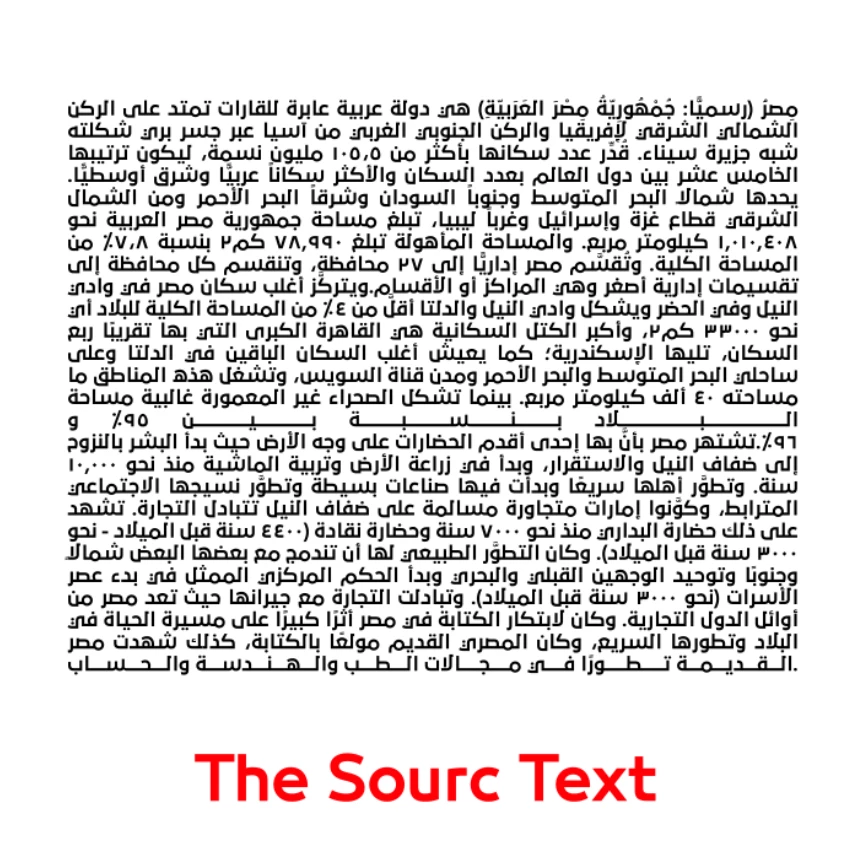
 AdChoices