Participant
July 31, 2025
Answered

「特定色域の選択」のインターフェイス

  • July 31, 2025
  • 1 reply
  • 255 views

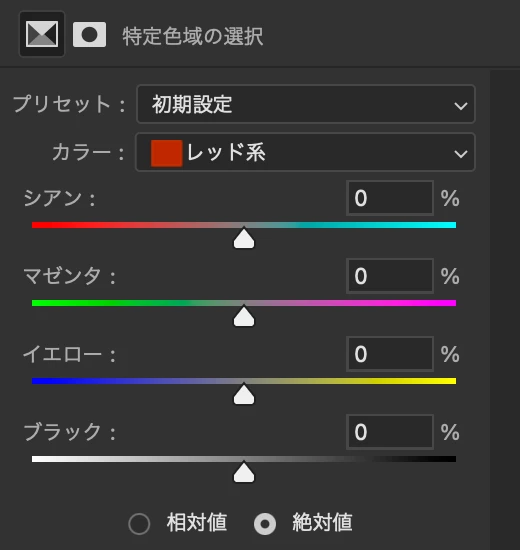
ちょっとしたことですが、特定色域の選択のインターフェイスがつい最近のアップデート(26.9.0)で変わったようです。

補色とグラデーションになったことが自分には使いづらいです。

元のインターフェイスに戻す方法はないでしょうか?


Correct answer creative explorer

@L K J Unfortunately, it is almost never possible to revert to a previous interface design within the same version of a software. When a major UI change like this is implemented in an update, it's typically a permanent part of that version and all subsequent updates. The developers remove the old code and replace it with the new, making it impossible to simply "switch back."  Unless you roll back to the previous verson, negating the 'update' — You would have to uninstall your current version and then install the older one! 

Your best bet is to spend some time exploring the new interface to understand its functionality. The new sliders and controls have the same core functionality as the old ones, just with a different visual presentation. The best approach is to spend some time getting familiar with how the new sliders and gradients work. 

1 reply

L K JAuthor
Participant
July 31, 2025

The recent update (26.9.0) seems to have changed the interface of the “Selecive color” panel.
It is now a gradient with complementary colors, which is sensitively difficult for me to use.
Is there any way to revert to the original interface?

creative explorer
Community Expert
creative explorerCommunity ExpertCorrect answer
Community Expert
July 31, 2025

@L K J Unfortunately, it is almost never possible to revert to a previous interface design within the same version of a software. When a major UI change like this is implemented in an update, it's typically a permanent part of that version and all subsequent updates. The developers remove the old code and replace it with the new, making it impossible to simply "switch back."  Unless you roll back to the previous verson, negating the 'update' — You would have to uninstall your current version and then install the older one! 

Your best bet is to spend some time exploring the new interface to understand its functionality. The new sliders and controls have the same core functionality as the old ones, just with a different visual presentation. The best approach is to spend some time getting familiar with how the new sliders and gradients work. 

m
L K JAuthor
Participant
July 31, 2025

@creative explorer Thanks for your answer!
I realized that there is no other way but to get used to it.
It's a feature I use almost daily, so I didn't want it to change.
For a while, I'll try adjusting the parameters with the arrow keys without looking at the sliders.