오브젝트 마스크 도구를 사용해서 객체를 선택하고 속성 패널에서 패더, 불투명도는 활성화가 되어있는데. 확장은 활성화가 되어있지 않습니다. 그리고 다른 영상이나 사진들을 보면 선택한 객체가 빨간색으로 칠해져 있고 외각선은 점선으로 표시가 되어있는데. 제 화면은 선택하면 외각선 점선 표시는 없습니다. 빨간색 칠만 되어있죠. 차이점이 뭔지 알고싶고 확장 기능을 꼭 사용하고 싶습니다. 감사합니다.
Correct answer Sameer K
Hey, @shushukYea. Welcome to the Photoshop Community. I’ll help you figure this out. Please share the system info from Photoshop Help > System Info. Copy & paste into a text document, then upload & attach here.
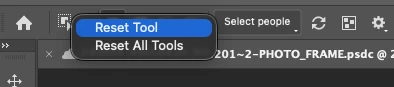
Try resetting the Object Selection tool from the toolbar menu to begin troubleshooting this.
If this does not help, please make sure there are no stale preferences in your Photoshop. Go to the location of the preference folder below and rename it to backup.
Windows 10/11: Users/[user name]/AppData/Roaming/Adobe/Adobe Photoshop [version]/Adobe Photoshop [version] Settings
You can press Press the Windows key > Enter 'Run' > Enter %APPDATA%\Adobe
Rename the Adobe Photoshop folder by adding a .old at the end. (Adobe Photoshop 2026 > Rename > Adobe Photoshop 2026. old), You can restore these preferences later if nyou need to(https://adobe.ly/4860qM9)
Restart the computer.
These changes will provide a fresh start to Photoshop, much like a new installation.
Let me know how it goes.
Thanks!
Sameer K
(Type '@' and type my name to mention me when you reply)
Hey, @shushukYea. Welcome to the Photoshop Community. I’ll help you figure this out. Please share the system info from Photoshop Help > System Info. Copy & paste into a text document, then upload & attach here.
Try resetting the Object Selection tool from the toolbar menu to begin troubleshooting this.
If this does not help, please make sure there are no stale preferences in your Photoshop. Go to the location of the preference folder below and rename it to backup.
Windows 10/11: Users/[user name]/AppData/Roaming/Adobe/Adobe Photoshop [version]/Adobe Photoshop [version] Settings
You can press Press the Windows key > Enter 'Run' > Enter %APPDATA%\Adobe
Rename the Adobe Photoshop folder by adding a .old at the end. (Adobe Photoshop 2026 > Rename > Adobe Photoshop 2026. old), You can restore these preferences later if nyou need to(https://adobe.ly/4860qM9)
Restart the computer.
These changes will provide a fresh start to Photoshop, much like a new installation.
Let me know how it goes.
Thanks!
Sameer K
(Type '@' and type my name to mention me when you reply)




 AdChoices