
Known Participant
July 30, 2019
Question

3D timeline rotation is choppy in Photoshop

  • July 30, 2019
  • 2 replies
  • 1837 views

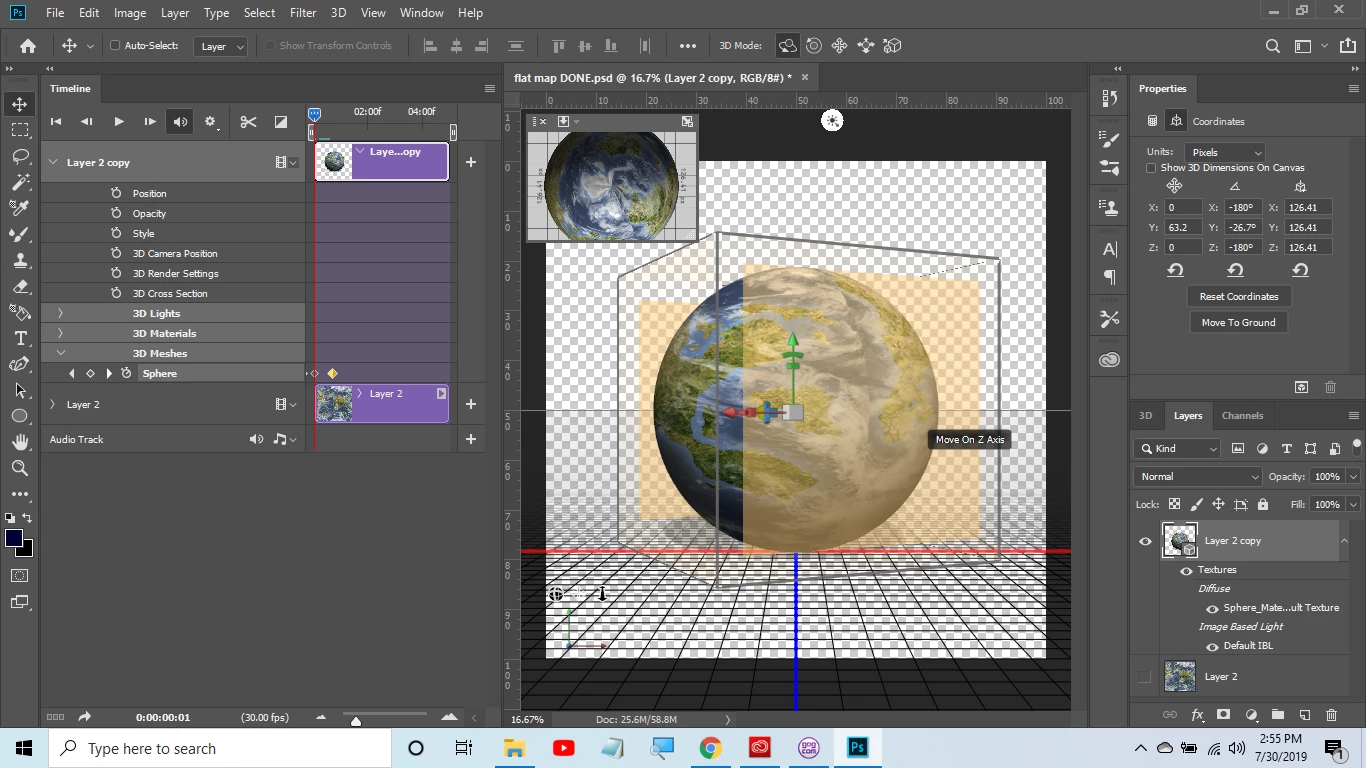
Hello.  I am new to Photoshop and very new to 3D and video timeline.  I am simply trying to make a planet I made spin.  I have watched tons of youtube videos and read a bunch of google posts and nothing seems to work except one I found saying to use 3D mesh.  I used the stop watch at the 1st position then moved the time over to 1 sec then rotated the planet on the Y axis then clicked the stop watch again.  This worked except that it is super super choppy/laggy yet in the video I watched it was smooth.  Thanks in advance for any help.  Gary
Message was edited by: Sahil Chawla

    This topic has been closed for replies.

    2 replies

    davescm
    Community Expert
    Community Expert
    July 30, 2019

    The preview playback speed will depend on both the size of your image canvas and the playback rate.

    Looking at your zoom level , it looks like you have picked a very large pixel size for your image. For video renders work no higher than your intended video output or you will find that each frame takes far too long to render (remember when finally rendered it will use ray tracing rather than the GPU preview render). So if your intended output is a full HD video use 1920 x 1080 pixels for your image canvas. If your intended output is to a gif - then reduce the canvas size further still.

    You have also chosen 30fps as the framerate in your timeline. That should render fine in a video format such as mp4 but will be too fast for a gif. I normally limit gifs to around 12-15fps. Any faster and some browsers actually slow the playback down.

    Dave

    garrobalAuthor
    Known Participant
    July 30, 2019

    Thankyou. Thats quite a bit of info for me but I think I understand. I

    rendered the video and it did quite fast as an MP4. When I played it on a

    viewer it worked well. My next question is can an MP4 be put into a

    timeline? I want to add orbiting moons and I assumed the best/easiest way

    to work on multiple 3d timeline animations would be to make one item its

    own video and then do the next and put them all together later? I am sorry

    Im such a newb I have only been using photoshop for about a month and the

    3d and timeline for a week or so. My only experience before that was about

    4 months working with GIMP. I really appreciate your help!! Gary

    davescm
    Community Expert
    Community Expert
    July 30, 2019

    Yes - you can open an mp4 as a video layer. Again the preview may not play at full speed/smoothness. You can of course reduce the preview resolution in the timeline to improve smoothness - this does not affect the final render

    However - you should be able to put multiple objects (in your case moons)  in the same 3D layer and animate each mesh. Or make them on separate 3D layers and then use "merge 3D layers" to bring them all into the same space where they will share lighting. That way the moons will cast a shadow on your planet as they pass.

    Dave

    Sahil.Chawla
    Adobe Employee
    Adobe Employee
    July 30, 2019

    Hi Gary,

    As the 3D planet rotation is Laggy in Photoshop, it might be due to the system configuration. Could you please post Photoshop's Help > System Info dialog text here?

    Also, are you viewing the rotation after rendering the 3D planet or just playing it on the timeline?

    Try rendering it and view it in a different application: 3D rendering and saving in Photoshop

    Regards,

    Sahil

    garrobalAuthor
    Known Participant
    July 30, 2019

    Hello.  Thanks for the response.  I am viewing it as a preview it is not rendered.  Here is the info you asked for:

    Adobe Photoshop Version: 20.0.5 20190605.r.83 2019/06/05: 1206907  x64

    Number of Launches: 7

    Operating System: Windows 10 64-bit

    Version: 10 or greater 10.0.18362.86

    System architecture: AMD CPU Family:15, Model:0, Stepping:1 with MMX, SSE Integer, SSE FP, SSE2, SSE3, SSE4.1, SSE4.2, AVX, AVX2, HyperThreading

    Physical processor count: 4

    Processor speed: 1996 MHz

    Built-in memory: 5080 MB

    Free memory: 3239 MB

    Memory available to Photoshop: 4627 MB

    Memory used by Photoshop: 70 %

    Alias Layers: Disabled.

    Modifier Palette: Enabled.

    Highbeam: Enabled.

    Image tile size: 1028K

    Image cache levels: 4

    Font Preview: Medium

    TextComposer: Latin

    Display: 1

    Display Bounds: top=0, left=0, bottom=768, right=1366

    OpenGL Drawing: Enabled.

    OpenGL Allow Old GPUs: Not Detected.

    OpenGL Drawing Mode: Advanced

    OpenGL Allow Normal Mode: True.

    OpenGL Allow Advanced Mode: True.

    AIFCoreInitialized=1

    AIFOGLInitialized=1

    OGLContextCreated=1

    NumGLGPUs=1

    NumCLGPUs=1

    NumNativeGPUs=0

    glgpu[0].GLVersion="4.1"

    glgpu[0].IsIntegratedGLGPU=0

    glgpu[0].GLMemoryMB=1024

    glgpu[0].GLName="AMD Radeon(TM) R5 Graphics"

    glgpu[0].GLVendor="ATI Technologies Inc."

    glgpu[0].GLVendorID=4098

    glgpu[0].GLDriverVersion="21.19.144.1281"

    glgpu[0].GLRectTextureSize=16384

    glgpu[0].GLRenderer="AMD Radeon(TM) R5 Graphics"

    glgpu[0].GLRendererID=38993

    glgpu[0].HasGLNPOTSupport=1

    glgpu[0].GLDriver="C:\Windows\System32\DriverStore\FileRepository\c0309839.inf_amd64_168acb088d48fafb\aticfx64.dll,C:\Windows\System32\DriverStore\FileRepository\c0309839.inf_amd64_168acb088d48fafb\aticfx64.dll,C:\Windows\System32\DriverStore\FileRepository\c0309839.inf_amd64_168acb088d48fafb\aticfx64.dll,C:\Windows\System32\DriverStore\FileRepository\c0309839.inf_amd64_168acb088d48fafb\amdxc64.dll"

    glgpu[0].GLDriverDate="20161216000000.000000-000"

    glgpu[0].CanCompileProgramGLSL=1

    glgpu[0].GLFrameBufferOK=1

    glgpu[0].glGetString[GL_SHADING_LANGUAGE_VERSION]="4.50"

    glgpu[0].glGetProgramivARB[GL_FRAGMENT_PROGRAM_ARB][GL_MAX_PROGRAM_INSTRUCTIONS_ARB]=[2147483647]

    glgpu[0].glGetIntegerv[GL_MAX_TEXTURE_UNITS]=[8]

    glgpu[0].glGetIntegerv[GL_MAX_COMBINED_TEXTURE_IMAGE_UNITS]=[192]

    glgpu[0].glGetIntegerv[GL_MAX_VERTEX_TEXTURE_IMAGE_UNITS]=[32]

    glgpu[0].glGetIntegerv[GL_MAX_TEXTURE_IMAGE_UNITS]=[32]

    glgpu[0].glGetIntegerv[GL_MAX_DRAW_BUFFERS]=[8]

    glgpu[0].glGetIntegerv[GL_MAX_VERTEX_UNIFORM_COMPONENTS]=[16384]

    glgpu[0].glGetIntegerv[GL_MAX_FRAGMENT_UNIFORM_COMPONENTS]=[16384]

    glgpu[0].glGetIntegerv[GL_MAX_VARYING_FLOATS]=[128]

    glgpu[0].glGetIntegerv[GL_MAX_VERTEX_ATTRIBS]=[29]

    glgpu[0].extension[AIF::OGL::GL_ARB_VERTEX_PROGRAM]=1

    glgpu[0].extension[AIF::OGL::GL_ARB_FRAGMENT_PROGRAM]=1

    glgpu[0].extension[AIF::OGL::GL_ARB_VERTEX_SHADER]=1

    glgpu[0].extension[AIF::OGL::GL_ARB_FRAGMENT_SHADER]=1

    glgpu[0].extension[AIF::OGL::GL_EXT_FRAMEBUFFER_OBJECT]=1

    glgpu[0].extension[AIF::OGL::GL_ARB_TEXTURE_RECTANGLE]=1

    glgpu[0].extension[AIF::OGL::GL_ARB_TEXTURE_FLOAT]=1

    glgpu[0].extension[AIF::OGL::GL_ARB_OCCLUSION_QUERY]=1

    glgpu[0].extension[AIF::OGL::GL_ARB_VERTEX_BUFFER_OBJECT]=1

    glgpu[0].extension[AIF::OGL::GL_ARB_SHADER_TEXTURE_LOD]=1

    clgpu[0].CLPlatformVersion="2.0 AMD-APP (2117.13)"

    clgpu[0].CLDeviceVersion="2.0 AMD-APP (2117.13)"

    clgpu[0].IsIntegratedCLGPU=1

    clgpu[0].CLMemoryMB=2559

    clgpu[0].CLName="Mullins"

    clgpu[0].CLVendor="Advanced Micro Devices, Inc."

    clgpu[0].CLVendorID=4098

    clgpu[0].CLDriverVersion="2117.13 (VM)"

    clgpu[0].CLBandwidth=9.30081e+09

    clgpu[0].CLCompute=72.4073

    License Type: Subscription

    Serial number: 90970120961418669421

    GUIDBucket:Composite Core (enable_composite_core): onComposite Core UI (comp_core_ui): offDocument Graph (enable_doc_graph): off

    Application folder: C:\Program Files\Adobe\Adobe Photoshop CC 2019\

    Temporary file path: C:\Users\Owner\AppData\Local\Temp\

    Photoshop scratch has async I/O enabled

    Scratch volume(s):

      Startup, 953.2G, 800.4G free

    Required Plug-ins folder: C:\Program Files\Adobe\Adobe Photoshop CC 2019\Required\Plug-Ins\

    Primary Plug-ins folder: C:\Program Files\Adobe\Adobe Photoshop CC 2019\Plug-Ins\

    Installed components:

       A3DLIBS.dll   A3DLIB Dynamic Link Library   9.2.0.112  

       ACE.dll   ACE 2018/11/13-18:07:21   79.603421   79.603421

       AdbePM.dll   PatchMatch 2018/09/10:19:04:15   1.601805   1.601805

       AdobeLinguistic.dll   Adobe Linguisitc Library   13.0.0.0  

       AdobeOwl.dll   Adobe Owl   5.3.0  

       AdobePDFL.dll   PDFL 2018/08/23-00:56:13   79.301181   79.301181

       AdobePIP.dll   Adobe Product Improvement Program   8.0.0.52.48027  

       AdobeSVGAGM.dll   AdobeSVGAGM   79.600623   79.600623

       AdobeXMP.dll   Adobe XMP Core 2018/08/13-16:40:22   79.163499   79.163499

       AdobeXMPFiles.dll   Adobe XMP Files 2018/08/13-16:40:22   79.163499   79.163499

       AdobeXMPScript.dll   Adobe XMP Script 2018/08/13-16:40:22   79.163499   79.163499

       adobe_caps.dll   Adobe CAPS   10,0,0,6  

       AGM.dll   AGM 2018/08/14-01:11:25   79.600623   79.600623

       ahclient.dll    AdobeHelp Dynamic Link Library   4.0.0.0  

       AIDE.dll   AIDE 2018/08/10-16:31:38   79.600470   79.600470

       ARE.dll   ARE 2018/08/14-01:11:25   79.600623   79.600623

       AXE8SharedExpat.dll   AXE8SharedExpat 2018/06/25-18:00:38   79.598424   79.598424

       AXEDOMCore.dll   AXEDOMCore 2018/06/25-18:00:38   79.598424   79.598424

       Bib.dll   BIB 2018/08/14-01:11:25   79.600623   79.600623

       BIBUtils.dll   BIBUtils 2018/08/14-01:11:25   79.600623   79.600623

       boost_date_time.dll   photoshopdva   12.1.0  

       boost_filesystem.dll   photoshopdva   12.1.0  

       boost_system.dll   photoshopdva   12.1.0  

       boost_threads.dll   photoshopdva   12.1.0  

       cg.dll   NVIDIA Cg Runtime   3.0.00007  

       cgGL.dll   NVIDIA Cg Runtime   3.0.00007  

       CITThreading.dll   Adobe CITThreading   2.1.0.1   2.1.0.1

       CoolType.dll   CoolType 2018/08/14-01:11:25   79.600623   79.600623

       CRClient.dll   Adobe Crash Reporter Client DLL   2.0.3.0  

       dnssd.dll   Bonjour   3,0,0,2  

       dvaaccelerate.dll   photoshopdva   12.1.0  

       dvaappsupport.dll   photoshopdva   12.1.0  

       dvaaudiodevice.dll   photoshopdva   12.1.0  

       dvacore.dll   photoshopdva   12.1.0  

       dvacrashhandler.dll   Adobe Audition CC 2017   10.0.0  

       dvamarshal.dll   photoshopdva   12.1.0  

       dvamediatypes.dll   photoshopdva   12.1.0  

       dvametadata.dll   photoshopdva   12.1.0  

       dvametadataapi.dll   photoshopdva   12.1.0  

       dvametadataui.dll   photoshopdva   12.1.0  

       dvaplayer.dll   photoshopdva   12.1.0  

       dvascripting.dll   photoshopdva   12.1.0  

       dvatransport.dll   photoshopdva   12.1.0  

       dvaui.dll   photoshopdva   12.1.0  

       dvaunittesting.dll   photoshopdva   12.1.0  

       dynamiclink.dll   photoshopdva   12.1.0  

       ExtendScript.dll   ExtendScript 2017/08/31-12:13:14   81.1157194   81.1157194

       icucnv58.dll   International Components for Unicode   58, 2, 0, 0  

       icudt58.dll   International Components for Unicode   58, 2, 0, 0  

       icuuc58.dll   International Components for Unicode   58, 2, 0, 0  

       igestep30.dll   IGES Reader   9.3.0.113  

       JP2KLib.dll   JP2KLib 2018/06/25-18:00:38   79.271024   79.271024

       libifcoremd.dll   Intel(r) Visual Fortran Compiler   10.0 (Update A)  

       libiomp5md.dll   Intel(R) OpenMP* Runtime Library   5.0  

       libmmd.dll   Intel(R) C/C++/Fortran Compiler   18.0.0  

       LogSession.dll   LogSession   8.0.0.52.48027  

       mediacoreif.dll   photoshopdva   12.1.0  

       MPS.dll   MPS 2019/05/21-16:06:34   95.610539   95.610539

       pdfsettings.dll   Adobe PDFSettings   1.04  

       Photoshop.dll   Adobe Photoshop CC 2019   20.0  

       Plugin.dll   Adobe Photoshop CC 2019   20.0  

       PlugPlugExternalObject.dll   Adobe(R) CEP PlugPlugExternalObject Standard Dll (64 bit)   9.2.1  

       PlugPlugOwl.dll   Adobe(R) CSXS PlugPlugOwl Standard Dll (64 bit)   9.2.1.39  

       PSCloud.dll                                                   1.0.0.1  

       PSViews.dll   Adobe Photoshop CC 2019   20.0  

       SCCore.dll   ScCore 2017/08/31-12:13:14   81.1157194   81.1157194

       SVGRE.dll   SVGRE   79.600623   79.600623

       svml_dispmd.dll   Intel(R) C/C++/Fortran Compiler   18.0.0  

       tbb.dll   Intel(R) Threading Building Blocks for Windows   2018, 0, 2017, 1205  

       tbbmalloc.dll   Intel(R) Threading Building Blocks for Windows   2018, 0, 2017, 1205  

       TfFontMgr.dll   FontMgr   9.3.0.113  

       TfKernel.dll   Kernel   9.3.0.113  

       TFKGEOM.dll   Kernel Geom   9.3.0.113  

       TFUGEOM.dll   Adobe, UGeom©   9.3.0.113  

       VulcanControl.dll   Vulcan Application Control Library   5.3.0.16  

       VulcanMessage5.dll   Vulcan Message Library   5.3.0.16  

       WinRTSupport.dll   Adobe Photoshop Windows RT Support   20.0.0.0  

       WRServices.dll   WRServices Tue August 14 2018 12:26:24   Build 0.23627   0.23627

       wu3d.dll   U3D Writer   9.3.0.113  

    Required plug-ins:

       3D Studio 20.0 (20190605.r.83 2019/06/05: 1206907) - from the file “U3D.8bi”

       Accented Edges 20.0 - from the file “Filter Gallery.8bf”

       Adaptive Wide Angle 20.0 - from the file “Adaptive Wide Angle.8bf”

       Angled Strokes 20.0 - from the file “Filter Gallery.8bf”

       Average 20.0 (20190605.r.83 2019/06/05: 1206907) - from the file “Average.8bf”

       Bas Relief 20.0 - from the file “Filter Gallery.8bf”

       BMP 20.0 - from the file “Standard MultiPlugin.8bf”

       Camera Raw 11.3 - from the file “Camera Raw.8bi”

       Camera Raw Filter 11.3 - from the file “Camera Raw.8bi”

       Chalk && Charcoal 20.0 - from the file “Filter Gallery.8bf”

       Charcoal 20.0 - from the file “Filter Gallery.8bf”

       Chrome 20.0 - from the file “Filter Gallery.8bf”

       Cineon 20.0 (20190605.r.83 2019/06/05: 1206907) - from the file “Cineon.8bi”

       Clouds 20.0 (20190605.r.83 2019/06/05: 1206907) - from the file “Clouds.8bf”

       Collada 20.0 (20190605.r.83 2019/06/05: 1206907) - from the file “U3D.8bi”

       Color Halftone 20.0 - from the file “Standard MultiPlugin.8bf”

       Colored Pencil 20.0 - from the file “Filter Gallery.8bf”

       Conté Crayon 20.0 - from the file “Filter Gallery.8bf”

       Craquelure 20.0 - from the file “Filter Gallery.8bf”

       Crop and Straighten Photos 20.0 (20190605.r.83 2019/06/05: 1206907) - from the file “CropPhotosAuto.8li”

       Crop and Straighten Photos Filter 20.0 - from the file “Standard MultiPlugin.8bf”

       Crosshatch 20.0 - from the file “Filter Gallery.8bf”

       Crystallize 20.0 - from the file “Standard MultiPlugin.8bf”

       Cutout 20.0 - from the file “Filter Gallery.8bf”

       Dark Strokes 20.0 - from the file “Filter Gallery.8bf”

       De-Interlace 20.0 - from the file “Standard MultiPlugin.8bf”

       Dicom 20.0 - from the file “Dicom.8bi”

       Difference Clouds 20.0 (20190605.r.83 2019/06/05: 1206907) - from the file “Clouds.8bf”

       Diffuse Glow 20.0 - from the file “Filter Gallery.8bf”

       Displace 20.0 - from the file “Standard MultiPlugin.8bf”

       Dry Brush 20.0 - from the file “Filter Gallery.8bf”

       Eazel Acquire 20.0 (20190605.r.83 2019/06/05: 1206907) - from the file “EazelAcquire.8ba”

       Entropy 20.0 (20190605.r.83 2019/06/05: 1206907) - from the file “statistics.8ba”

       Export Color Lookup Tables 20.0 (20190605.r.83 2019/06/05: 1206907) - from the file “Export3DLUT.8be”

       Extrude 20.0 - from the file “Standard MultiPlugin.8bf”

       FastCore Routines 20.0 (20190605.r.83 2019/06/05: 1206907) - from the file “FastCore.8bx”

       Fibers 20.0 - from the file “Standard MultiPlugin.8bf”

       Film Grain 20.0 - from the file “Filter Gallery.8bf”

       Filter Gallery 20.0 - from the file “Filter Gallery.8bf”

       Flash 3D 20.0 (20190605.r.83 2019/06/05: 1206907) - from the file “U3D.8bi”

       Fresco 20.0 - from the file “Filter Gallery.8bf”

       Glass 20.0 - from the file “Filter Gallery.8bf”

       Glowing Edges 20.0 - from the file “Filter Gallery.8bf”

       Google Earth 4 20.0 (20190605.r.83 2019/06/05: 1206907) - from the file “U3D.8bi”

       Grain 20.0 - from the file “Filter Gallery.8bf”

       Graphic Pen 20.0 - from the file “Filter Gallery.8bf”

       Halftone Pattern 20.0 - from the file “Filter Gallery.8bf”

       Halide Bottlenecks 20.0 (20190605.r.83 2019/06/05: 1206907) - from the file “HalideBottlenecks.8bx”

       HDRMergeUI 20.0 - from the file “HDRMergeUI.8bf”

       HSB/HSL 20.0 - from the file “Standard MultiPlugin.8bf”

       IFF Format 20.0 - from the file “Standard MultiPlugin.8bf”

       IGES 20.0 (20190605.r.83 2019/06/05: 1206907) - from the file “U3D.8bi”

       Ink Outlines 20.0 - from the file “Filter Gallery.8bf”

       JPEG 2000 20.0 - from the file “JPEG2000.8bi”

       Kurtosis 20.0 (20190605.r.83 2019/06/05: 1206907) - from the file “statistics.8ba”

       Lens Blur 20.0 - from the file “Lens Blur.8bf”

       Lens Correction 20.0 - from the file “Lens Correction.8bf”

       Lens Flare 20.0 - from the file “Standard MultiPlugin.8bf”

       Liquify 20.0 - from the file “Liquify.8bf”

       Matlab Operation 20.0 (20190605.r.83 2019/06/05: 1206907) - from the file “ChannelPort.8bf”

       Maximum 20.0 (20190605.r.83 2019/06/05: 1206907) - from the file “statistics.8ba”

       Mean 20.0 (20190605.r.83 2019/06/05: 1206907) - from the file “statistics.8ba”

       Measurement Core 20.0 (20190605.r.83 2019/06/05: 1206907) - from the file “MeasurementCore.8me”

       Median 20.0 (20190605.r.83 2019/06/05: 1206907) - from the file “statistics.8ba”

       Mezzotint 20.0 - from the file “Standard MultiPlugin.8bf”

       Minimum 20.0 (20190605.r.83 2019/06/05: 1206907) - from the file “statistics.8ba”

       MMXCore Routines 20.0 (20190605.r.83 2019/06/05: 1206907) - from the file “MMXCore.8bx”

       Mosaic Tiles 20.0 - from the file “Filter Gallery.8bf”

       Multiprocessor Support 20.0 (20190605.r.83 2019/06/05: 1206907) - from the file “MultiProcessor Support.8bx”

       Neon Glow 20.0 - from the file “Filter Gallery.8bf”

       Note Paper 20.0 - from the file “Filter Gallery.8bf”

       NTSC Colors 20.0 (20190605.r.83 2019/06/05: 1206907) - from the file “NTSC Colors.8bf”

       Ocean Ripple 20.0 - from the file “Filter Gallery.8bf”

       OpenEXR 20.0 - from the file “Standard MultiPlugin.8bf”

       Paint Daubs 20.0 - from the file “Filter Gallery.8bf”

       Palette Knife 20.0 - from the file “Filter Gallery.8bf”

       Patchwork 20.0 - from the file “Filter Gallery.8bf”

       Paths to Illustrator 20.0 - from the file “Standard MultiPlugin.8bf”

       PCX 20.0 (20190605.r.83 2019/06/05: 1206907) - from the file “PCX.8bi”

       Photocopy 20.0 - from the file “Filter Gallery.8bf”

       Picture Package Filter 20.0 (20190605.r.83 2019/06/05: 1206907) - from the file “ChannelPort.8bf”

       Pinch 20.0 - from the file “Standard MultiPlugin.8bf”

       Pixar 20.0 (20190605.r.83 2019/06/05: 1206907) - from the file “Pixar.8bi”

       Plaster 20.0 - from the file “Filter Gallery.8bf”

       Plastic Wrap 20.0 - from the file “Filter Gallery.8bf”

       PLY 20.0 (20190605.r.83 2019/06/05: 1206907) - from the file “U3D.8bi”

       Pointillize 20.0 - from the file “Standard MultiPlugin.8bf”

       Polar Coordinates 20.0 - from the file “Standard MultiPlugin.8bf”

       Portable Bit Map 20.0 (20190605.r.83 2019/06/05: 1206907) - from the file “PBM.8bi”

       Poster Edges 20.0 - from the file “Filter Gallery.8bf”

       PRC 20.0 (20190605.r.83 2019/06/05: 1206907) - from the file “U3D.8bi”

       Radial Blur 20.0 - from the file “Standard MultiPlugin.8bf”

       Radiance 20.0 (20190605.r.83 2019/06/05: 1206907) - from the file “Radiance.8bi”

       Range 20.0 (20190605.r.83 2019/06/05: 1206907) - from the file “statistics.8ba”

       Render Color Lookup Grid 20.0 (20190605.r.83 2019/06/05: 1206907) - from the file “Export3DLUT.8be”

       Reticulation 20.0 - from the file “Filter Gallery.8bf”

       Ripple 20.0 - from the file “Standard MultiPlugin.8bf”

       Rough Pastels 20.0 - from the file “Filter Gallery.8bf”

       Save for Web 20.0 - from the file “Save for Web.8be”

       ScriptingSupport 20.0 - from the file “ScriptingSupport.8li”

       Shake Reduction 20.0 - from the file “Shake Reduction.8bf”

       Shear 20.0 - from the file “Standard MultiPlugin.8bf”

       Skewness 20.0 (20190605.r.83 2019/06/05: 1206907) - from the file “statistics.8ba”

       Smart Blur 20.0 - from the file “Standard MultiPlugin.8bf”

       Smudge Stick 20.0 - from the file “Filter Gallery.8bf”

       Solarize 20.0 (20190605.r.83 2019/06/05: 1206907) - from the file “Solarize.8bf”

       Spaces 20.0 - from the file “Spaces.8li”

       Spatter 20.0 - from the file “Filter Gallery.8bf”

       Spherize 20.0 - from the file “Standard MultiPlugin.8bf”

       Sponge 20.0 - from the file “Filter Gallery.8bf”

       Sprayed Strokes 20.0 - from the file “Filter Gallery.8bf”

       Stained Glass 20.0 - from the file “Filter Gallery.8bf”

       Stamp 20.0 - from the file “Filter Gallery.8bf”

       Standard Deviation 20.0 (20190605.r.83 2019/06/05: 1206907) - from the file “statistics.8ba”

       STL 20.0 (20190605.r.83 2019/06/05: 1206907) - from the file “U3D.8bi”

       Sumi-e 20.0 - from the file “Filter Gallery.8bf”

       Summation 20.0 (20190605.r.83 2019/06/05: 1206907) - from the file “statistics.8ba”

       Targa 20.0 - from the file “Standard MultiPlugin.8bf”

       Texturizer 20.0 - from the file “Filter Gallery.8bf”

       Tiles 20.0 - from the file “Standard MultiPlugin.8bf”

       Torn Edges 20.0 - from the file “Filter Gallery.8bf”

       Twirl 20.0 - from the file “Standard MultiPlugin.8bf”

       U3D 20.0 (20190605.r.83 2019/06/05: 1206907) - from the file “U3D.8bi”

       Underpainting 20.0 - from the file “Filter Gallery.8bf”

       Vanishing Point 20.0 - from the file “VanishingPoint.8bf”

       Variance 20.0 (20190605.r.83 2019/06/05: 1206907) - from the file “statistics.8ba”

       Virtual Reality Modeling Language | VRML 20.0 (20190605.r.83 2019/06/05: 1206907) - from the file “U3D.8bi”

       Water Paper 20.0 - from the file “Filter Gallery.8bf”

       Watercolor 20.0 - from the file “Filter Gallery.8bf”

       Wave 20.0 - from the file “Standard MultiPlugin.8bf”

       Wavefront|OBJ 20.0 (20190605.r.83 2019/06/05: 1206907) - from the file “U3D.8bi”

       WIA Support 20.0 (20190605.r.83 2019/06/05: 1206907) - from the file “WIASupport.8li”

       Wind 20.0 - from the file “Standard MultiPlugin.8bf”

       Wireless Bitmap 20.0 (20190605.r.83 2019/06/05: 1206907) - from the file “WBMP.8bi”

       ZigZag 20.0 - from the file “Standard MultiPlugin.8bf”

    Optional and third party plug-ins: NONE

    Duplicate and Disabled plug-ins: NONE

    Plug-ins that failed to load: NONE

    Extensions:

       com.adobe.Butler.backend  2.1.1 - from the file “C:\Program Files\Adobe\Adobe Photoshop CC 2019\Required\CEP\extensions\com.adobe.Butler.backend\index.html”

       com.adobe.inapp.purchase  1.0.0 - from the file “C:\Program Files (x86)\Common Files\Adobe\CEP\extensions\CC_LIBRARIES_PANEL_EXTENSION_3_2_108\purchaseStock.html”

       com.adobe.stock.panel.licensing  0.1.0 - from the file “C:\Program Files\Adobe\Adobe Photoshop CC 2019\Required\CEP\extensions\com.adobe.stock.panel.licensing\index.html”

       Libraries  1.0.0 - from the file “C:\Program Files (x86)\Common Files\Adobe\CEP\extensions\CC_LIBRARIES_PANEL_EXTENSION_3_2_108\index.html”

       New Document  2.5.1 - from the file “C:\Program Files (x86)\Common Files\Adobe\CEP\extensions\com.adobe.ccx.fnft-2.5.1\fnft.html?v=2.5.1.8”

       com.adobe.inapp.typekit.purchase  1.0.0 - from the file “C:\Program Files (x86)\Common Files\Adobe\CEP\extensions\CC_LIBRARIES_PANEL_EXTENSION_3_2_108\purchaseTypekit.html”

       Home  2.7.1 - from the file “C:\Program Files (x86)\Common Files\Adobe\CEP\extensions\com.adobe.ccx.start-2.7.1\index.html?v=2.7.1.2”

       Adobe Color Themes  6.1.0 - from the file “C:\Program Files\Adobe\Adobe Photoshop CC 2019\Required\CEP\extensions\com.adobe.KulerPanel.html\index.html”

       Export As  4.6.7 - from the file “C:\Program Files\Adobe\Adobe Photoshop CC 2019\Required\CEP\extensions\com.adobe.photoshop.crema\index.html”

       Export As  4.6.7 - from the file “C:\Program Files\Adobe\Adobe Photoshop CC 2019\Required\CEP\extensions\com.adobe.photoshop.crema\index.html”

    Installed TWAIN devices: NONE

    Now I have a second question.  I saved a 3D image I was working on (not rendered) and when I re-opened it there is this black shadowy stuff on it.  I closed and re-opened multiple times but its still there.  Thanks

    garrobalAuthor
    Known Participant
    July 30, 2019

    PS can you recommend a free tutorial that would teach me this stuff without having to bother you guys in the forum?  I have not found a good one.  Thanks again!  Gary