Participant
March 23, 2023
Answered

3DLUTS Greyed Out

  • March 23, 2023
  • 2 replies
  • 1686 views

Not sure what the problem is. I select Color Lookup and the 3DLUTS option is greyed out.
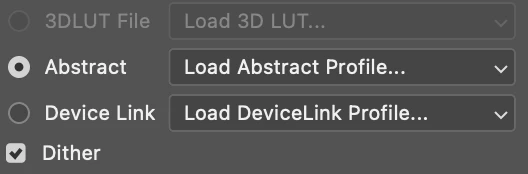


Please help!

This topic has been closed for replies.
Correct answer davescm

Windows 10 and photoshop 2023 24.1

Patrick Dove
Dove Photography LLC
[Link removed by moderator]


Is your document in RGB mode? 3D Luts will be greyed out in CMYK

Dave

2 replies

RJH065
Participant
February 11, 2026

I had this issue and I found it was because I was in CMYK mode under Image → Mode → CMYK Color
Setting it to RGB instead lets me re-add the Color Lookup adjustment layer and the option is no longer greyed out.

Problem is, the whole reason I wanted to use it was that importing RBG images into a Photoshop canvas setup with CMYK for printing purposes totally changes the color of the orginal image and I was trying to apply a 3D LUT to compensate (My greens were cooler in the CMYK mode for instance)

Jeff Arola
Community Expert
Community Expert
March 23, 2023

What version of macOS and version of photoshop are you using?


If you go to

Applications/Adobe Photoshop 2023/Presets/3DLUTs

do you see any Luts in the folder?

Participating Frequently
January 16, 2024

Im having the same problem, I can now no longer access any of the LUTs I  have placed in the 3DLUTs folder.  I can see it and see everything I have placed in it, but the 3DLUTs dropdown menu is greyed out.  What needs to be done to fix this?

Jeff Arola
Community Expert
Community Expert
January 16, 2024

What version of photoshop and operating system are you using?