
August 22, 2021
Question

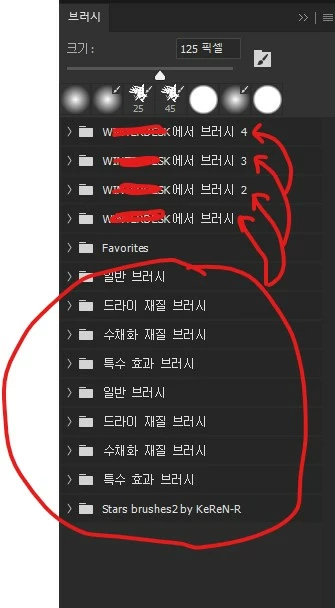
A group folder is automatically created in the Photoshop Brush Panel.
  • August 22, 2021
  • 1 reply
  • 132 views


Please understand if my English is awkward.
The brush group folder that I did not create continues to be created with my computer name. Even if you erase them, they will be recreated next time. The folder contains the same folders that I circled. That is, I have five times as many folders as I needlessly. How do I correct this error?

This topic has been closed for replies.

1 reply

JJMack
Community Expert
Community Expert
August 22, 2021

Something in one you system Muse be set up to automatically loads the brush groups into Photoshop brushes palette. I just deleted all groups in my brushes Palette.  No groups are being automatically added to my palette. There is a single brush in my Brushes Palette.    Photoshop does not automatically load brush groups.  Some WorkSpaces may has some loaded in  their's.

No even when I switch the Adobe default Workspace my brushes Palette only has one brush.

When I close and the restart Photoshop there is still one brush only....

JJMack